





Things to note:
Friends who use Mac to install or download application software often encounter the following three error situations. The editor here provides you with solutions to help you solve the Mac error problem:
1. "...the software is damaged and cannot be opened. You should move it to the Trash"
2. "The xxx software cannot be opened becauseApple can't check if it contains malware"
3. "Cannot open xxxsoftware because it comes from an unidentified developer"
Don’t panic if you encounter the above three situations, follow the editor’s instructions and solve them easily.
1. Turn on any source in the computer settings.Open any source.
2. Opening any source will solve the problem of most software error reports. If it does not work, it means that you need to bypass application signature authentication by executing command line code. Execute command bypassiosnotarizationGatekeeper.
3. If the above operations still cannot solve the problem, then you need tocloseSIPSystem integrity protectionOnly then can.
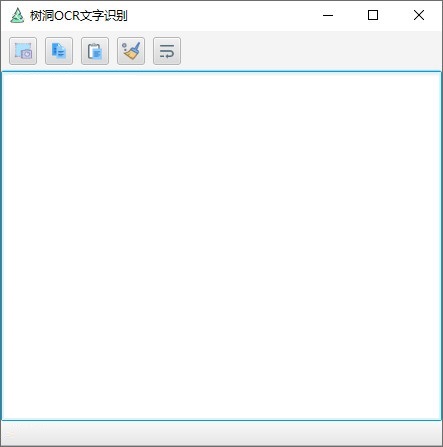
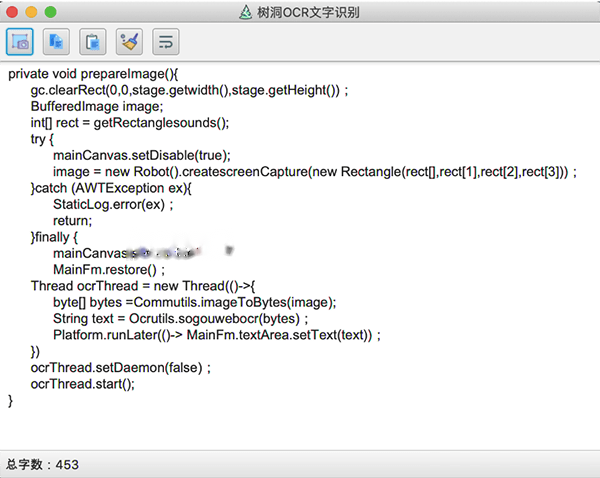
Introduction to Tree Hole OCR Text Recognition Mac Function
Image text recognition
Supports accurate recognition of text content from images, and the recognition results support text alignment to improve readability.
Multi-column recognition has not been implemented yet, but the accuracy of single-column recognition is high.
Screenshot recognition
Provides a screenshot function in full-screen mode. Users can quickly start taking screenshots through shortcut keys (such as F4) and circle the area that needs to be identified.
Supports fine-tuning of the screenshot area (using arrow keys or Shift+arrow keys) to ensure recognition accuracy.
text translation
Integrated text translation function supports multi-language translation to meet the needs of cross-language scenarios.
Formula recognition
Able to identify mathematical formulas, chemical equations, etc. in pictures, and support copying or exporting to editable formats.
Table recognition
Supports table structure recognition and can convert tables in pictures into Excel or CSV format to facilitate data processing.
Software settings
Provides customized installation paths, multi-screen mode support, Baidu recognition API access and other advanced settings to meet personalized needs.
Features of Shudong OCR text recognition for Mac
Local OCR technology:
Using local OCR technology for text recognition, no network connection is required, ensuring the speed and accuracy of recognition.
Based on the Paddle OCR model and deep learning frameworks such as PyTorch, DJL, etc., it provides efficient text recognition functions.
Cross-platform compatibility:
Developed using Java 1.8 and JavaFX, it supports multiple operating systems including Mac OS X.
Open source features:
Shudong OCR text recognition Mac software is open source on gitee and github, and comes with detailed documentation guidance, making the installation and use process simple and straightforward.
For developers, the open source feature means that secondary development and functional expansion can be carried out according to their own needs.
Tree hole OCR text recognition MacHow to use
Start screenshot
Method 1: Click the screenshot button on the main interface of the program;
Method 2: Click the screenshot shortcut key F4.
Circle the area
After entering the screenshot interface, press the left button of the mouse and then drag to circle the area you want to capture; after the circle selection is completed, you can fine-tune the circled area:
Use the arrow keys to fine-tune the right and upper boundaries of the selected area;
Use Shift+arrow keys to fine-tune the left and lower borders of the selected area;
Use Ctrl+A to select the entire screen.
Confirm your selection
After the circle selection is completed, click the Enter or Space key, or double-click with the left mouse button to confirm the circle selection; after confirming the circle selection, OCR text recognition will be automatically performed on the selected area.
Frequently Asked Questions about Tree Hole OCR Text Recognition Mac
Software frequently crashes or freezes
Possible reasons: insufficient device performance, software BUG, memory leak.
Solution:
Upgrade equipment: add memory or replace high-performance equipment.
Update software: Download the latest version and fix known bugs.
Clean up memory: Close other programs and release memory resources.
A specific language or font is not recognized
Possible reasons: The software does not support the language or font.
Solution:
Check language support: Confirm whether Tree Hole OCR supports target language recognition.
Change fonts: Try to use fonts supported by the software for recognition.
Tree Hole OCR text recognition Mac update log
You can customize the installation directory during installation
Support multi-screen mode
Add Baidu recognition API
Package the new version of JRE to solve the bug that cannot be opened normally
Support text recognition for local images
Huajun editor recommends:
Shudong OCR text recognition Mac, word-of-mouth software, guaranteed to solve all your problems! The editor highly recommends! There are similar software on this siteeZip,Paste,ChemDraw Professional,WeChat For Mac,Hand-drawn mind mapping software iMindMap9 For Mac, if you are interested, you can download it!










Your comment needs to be reviewed before it can be displayed