



- Green versionView
- Green versionView
- Green versionView
- Green versionView
- Green versionView
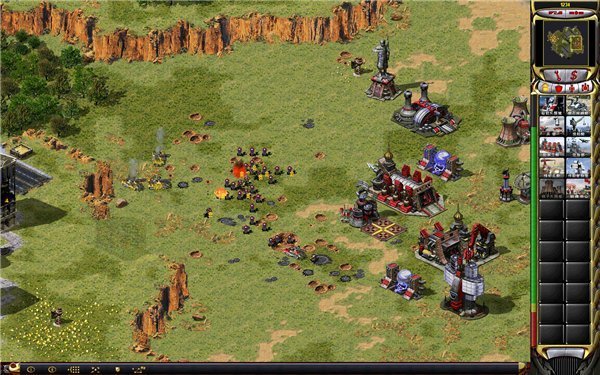
Introduction to the functions of the Red Alert Battle Network battle platform
Multi-version support
Supports the original version of "Red Alert 2" (v1.006), Yuri's Revenge DLC (v1.001) and the self-created Glory of the Republic MOD to meet the needs of different players.
Players can freely choose the game version to create a room and play against friends or opponents matched by the system.
Matchmaking and ranking system
1v1/2v2/3v3 ranked matching: Automatically match opponents of similar strength based on player level, supporting single player or team competition.
Melee mode: Supports 8-person melee (such as ice and snow maps) to quickly experience the fun of large-scale team battles.
Record statistics and rankings: Record player wins, losses, kills and other data, and provide server-wide ranking lists to encourage improvement.
Anti-cheating and fair competition
Special technologies are used to block cheats (such as money brushing and self-stealing) to ensure fairness in the battle.
The anti-cheating mechanism is regularly updated to adapt to new versions of cheating methods.
Social and community features
Friend system: Add friends and check online status to facilitate teaming up and playing games.
Team system (under planning): Supports creating or joining teams and participating in team leagues.
Battle replay: Save the game video and watch the first-person perspective repeatedly to analyze tactical mistakes.
Convenient game management
The game is independent of the platform: switching screens will not cause the game to freeze or crash. You can organize battles while chatting on QQ and watching videos.
Shortcut key support: Integrated shortcut keys for common operations such as deploying troops, warning areas, forced fire, etc. to improve operational efficiency.
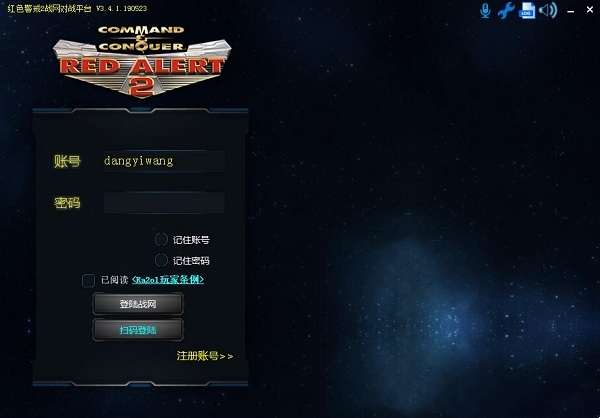
Red Alert Battle Network Battle Platform Software Features
TCP/IP direct connection technology
Abandon the traditional IPX protocol and use the TCP protocol to communicate directly with the server, doubling the transmission efficiency and reducing lags and delays.
Supports high-resolution display and solves the problem of black screen for a few seconds after reading the article.
Cross-system compatibility
Compatible with Win7/Win8/Win10/Win11 systems, it can run stably without complicated settings.
Integrate common plug-ins such as mouse connection, key blocking, and automatic screenshots to avoid download risks.
Continuous updates and optimizations
Regularly fix bugs (for example, pressing T continuously without selecting a unit will cause frame drops, Win8/10/XP systems not reading the bar or disconnecting, etc.).
It is planned to add new functions such as friend system, team system, and competition system to enrich player experience.
Red Alert Battle Network Battle Platform Software Highlights
Nickname lock function
Players can customize their nickname with a combination of letters and numbers. The nickname is unique and will not be preempted by others. It becomes the only identifier for ranking lists and adding friends.
Combining free and paid models
Free Battle: It’s completely free to create a room using the game’s own maps (such as Arctic Circle, Island Battle).
Membership service: To use self-made maps, you need to open a sponsoring membership (minimum 3 days), and the sponsorship income is used for platform costs and competitions.
Active community atmosphere
The platform brings together a large number of Red Alert enthusiasts and provides an interactive space for exchanging tactics, sharing maps, and organizing competitions.
Regular events are held with a complete reward mechanism to enhance player stickiness.
Frequently Asked Questions about Red Alert Battle Network Battle Platform
1. Game settings and compatibility issues
Problem description:
The game cannot be started or an error message appears when running (such as FATAL ERROR, the specified memory cannot be read, the display mode cannot be set, etc.).
Improper game resolution settings cause abnormal screen display.
Solution:
Modify compatibility settings:
Right-click the game program, select "Properties" - "Compatibility", try to modify the compatibility mode, check the simplified color mode, and run the game program as an administrator.
Adjust game resolution:
Open the configuration file in the Red Alert directory (such as RA2.ini or RA2MD.ini) and adjust the game resolution by modifying the ScreenWidth and ScreenHeight values.
Updated games and patches:
Make sure your version of the game is up to date and has all necessary patches installed.
2. Platform usage issues
Problem description:
Don’t know how to join or create a room.
The platform interface language is not familiar (for example, the cncnet battle platform has an English interface).
Solution:
View the platform tutorial:
Visit the platform’s official website or related communities to find platform usage tutorials or video guides.
Community help:
Seek help in the platform’s official forum, QQ group or related communities. Other players or administrators may provide solutions.
Use translation tools:
For platforms with English interfaces, you can use online translation tools or browser translation functions to assist in understanding the platform interface and operations.
Red Alert Battle Network Battle Platform Update Log
1. The pace of optimization never stops!
2. More little surprises are waiting for you to discover~
Huajun editor recommends:
If you are dazzled by the introduction of so many functions above, then quickly download the Red Alert Battle Network battle platform. This site also providesGod General World Modifier,Pingxiang City Game Hall,Ora star modifier,Rock Kingdom Feifei auxiliary latest version,Kunshan city gamesWaiting for you to download.










Useful
Useful
Useful