




- Green versionView
- Green versionView
- Green versionView
- Green versionView
- Green versionView
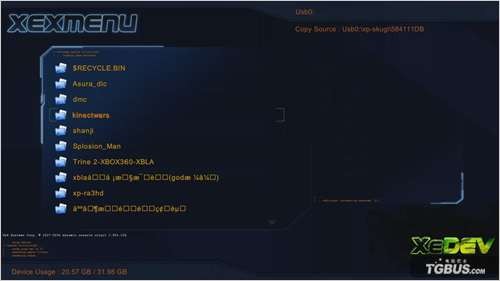
How to use xexmenu
Basic operations of XEXMENU: copying and copying files
Using an XBLA game as an example, we will explain how to copy and import game files between an ordinary USB flash drive and the built-in hard drive through XEXMENU.
·Understanding XEX executable files
Although XBOX360 is a game console, the operation of games and software is similar to that of a computer, and it also has the concept of "executable files". This article guides everyone to understand XEX and learn to execute it through XEXMENU.
Through the above two articles, we can basically understand the functions and operation methods of XBOX360's resource manager - XEXMENU - which is actually very simple. So here Liagu hopes that everyone can draw inferences and think about how to use XEXMENU to manage their own game files or install other software.
xexmenuAbout installation
It cannot be installed on an external hard drive, it can only be installed on the 360's hard drive or memory card. After you enter it with a CD, press RB and then left and right to select a folder with CODE99999. After pressing Y on this folder to copy, select your 360's hard drive or paste it into the 0000000000000 folder in the content of the memory card to run it directly in the game library of the console.
How to copy files
Download the GOD game file of the game online. After decompressing it, you will get a folder with a series of numbers and English, such as: the 4D5308AB folder of Gears of War 3. After copying the 4D5308AB folder into the FAT32 format mobile hard disk, plug it into the USB interface of the 360 host, open the host, and start xexmenu 1.1 software, press the RB key on the controller to enter the mobile hard disk, select the 4D5308AB folder, press the Y key to select Copy, and then press the B key to return. Press the X key to select Hdd1: Enter the host hard disk. Enter the Contrnt�000000000000000 folder and press the Y key to select Paste. Then proceed with the copy progress. After completion, you can directly press the watermelon key to exit to the main interface. Find the copied game in My Games and it will be OK!
【Implementation principle】
Microsoft has supported the function of U disk as external storage since 9199 (of course USB hard disk can also be used). We use this function to copy the above two software into the prepared U disk or hard disk, and then execute it directly in the 360 game library!
How to make xexmenu
1. Preparation
Production software package: see the end of the post to download
U disk: If it can be correctly recognized by 360, it can be formatted on the PC first. The capacity is not limited.
2. Make the U disk into an external memory (memory box)
Open 360
Insert the formatted U disk and enter the 360 system settings
Enter memory function
Your USB flash drive will be displayed at this time, but it has not been formatted into a memory box that 360 can recognize.
Press the A button and select the immediate setting function
During this period, ignore the prompts and wait patiently
Finally, the USB flash drive was set to a memory box format that 360 can recognize
3. Inject XEXMENU and NXE2GOD into the USB flash drive through PC
Remove the USB flash drive from the 360 and insert it into the PC. Although you can see the drive letter of the USB flash drive, the files inside cannot be correctly identified.
运行软件包U盘读写下的 USBXTAFGUI_chn.exe 文件,出现程序界面
Select the menu above: Start using, open the USB flash drive, the word Root will appear in the left window, indicating that your USB flash drive has been correctly identified
Right-click the blank space of the window on the right and select: Create a new folder in the menu that appears.
In the pop-up dialog box, enter the folder name: Content, click OK, and the folder is created successfully.
Click the "+" sign in front of Root in the left window, expand the Root folder, and then click the Content folder below. At this time, the right window changes to Content Folder contents
Create folders in sequence according to the above method 0000000000000000, C0DE9999, 00080000. The final path is: Content�000000000000000C0DE9999�0080000
Change the window path on the right to: 00080000, right-click in the blank space and select Inject File
Inject the two files in the folder To USB into the 00080000 folder twice.
Don’t rush to unplug the U disk at this time, the work is not done yet, select the menu above: start using, close the U disk, the program will actually write these two software to the U disk, wait patiently for the shutdown to complete
Insert the USB flash drive into the 360 and enter the game library. Do you see it? You’re done!
If players have a built-in hard drive, they can then copy the software in the USB flash drive to the built-in hard drive through the memory function in the system settings. Players without a built-in hard drive can plug in a USB flash drive to use it, or they can refer to this method to customize it with a mobile hard drive.
xexmenu update log
1. Sweep the bug out and carry it out to the end
2. The most stable version ever
Huajun editor recommends:
xexmenu is a very good game software. I secretly tell you that I also use this software, and I don’t tell others about it! Powerful, green and safe. Huajun Software Park also provides you withPingxiang City Game Hall,Ora star modifier,Rock Kingdom Feifei auxiliary latest version,Kunshan city games,Mini World Angel AssistantWaiting for you to download.




Useful
Useful
Useful