




- Green versionView
- Green versionView
- Green versionView
- Green versionView
- Green versionView

Features of the Ranger Battle Platform Software:
1. The most comprehensive support
The Ranger battle platform supports all popular battle stand-alone games
2. The fastest update
With the technical strength of Youxia.com, a certain number of battle games will be added every week.
3. The richest communication
You only need a forum account to log in to the Ranger Battle Platform
4. The most exciting follow-up
The Ranger Battle Platform has a complete achievement system, team system, and master-disciple system that will be opened one after another, so stay tuned.
Ranger battle platform installation steps:
1. First, find the "Download Address" on this page and select any address to start selecting. Download the [Ranger Battle Platform] software package to your local computer and double-click to unzip it to find the .exe format program and double-click to run it. As shown below: We have two installation methods to choose from.

2. Method 1: Select the default installation and click [Install Now] to start the installation. The second option is to customize the installation. Click [Custom Installation] to enter the custom installation interface settings.

3. After entering the custom installation interface of the Ranger Battle Platform, we can choose to set the installation path of the software, and click [Change Directory] to set up successfully. There are also several options that friends can check and install according to their own needs.
Create desktop shortcut/create taskbar shortcut/add to start menu. These three items are all set to facilitate the next time you open the Ranger Battle Platform. Among the other two items, the user agreement is a required option. If you do not select it, you will not be able to continue the installation.

4. After the above information is set, you will enter the installation progress bar interface of the Ranger Battle Platform. In this interface, we only need to wait patiently.

5. Finally, the installation of the Ranger Battle Platform is completed. Click the [Finish] button to close the interface.
How to use the Ranger Battle Platform
1. First, we need to double-click to open the installed Ranger Battle Platform, and then the login interface of the Ranger Battle Platform will appear. In this interface, we enter the corresponding account password according to the prompts and click the [Login] button to log in.
Tip: If you want to log in automatically next time you open the software, you can check the Remember password and Auto login options.

2. If you don’t have an account on the Ranger Battle Platform yet, click the [Register] button to apply for a new account. If you forget the password of your Ranger Battle Platform account, you can retrieve it according to the prompts at [Forgot Password]. If you just browse and watch briefly, you can select the [Guest Login] button.
3. After logging in to the Ranger Battle Platform normally, you can enter the user center in the upper left corner to modify your account information. However, the official setting of the Ranger does not allow modification of the avatar and name. Friends who come in as tourists can change their names.

Frequently asked questions about the Ranger Battle Platform:
1. How to connect to the Ranger Battle Platform?
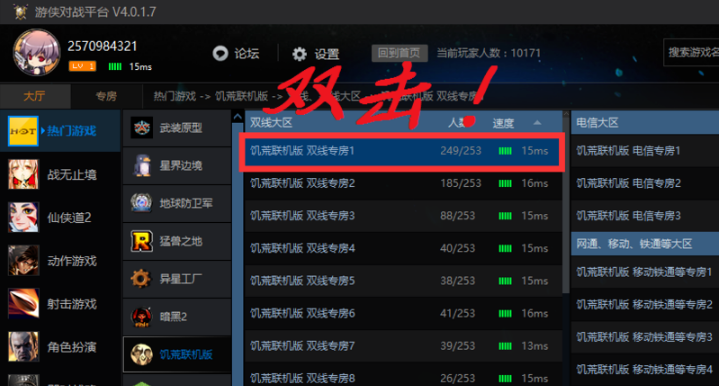
1. First we logged into the Ranger Battle Platform, and then we selected any game on the platform to start creating a room. For example: The editor here takes the online version of Don't Starve Game as an example, and then selects the dual-line special room 1. When you choose again, it is better to choose the network status speed green. By the way, look at the number of people and choose a room that doesn’t have too many people. After selecting, you can enter the room.
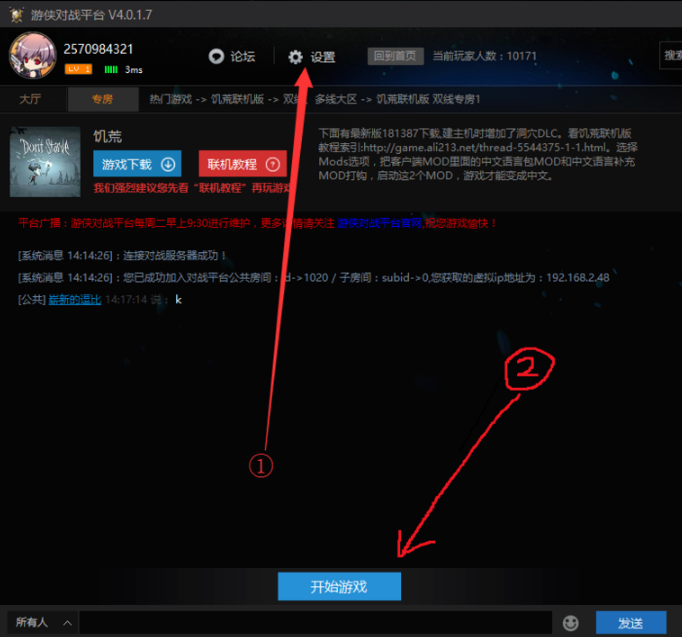
2. After selecting the room, we can click the [Settings] button, set the game start file and click [Start Game] to experience the game. After joining the game room, friends can start playing games online by adding their friends.
Which one is better, the Ranger Battle Platform or the Haofang Battle Platform?
The Ranger Battle Platform is the fastest and most comprehensive interactive platform for stand-alone games. It supports various types of stand-alone games and allows you to play stand-alone games as happily as online games. The Ranger battle platform will support all online stand-alone games, creating a game platform for players that will not drop or freeze.
Haofang Battle Platform is one of the world's largest game battle platforms, providing players with Internet-based multiplayer online game services, allowing online battles in popular games such as CS, War3, SC, FIFA and so on. The Haofang Battle Platform has a strong community system and a complete peripheral service system.
Both softwares have their own advantages and you can download them yourself.
Haofang battle platform download address:http://softwaredownload4.com/soft/42244.htm
Ranger battle platform update log:
1. Fixed the scaling issue on the Ranger Battle Platform that caused the platform login interface to be incompletely viewed.
2. Fixed the problem that some players could not log in.
3. Added new game Car and Gun Battle 5.
4. Fix the advertising crash problem.
|
Huajun editor recommends: The Ranger Battle Platform is a cool and fast free game battle platform. The Ranger Battle Platform can support many current popular stand-alone games, so that you will not be troubled by not being able to find fun games. The game results on the Ranger Battle Platform can be shared to the forum with one click to show other players their results. And when playing games on the Ranger Battle Platform, you will not encounter problems such as lag or disconnection. In addition, the editor of Huajun has also collected and compiled other [game platforms] for you to choose and download, such as:QQ Game Hall, amusing game boxes, etc. |




Useful
Useful
Useful