




Jingchen B11 driver highlights
Portability and flexibility: The Jingchen B11 printer itself is compact in design, and the driver software further enhances its portability and supports printing anytime and anywhere.
Exclusive collaborative editing: The driver software cooperates with the exclusive mobile APP to support multiple input methods such as Pinyin, handwriting, and English. Users can freely combine text, tables, and barcodes to easily design personalized labels.
Template sharing and batch printing:
Template sharing: Users can upload label templates to the cloud to achieve unified format within the team and improve work efficiency.
Batch printing: Supports importing Excel files through communication tools, automatically matching data and completing batch printing, saving time and effort.
Built-in rich template library: The driver software has built-in logo templates for many companies such as China Mobile, China Unicom, Telecom, Tower, Power Grid, Cable, and Bank. Users can call them directly to quickly complete editing.
Jingchen B11 driver functionDevice connection and recognition: The driver software is a bridge between the printer and the computer, which can solve the problem of the device not being recognized or the connection failing. When using the printer for the first time, this driver must be installed for normal operation.
Printing function support: Through the driver software, users can control various parameters of the printer, such as printing mode (line thermal), resolution (203dpi), printing speed (35mm/s), maximum printing width (50mm), etc., to ensure that the printing effect meets the needs.
Multi-interface compatibility: The driver supports two communication methods: USB and Bluetooth, adapting to the connection needs in different scenarios and improving the flexibility of device use.
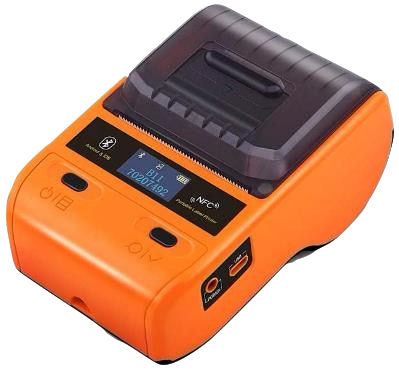
Jingchen B11 driver product introduction
The latest version of the Jingchen B11 printer driver is a dedicated driver for the Jingchen B11 printer, which can ensure the perfect operation of the Jingchen B11 printer.
Jingchen B11 printer product type: Bluetooth label printer
Printing method: Line thermal
Resolution: 203dpi
Printing speed: 35mm/s
Maximum width: 50mm
Communication interface: USB, Bluetooth
Hardware ID: USBPRINTDeTong_DP20_Label_Pr37D2
Features of Jingchen B11 software
1. Jingchen B11 printer is compact, handheld and portable
The compact body is portable and flexible, allowing you to print anywhere and at any time
2.Easy editing with exclusive APP
Suitable for various input methods such as pinyin, handwriting, English... Any combination of text, forms, and barcodes that meets customer usage habits, and allows you to play with label design
3. Freely match personalized tags
Freely match text, barcodes, tables, etc., set format parameters, and create personalized labels as you like
4. Built-in rich templates, easy to call
Built-in mobile/China Unicom/Telecom/Tower/Power Grid/Cable/Bank and other corporate logos for easy transfer and quick editing
6. Thousands of miles of sound transmission, template sharing
Sharing label templates allows friends to have a unified label format. Qianli Transsion makes labeling work easier and more professional
7. Import EXCEL-batch printing
Supports importing EXCEL through communication tools and binding it to labels to achieve automatic data matching, enjoy printing, and save time and effort
Jingchen B11 driver installation steps
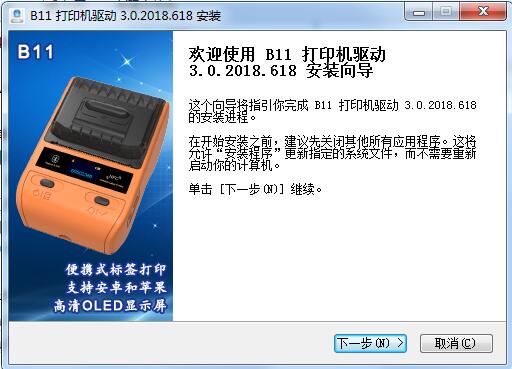
1. Download the latest version of the Jingchen B11 driver software package from the Huajun Software Park. After unzipping, double-click to run the exe file, enter the installation wizard, and click Next
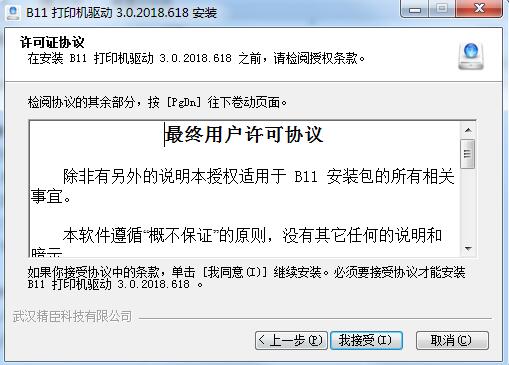
2. Read and accept the license agreement, click I accept
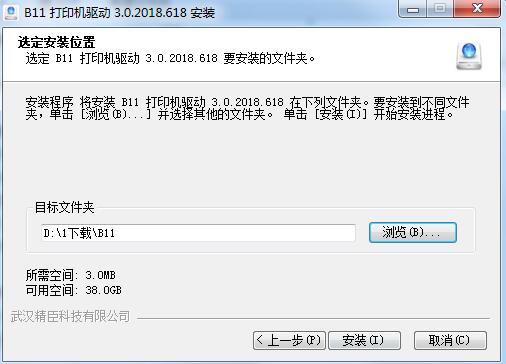
3. Select the installation directory and click Install
4. The Jingchen B11 driver is being installed, please wait.
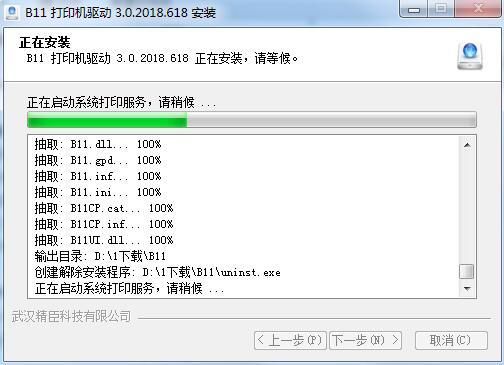
5. Jingchen B11 driver installation is completed
Jingchen B11 driver FAQ
The printed content is not clear
Reason: The print head is dirty, the label paper does not match the label, or the print density setting is too low.
Solution:
Use alcohol cotton balls to clean the print head and rubber roller surfaces.
Make sure to use Jingchen original label paper to avoid compatibility issues.
Adjust the print density setting in the driver or application.
Jingchen B11 driver update log
1. The details are more outstanding!
2.BUG gone without a trace
Huajun editor recommends:
What? I haven’t used the Jingchen B11 driver yet. Do you know that all your good friends are using it? Come and download it. The editor also prepares for youCanon mf4400 printer driver,Canon imageCLASS MF4752 driver,Fuji Xerox WorkCentre 7835 driver,Canon lbp2900 printer driver,Fuji Xerox P355d Printer Driver













Useful
Useful
Useful