If you are looking for software to use, go to Huajun Software Park! software release AI product list

Hello, if there is a need for software inclusion, please package the software and attach the software name, software introduction, software-related screenshots, software icon, soft copy, business license (if you do not have a business license, please provide the front and back of the corresponding developer ID card and a photo of yourself holding the ID card), and send it to email http://softwaredownload4.com/sbdm/user/login

Close >>

Send to email:news@onlinedown.net

Close >>

Location: Home pagePC softwaremedia toolsrecording software Xiaomi high quality recorder
Xiaomi high quality recorder

Xiaomi High Quality Recorder 1.0 Green Version

QR code
  • Software licensing: free software
  • Software size: 0.16MB
  • Software rating:
  • Software type: Domestic software
  • Update time: 2024-12-26
  • Application platform: WinAll
  • Software language: Simplified Chinese
  • Edition: 1.0 Green version

Download the service agreement at the bottom of the page

Software introduction Related topics FAQ Download address

Basic introduction
Xiaomi high quality recorder segment first LOGO
Xiaomi high quality recorderIt is a small, exquisite and practical recording software. The recording quality is much higher than the default computer recorder. I believe it will be a good helper for your recording! Friends who like online karaoke, YY recording, hosting recording and shout-out recording can download and collect it for use.

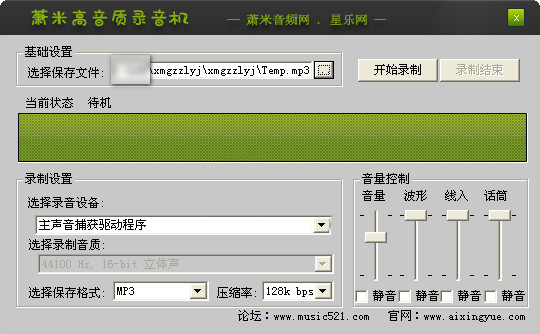
Screenshot of Xiaomi high quality recorder

Function introduction

1. Supports the selection of recording input device, sound card's own function of recording sound quality setting (some sound cards do not support it), recording compression rate of 32~224k bps and recording saving format MP3 or WAV selection
2. Support volume control, total volume, waveform, line input, microphone, with mute function. It is easy to use and has excellent sound quality. Start recording your personal songs now!

How to use

1. Open the "Xiaomi High Quality Recorder" program, and in Basic Settings - select the save file path
2. Set "Recording Settings" - "Select Recording Device" and "Recording Sound Quality (not supported by some sound cards)", select the saving format "MP3" or "WAV" format, select "Compression Rate", it is recommended to set it to 224k bps for better sound quality.
3. Click "Start Recording" to start recording, and click the "End Recording" button to end recording.

FAQ

Xiaomi high quality recorder

Xiaomi High Quality Audio Recorder 1.0 Green Version

close