





Universal Data Recovery Software Frequently Asked Questions
U diskHow to recover deleted files using universal data recovery software?
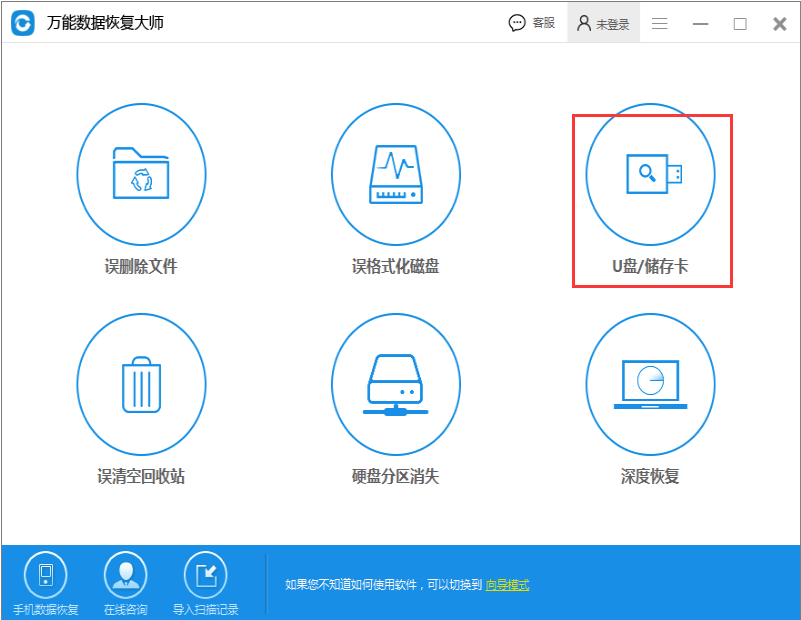
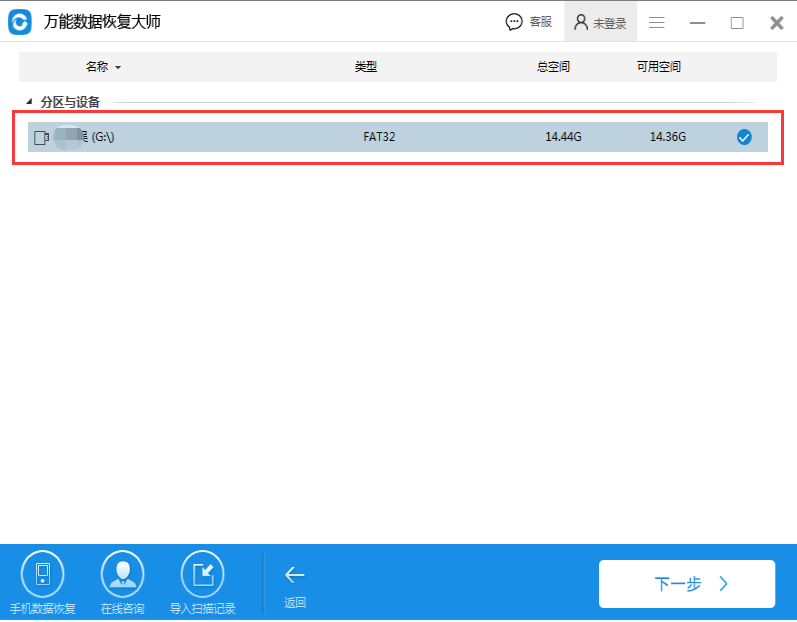
1. Open the universal data recovery software, click "U Disk/Memory Card" and then follow the prompts to select the U disk from which files need to be recovered.
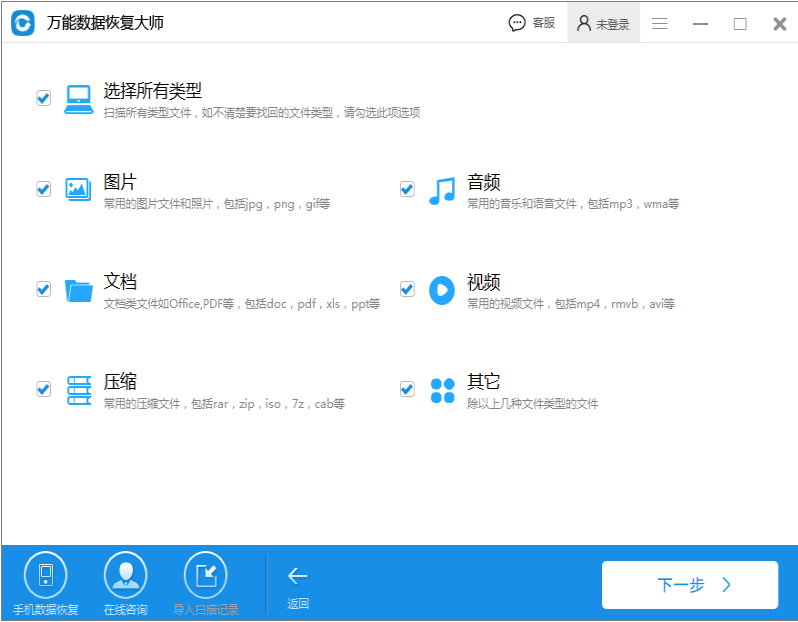
2. You can select all data types here, but we usually only select the data type that needs to be recovered, and then start scanning
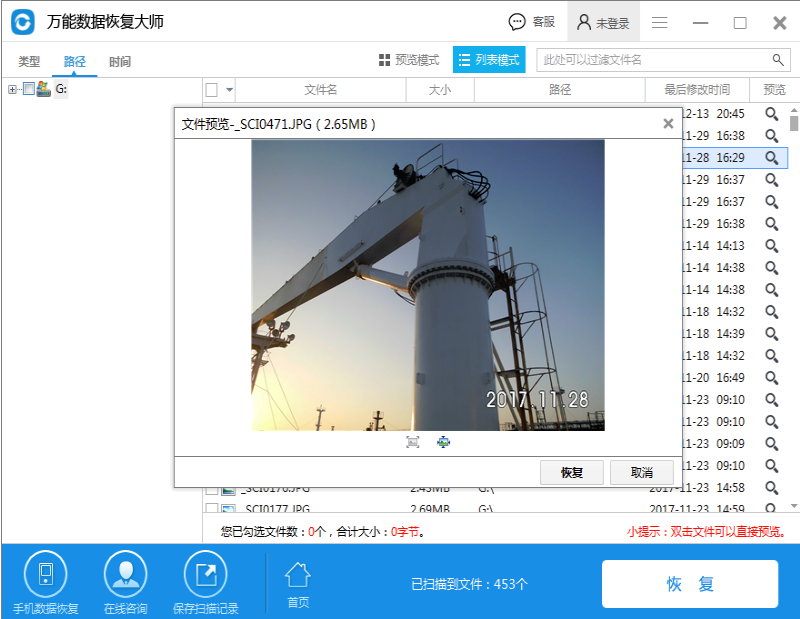
3. The scanning time may be longer or shorter, depending on the size of the scanned file. After scanning, we can double-click to open the preview. After previewing, check the files that need to be recovered, and then select the save folder. After recovery, you can go to the folder to view it!
How to use universal data recovery software
How to use universal data recovery software to recover data deleted by mistakeFormathard drive data?
The first step is to download and install the universal data recovery software from this site. Note, please do not install the software on the hard disk partition to be recovered. For example, if you need to restore files in the C drive, the software must be installed on D/E/F or an external hard drive.
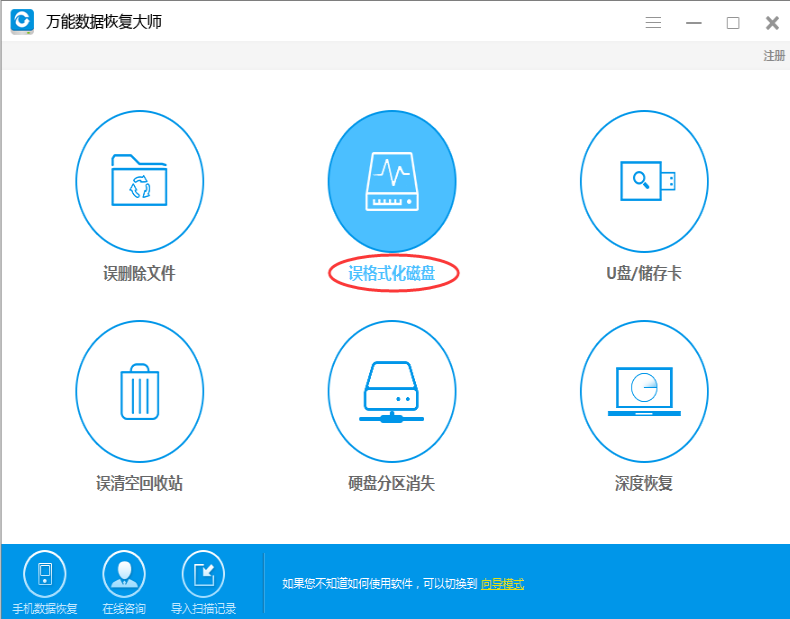
The second step is to run the universal data recovery software and select "Accidentally formatted hard drive"
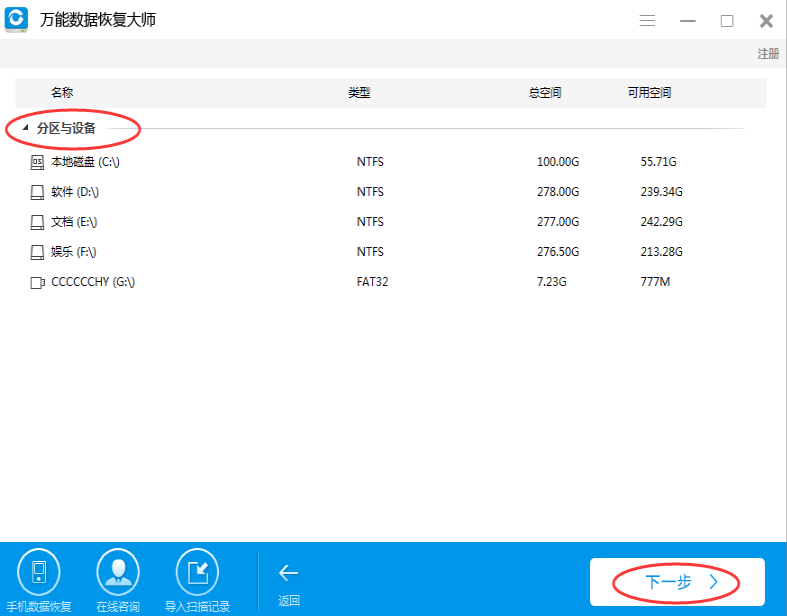
Step 3: Select the hard disk partition that was mistakenly formatted (if an external device is connected, please connect it before running the software), and click "Next" to start scanning.
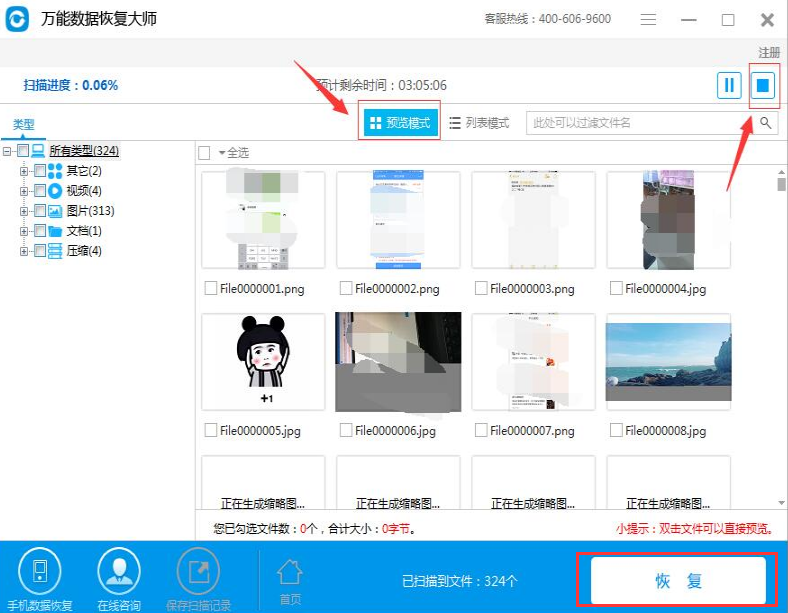
Step 4: Search for formatted recovered files from the scan results, select the files to be recovered, and click the "Recover" button
Introduction to the functions of universal data recovery software
Broad compatibility:
Supports data recovery from various storage devices such as computer hard drives, USB flash drives, TF cards, SD cards, Sony memory sticks, etc.
Compatible with FAT12, FAT16, FAT32, NTFS, EXT2 and other file systems.
Applicable to a variety of operating systems, including Windows series (such as Win9x/2000/2003/XP, etc., some versions support a wider range of Windows systems).
Data recovery capability:
Able to handle data loss caused by accidental deletion, formatting, partition loss, etc.
Provides a file preview function, allowing users to confirm file contents before recovery to avoid invalid recovery.
Supports recovery from image files and remote recovery (some versions or functions).
As of a certain time, new data recovery functions for iPhone and Android phones have been added, including address book recovery.
Deep scan function:
Provides deep scan mode to improve recovery success rate, especially suitable for complex data loss scenarios.
Highlights of Universal Data Recovery Software
Extensive data recovery capabilities:
Supports the recovery of accidentally deleted files, files deleted by emptying the Recycle Bin, accidentally formatted drive letters, lost partitions (partition table damage, repartitioning, deletion of partitions), damaged partitions (DBR damage, turning into RAW partitions, damaged root directories, unreadable, double-clicking the drive letter prompts for formatting), empty drive letters (the root directory disappears after plugging and unplugging the USB flash drive but the used space remains), files lost by encryption software, files lost by CHKDSK, documents and desktop data forgotten to be backed up after reinstalling the system, etc.
Supports file recovery from various storage media such as computer hard drives, USB flash drives, memory cards, CF cards, SD cards, cameras, memory sticks, etc.
Supports FAT12, FAT16, FAT32, NTFS, EXT2, HFS+, APFS and other file systems.
Multiple recovery modes:
Provides multiple scanning modes such as accidental deletion scanning, accidental formatting scanning, and deep recovery to meet data recovery needs in different scenarios.
Supports recovery from image files and remote recovery (some versions or functions).
File preview function:
Before recovery, users can preview the file content to confirm whether the file is complete and correct to avoid invalid recovery.
The preview function supports multiple file types, including documents, pictures, videos, audios, etc.
User friendly interface:
The interface design is simple and clear, and the operation process is intuitive and easy to understand. Even users without technical experience can easily get started.
Provide detailed operation guides and customer service support to help users solve problems encountered during use.
Features of universal data recovery software
Compatibility: Compatible with various file systems such as FAT12, FAT16, FAT32, NTFS, EXT2, etc., as well as storage media such as IDE/SCSI/U disk/SD card.
Cross-platform: Supports Windows and Mac operating systems, making it convenient for users on different platforms.
Security: Make sure there is no further damage to your device or data loss while recovering your data.
Universal data recovery software installation steps
1. First download the universal data recovery software installation package from this site. After completion, double-click the exe file to run. A note will pop up, click OK.

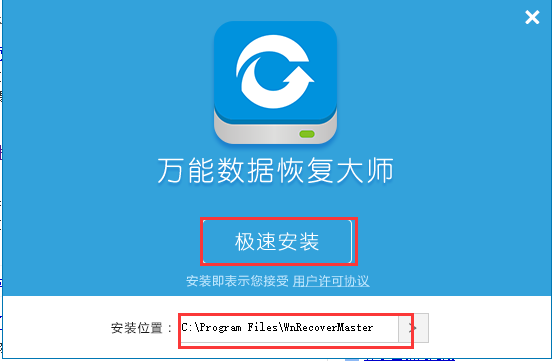
2. Enter the universal data recovery software installation interface, first select the appropriate installation location, and then click Quick Install
3. The universal data recovery software is installed, click to experience it now and you can use it.

Comparison of similar software for universal data recovery
What are the computer data recovery software?
The first software that most people are using,360 Security Guard, there is a file recovery function, just enter the application and add it.
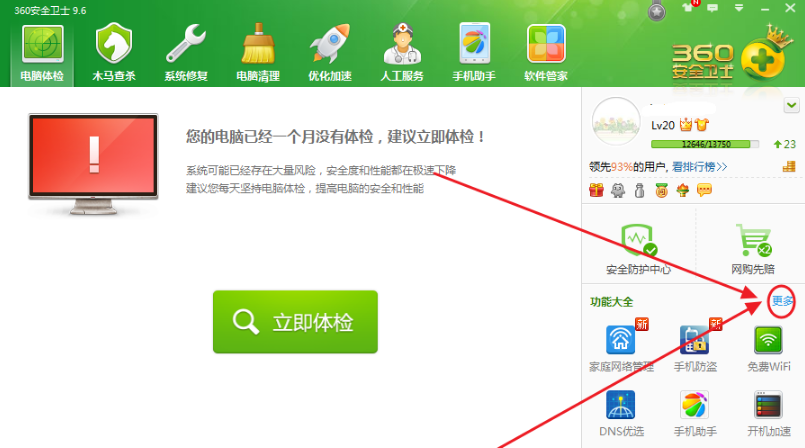
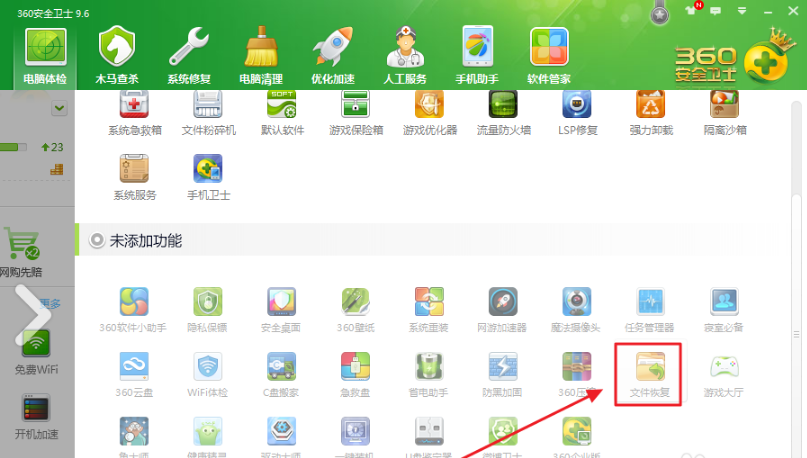
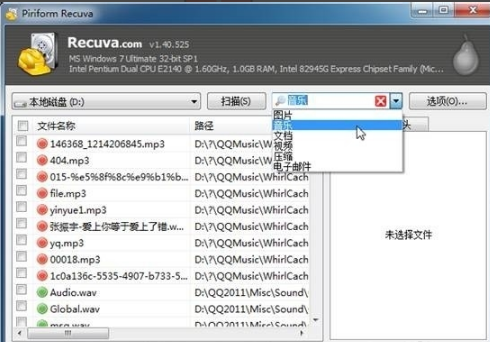
The second software is Recuva - a file recovery tool for Windows platform. It can be used to recover accidentally deleted files in any format. It can directly recover files contained in hard drives, flash drives, and memory cards (SD cards, MMC cards, etc.). As long as the data has not been written repeatedly, it can be directly recovered regardless of formatting or deletion. It supports FAT12, FAT16, FAT32, and NTFS file systems (supports most file systems on the market).
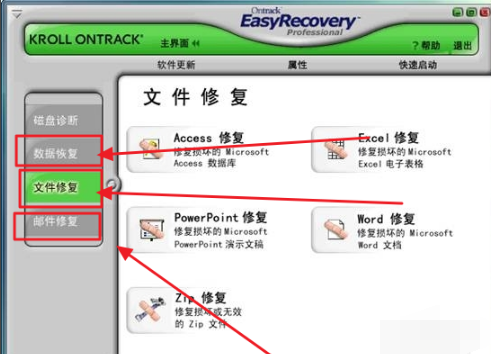
The third software,EasyRecovery, supports data recovery from storage devices such as hard drives and USB flash drives, and also supports the repair of damaged Office documents (including Access databases, Excel spreadsheets, PowerPoint presentations, Word documents), ZIP compressed packages and emails, etc. It is characterized by the repair of damaged Office documents.
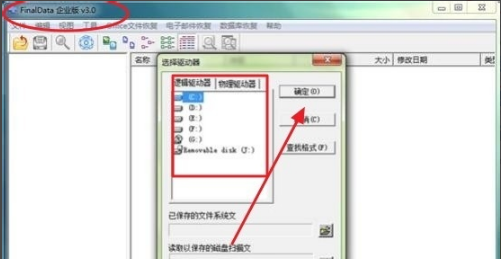
The fourth software, FinalData, is a simple and easy-to-use data recovery tool with a simple and easy-to-understand interface design.
The picture below is to select the location of the recovered files. After selecting, just confirm. The detailed usage process is not shown here.
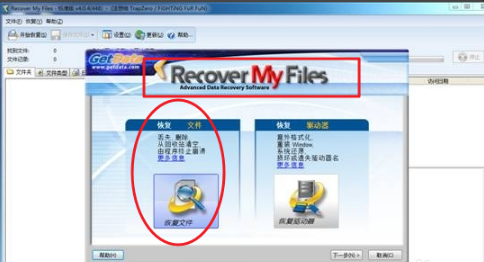
The fifth software, Recover My Files, can specify folders to search. Accidentally deleted files or formatted disk data support the recovery of files in multiple formats.
The above data recovery software has its own characteristics and powerful functions. Users can choose the appropriate software to download and use according to their own needs.
Universal data recovery software update log
1. Deep scanning function, supports scanning and previewing of more formats, improving recovery rate
2. Universal data recovery software fixes other possible crash bugs and improves program stability
Due to copyright and manufacturer requirements, Huajun Software Park provides the official download package of the universal data recovery software.
Huajun editor recommends:
Universal data recovery software takes up little memory, has stable performance, is free of any bundles, is green and safe, and is truly a conscientious software! This site also hasDiskGenius Free Edition,filerecovery 2016,Gecko Data Recovery,YumSote Universal Data Recovery Master,Prickly Pear Data Recovery, available for you to download!

























Useful
Useful
Useful