




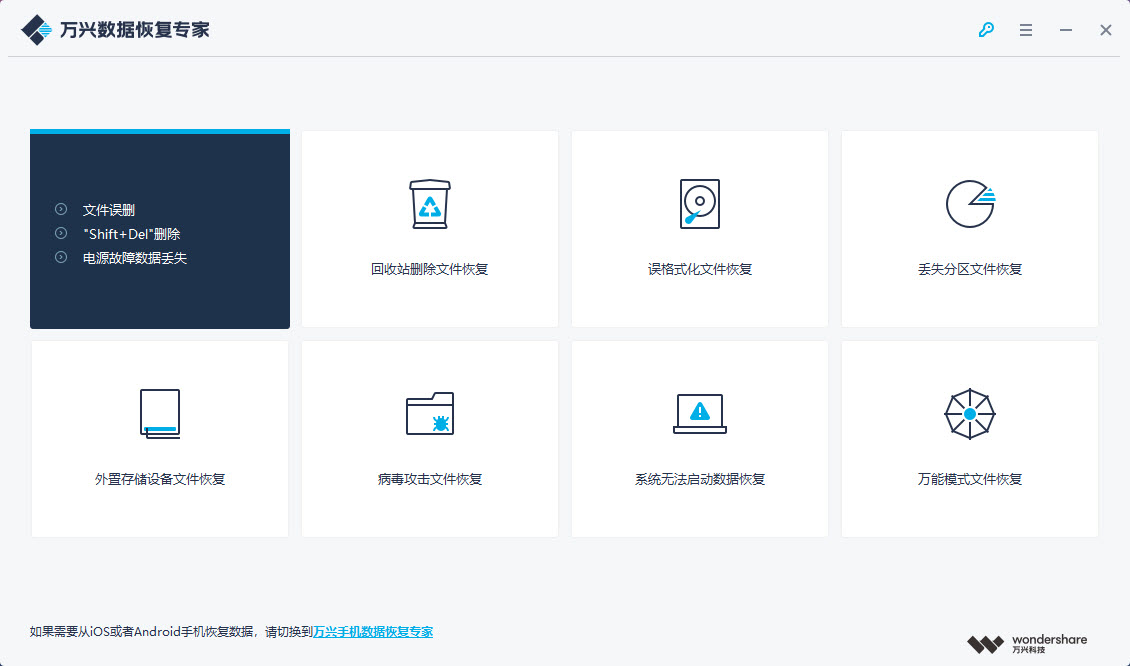
Introduction to the functions of Wondershare Data Recovery Expert
Full format, full device support:
Recoverit Win version supports more than 550 data formats, including almost all video, picture, document, music, email and computer file formats.
Supports all data storage devices using NTFS, FAT16, FAT32, HFS+ file systems.
Video repair function and advanced video recovery function can recover mainstream video format file packages
Data recovery algorithm:
Built-in data analysis engine independently developed by Wondershare Technology, scanning is faster and more thorough!
Advanced data recovery algorithms make Recoverit Win version even more powerful, with a recovery success rate of 96%!
Data recovery mode:
Supports format recovery, lost partition recovery, and Raw format recovery;
Even if the computer system crashes/cannot enter the system, or the computer is fatally attacked by a virus, Recoverit Win version can help you recover your data!
How to use Wondershare Data Recovery Expert
1 choice
Launch the Recoverit Win desktop software and select the original storage location of the lost data.
2 scan
The software starts scanning all data stored on your device/computer;
3 restore
Selective recovery: Preview, recover and save files.
Wondershare Data Recovery Expert FAQ
1. If the hard drive cannot be detected by my computer, can I recover data from it?
We are sorry to say that if the hard drive cannot be detected or read by the computer, Recoverit Win Edition cannot find it or recover data from it. You need to repair the hard drive first.
2. Why can’t the recovered files be opened?
The recovered files may have been overwritten or corrupted. Since more and more users are now using mechanical hard drives, the deleted data storage area may be overwritten by other data, and the recovered files will be damaged.
3. Why are the names of the scanned folders different from those that were lost?
Because after recovery, the lost data is reclassified by file type and does not exist in the form of the original folder. You can open the recovered data and find the data you want based on the file type.
Recoverit Data Recovery Update Log
1. Optimized some functions
2. Solved many intolerable bugs
Huajun editor recommends:
As a free data recovery tool with wide application and powerful functions, Wondershare Data Recovery Expert has won unanimous praise from many netizens for its functions. It is strongly recommended that everyone download and use it. In addition, there areDiskGenius Free Edition,filerecovery 2016,Gecko Data Recovery,YumSote Universal Data Recovery Master,Prickly Pear Data RecoveryIt is recommended for everyone to download and use.







Useful
Useful
Useful