
If you are looking for software to use, go to Huajun Software Park! software release AI product list

Hello, if there is a need for software inclusion, please package the software and attach the software name, software introduction, software-related screenshots, software icon, soft copy, business license (if you do not have a business license, please provide the front and back of the corresponding developer ID card and a photo of yourself holding the ID card), and send it to email http://softwaredownload4.com/sbdm/user/login

Close >>

Send to email:news@onlinedown.net

Close >>

Location: Home pageAndroid softwareApplicationsystem tools 360 mobile assistant

99.57%

0.43%
QR code

Scan the QR code to access the mobile version

Permissions: View

The following important permissions need to be called
uses-permission:'android.permission.WAKE_LOCK', allows the background process to still run after the phone screen is turned off
uses-permission:'android.permission.SEND_RESPOND_VIA_MESSAGE', allows users to use your application to reply instant text messages when they receive a call.
uses-permission:'android.permission.INTERNET', allows the program to access the network connection, which may generate GPRS traffic
uses-permission:'android.permission.READ_PHONE_STATE', allows the program to access the phone state
uses-permission:'android.permission.WAKE_LOCK', allows the background process to still run after the phone screen is turned off
uses-permission:'android.permission.ACCESS_NETWORK_STATE', allows the program to obtain network information status, such as whether the current network connection is valid
uses-permission:'android.permission.ACCESS_WIFI_STATE', allows the program to obtain the current WiFi access status and WLAN hotspot information
uses-permission:'android.permission.CHANGE_WIFI_STATE', allows the program to change the WiFi state
uses-permission:'android.permission.CAMERA', allows the program to access the camera to take pictures
uses-permission:'android.permission.READ_EXTERNAL_STORAGE', the program can read files in the device's external storage space (built-in SDcard and external SDCard)
uses-permission:'android.permission.WRITE_EXTERNAL_STORAGE', allows the program to write to external storage, such as writing files on the SD card
uses-permission:'android.permission.MOUNT_UNMOUNT_FILESYSTEMS', allows the program to mount and unmount external file systems
uses-permission:'android.permission.WRITE_MEDIA_STORAGE'
uses-permission:'android.permission.ACCESS_CACHE_FILESYSTEM'
uses-permission:'android.permission.VIBRATE', allows the program to vibrate
uses-permission:'android.permission.SYSTEM_ALERT_WINDOW', allows the program to display the system window
uses-permission:'android.permission.SYSTEM_OVERLAY_WINDOW'
uses-permission:'com.android.launcher.permission.WRITE_SETTINGS'
uses-permission:'com.android.launcher.permission.READ_SETTINGS'
uses-permission:'com.android.launcher2.permission.READ_SETTINGS'
uses-permission:'com.android.launcher3.permission.WRITE_SETTINGS'
uses-permission:'com.android.launcher3.permission.READ_SETTINGS'
uses-permission:'android.permission.CHANGE_CONFIGURATION', allows the current application to change configuration, such as positioning
uses-permission:'android.permission.WRITE_APN_SETTINGS', allows the program to write network GPRS access point settings
uses-permission:'android.permission.WRITE_SETTINGS', allows the program to read or write system settings
uses-permission:'android.permission.WRITE_SECURE_SETTINGS', allows applications to read or write security system settings
uses-permission:'com.google.android.launcher.permission.READ_SETTINGS'
uses-permission:'com.htc.launcher.permission.READ_SETTINGS'
uses-permission:'com.htc.launcher.permission.WRITE_SETTINGS'
uses-permission:'com.nd.android.launcher.permission.WRITE_SETTINGS'
uses-permission:'com.nd.android.launcher.permission.READ_SETTINGS'
uses-permission:'com.huawei.android.launcher.permission.READ_SETTINGS'
uses-permission:'com.huawei.android.launcher.permission.WRITE_SETTINGS'
uses-permission:'com.huawei.launcher2.permission.READ_SETTINGS'
uses-permission:'com.huawei.launcher3.permission.READ_SETTINGS'
uses-permission:'com.oppo.launcher.permission.READ_SETTINGS'
uses-permission:'com.oppo.launcher.permission.WRITE_SETTINGS'
uses-permission:'com.bbk.launcher2.permission.READ_SETTINGS'
uses-permission:'com.qiku.launcher.permission.READ_SETTINGS'
uses-permission:'com.qiku.launcher.permission.WRITE_SETTINGS'
uses-permission:'com.qihoo360.launcher.permission.READ_SETTINGS'
uses-permission:'net.qihoo.launcher.permission.READ_SETTINGS'
uses-permission:'com.lge.launcher.permission.READ_SETTINGS'
uses-permission:'com.sec.android.app.twlauncher.settings.READ_SETTINGS'
uses-permission:'com.ztemt.launcher.permission.READ_SETTINGS'
uses-permission:'com.yulong.android.launcher.permission.READ_SETTINGS'
uses-permission:'com.yulong.android.launcher3.READ_SETTINGS'
uses-permission:'com.yulong.android.launcher3.WRITE_SETTINGS'
uses-permission:'com.yulong.android.launcherL.permission.READ_SETTINGS'
uses-permission:'com.sonyericsson.home.READ_SETTINGS'
uses-permission:'com.sonyericsson.home.WRITE_SETTINGS'
uses-permission:'com.meizu.flyme.launcher.permission.READ_SETTINGS'
uses-permission:'com.meizu.flyme.launcher.permission.WRITE_SETTINGS'
uses-permission:'org.adw.launcher.permission.READ_SETTINGS'
uses-permission:'org.adw.launcher_donut.permission.READ_SETTINGS'
uses-permission:'com.tencent.qqlauncher.permission.READ_SETTINGS'
uses-permission:'org.adwfreak.launcher.permission.READ_SETTINGS'
uses-permission:'com.fede.launcher.permission.READ_SETTINGS'
uses-permission:'com.ebproductions.android.launcher.permission.READ_SETTINGS'
uses-permission:'com.android.mylauncher.permission.READ_SETTINGS'
uses-permission:'telecom.mdesk.permission.READ_SETTINGS'
uses-permission:'cn.nubia.launcher.permission.READ_SETTINGS'
uses-permission:'dianxin.permission.READ_SETTINGS'
uses-permission:'com.zte.mifavor.launcher.permission.READ_SETTINGS'
uses-permission:'com.lenovo.launcher.permission.READ_SETTINGS'
uses-permission:'android.permission.CALL_PHONE',允许程序从非系统拨号器里拨打电话
uses-permission:'android.permission.READ_CALL_LOG',读取通话记录
uses-permission:'android.permission.WRITE_CALL_LOG',允许程序写入(但是不能读)用户的联系人数据
uses-permission:'android.permission.PROCESS_OUTGOING_CALLS',允许程序监视,修改或放弃播出电话
uses-permission:'android.permission.READ_CONTACTS',允许程序访问联系人通讯录信息
uses-permission:'android.permission.WRITE_CONTACTS',写入联系人,但不可读取
uses-permission:'android.permission.READ_SMS',允许程序读取短信内容
uses-permission:'android.permission.WRITE_SMS',允许程序写短信
uses-permission:'android.permission.SEND_SMS',允许程序发送短信
uses-permission:'android.permission.RECEIVE_SMS',允许程序接收短信
uses-permission:'android.permission.REQUEST_INSTALL_PACKAGES',允许访问来自未知来源的安装应用程序
uses-permission:'android.permission.GET_PACKAGE_SIZE',允许程序获取应用的文件大小
uses-permission:'android.permission.INSTALL_PACKAGES',允许程序安装应用
uses-permission:'android.permission.DELETE_PACKAGES',允许程序删除应用
uses-permission:'android.permission.CLEAR_APP_USER_DATA',允许程序清除用户数据
uses-permission:'android.permission.CLEAR_APP_CACHE',允许程序清除应用缓存
uses-permission:'android.permission.RESTART_PACKAGES',允许程序结束任务通过restartPackage(String)方法,该方式将在外来放弃
uses-permission:'android.permission.KILL_BACKGROUND_PROCESSES',允许程序调用killBackgroundProcesses(String).方法结束后台进程
uses-permission:'android.permission.PACKAGE_USAGE_STATS'
uses-permission:'android.permission.GET_TASKS',允许程序获取任务信息
uses-permission:'android.permission.SET_WALLPAPER',允许程序设置桌面壁纸
uses-permission:'android.permission.MODIFY_AUDIO_SETTINGS',允许程序修改声音设置信息
uses-permission:'android.permission.DEVICE_POWER',允许程序访问底层电源管理
uses-permission:'android.permission.BATTERY_STATS'
uses-permission:'android.permission.FLASHLIGHT', allows access to flash
uses-permission:'android.permission.CHANGE_NETWORK_STATE', allows the program to change the network status, such as whether it is connected to the Internet
uses-permission:'android.permission.REORDER_TASKS', allows the program to reorder the running tasks of the system Z axis
uses-permission:'com.android.alarm.permission.SET_ALARM', allows the program to set alarm reminders
uses-permission:'android.permission.BROADCAST_STICKY', allows the program to quickly receive the next broadcast after receiving the broadcast
uses-permission:'com.sonyericsson.home.permission.BROADCAST_BADGE'
uses-permission:'android.permission.EXPAND_STATUS_BAR', allows the program to expand or shrink the status bar
uses-permission:'android.permission.BLUETOOTH_ADMIN', allows the program to discover and pair new Bluetooth devices
uses-permission:'android.permission.BLUETOOTH', allows the program to connect to paired Bluetooth devices
uses-permission:'android.permission.NFC', allows the program to perform NFC short-range communication operations for mobile support
uses-permission:'com.fingerprints.service.ACCESS_FINGERPRINT_MANAGER'
uses-permission:'android.permission.DISABLE_KEYGUARD', allows the program to disable the keyboard lock
uses-permission:'android.permission.BIND_JOB_SERVICE'
uses-permission:'android.permission.BIND_NOTIFICATION_LISTENER_SERVICE', must be required by the notificationlistenerservice to ensure that only the system can bind to it.
uses-permission:'android.permission.ACCESS_NOTIFICATION_POLICY'
uses-permission:'com.qihoo.appstore.update.permission.clear_sdk'
uses-permission:'android.permission.ADDINSTALLKEY'
uses-permission:'android.permission.ACCESS_COARSE_UPDATES'
uses-permission:'android.permission.BIND_ACCESSIBILITY_SERVICE', requests the accessibilityservice service to ensure that only the system can bind to it.
uses-permission:'android.permission.MANAGE_ACCOUNTS', allows the program to manage the account list in AccountManager
uses-permission:'android.permission.USE_FINGERPRINT'
uses-permission:'android.permission.DOWNLOAD_WITHOUT_NOTIFICATION'
uses-permission:'android.permission.FORCE_STOP_PACKAGES'
uses-permission:'android.permission.ACCESS_MTK_MMHW'
uses-permission:'yulong.permission.ACCESS_YLPARAMS'
uses-permission:'qiku.permission.ACCESS_QKPARAMS'
uses-permission:'com.qihoo360.mobilesafe.news.permission.NEWS_SDK_BROADCAST'
uses-permission:'com.samsung.android.providers.context.permission.WRITE_USE_APP_FEATURE_SURVEY'
uses-permission:'com.qihoo.appstore.permission.GXB_INIT'
uses-permission:'android.permission.GET_ACCOUNTS', allows the program to access the account Gmail list
uses-permission:'android.permission.READ_SYNC_SETTINGS', allows the program to read synchronization settings and read Google online synchronization settings
uses-permission:'android.permission.AUTHENTICATE_ACCOUNTS', allows the program to access account management ACCOUNT_MANAGER related information through account verification
uses-permission:'android.permission.WRITE_SYNC_SETTINGS', write Google online synchronization settings
uses-permission:'com.android.permissions.APPSTORE_BROADCAST_PERMISSIONS'
uses-permission:'com.qihoo.appstore.LIBCOREDAEMON_BROADCAST_PERMISSIONS'
uses-permission:'com.qihoo.appstore.permissions.MY_BROADCAST_PERMISSIONS'
uses-permission:'android.permission.READ_SYNC_STATS', allows the program to read the synchronization status and obtain Google online synchronization status
uses-permission:'com.qihoo.appstore.permission.NEWS_SDK_BROADCAST'
uses-permission:'android.permission.RECEIVE_BOOT_COMPLETED', allows the program to run automatically after booting
uses-permission:'android.permission.MANAGE_USERS'
uses-permission:'android.permission.INTERACT_ACROSS_USERS_FULL'
uses-permission:'android.permission.INTERACT_ACROSS_USERS'
uses-permission:'android.permission.RECEIVE_USER_PRESENT'
uses-permission:'qiku.permission.READ_WRITE_SAFE_SPACE'
uses-permission:'android.webkit.permission.PLUGIN'
uses-permission:'android.permission.USE_CREDENTIALS', allows the program to request verification from AccountManager
uses-permission:'android.permission.READ_SETTINGS'
uses-permission:'android.permission.READ_PRIVILEGED_PHONE_STATE'
uses-permission:'android.permission.FOREGROUND_SERVICE'
uses-permission:'android.permission.READ_LOGS', allows the program to read the system's underlying logs
uses-permission:'com.asus.msa.SupplementaryDID.ACCESS'
uses-permission:'freemme.permission.msa'
uses-permission:'com.sec.android.provider.badge.permission.READ'
uses-permission:'com.sec.android.provider.badge.permission.WRITE'
uses-permission:'com.htc.launcher.permission.UPDATE_SHORTCUT'
uses-permission:'com.sonymobile.home.permission.PROVIDER_INSERT_BADGE'
uses-permission:'com.anddoes.launcher.permission.UPDATE_COUNT'
uses-permission:'com.majeur.launcher.permission.UPDATE_BADGE'
uses-permission:'com.huawei.android.launcher.permission.CHANGE_BADGE'
uses-permission:'android.permission.READ_APP_BADGE'
uses-permission:'me.everything.badger.permission.BADGE_COUNT_READ'
uses-permission:'me.everything.badger.permission.BADGE_COUNT_WRITE'
uses-permission:'com.qiku.android.launcher3.permission.READ_UNREAD'
uses-permission:'com.qiku.android.launcher3.permission.WRITE_UNREAD'

360 Mobile Assistant 10.2.2

Special area
Software size:44.2 MB
software language:Simplified Chinese
Software rating:
Software type:Domestic software
Software licensing:free software
Update time:2025-11-03
Application platform:Android
Software classification:system tools
version:10.2.2
Registration number:Beijing ICP No. 12051853-11A
Software vendor:Beijing Qifutong Technology Co., Ltd.

Software introduction Related topics FAQ Other versions Download address

Recommended for you:- 360 mobile assistant

Basic introduction
360 mobile assistant tool first LOGO
360 mobile assistantThe Android version is the software manager on your mobile phone! Hundreds of thousands of Android software and games are available for you to download, and the 360 ​​Security Center detects all-round security. Install 360 Mobile Assistant, download software instantly, play editor-selected games, and manage mobile software at any time. It is a must-have for your Android phone! This site provides free downloads.

360 Mobile Assistant Android version software functions


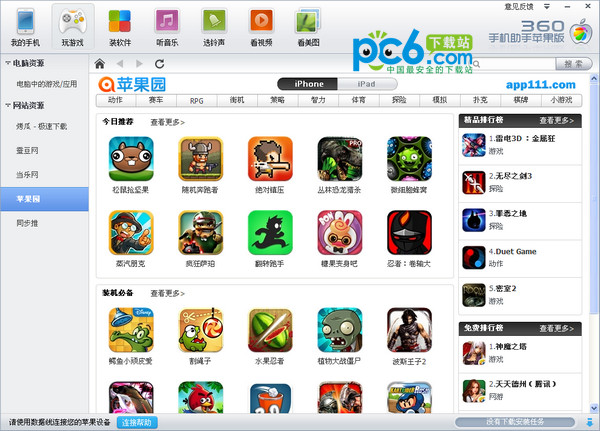
One-click installation of massive resources: 360 Mobile Assistant cooperates with more than 30 application stores to provide more than 100,000 mobile resources, including games, software, music, novels, videos, pictures, etc. Users can download and install the required resources with one click without spending mobile phone data.

Green, non-toxic, safe and worry-free: All information resources provided have been audited and certified by the 360 ​​Security Testing Center to ensure that they are green and non-toxic, providing users with the safest and most secure mobile resource acquisition platform.

Convenient management of applications: Provides the functions of uninstalling, installing, and upgrading applications to achieve efficient localized management. At the same time, it supports one-click backup of text messages and contact information, and restores it conveniently and quickly.

Comprehensive and convenient file management: Users can easily manage memory card files, including adding and deleting files, and comprehensively manage mobile phone files. In addition, it also supports quickly adding and deleting mobile phone resources, setting ringtones and wallpapers, and providing mobile phone screenshot functions.

Cross-device file transfer: After connecting the phone to the PC via a data cable, users can download massive applications through 360 Mobile Assistant and import and export pictures, videos, music and other files. After the connection is successful, a floating box of 360 Mobile Assistant will appear on the computer screen. Users can drag the files they want to upload to the mobile phone directly onto the floating box to achieve rapid transfer.

Features of 360 Mobile Assistant Android version software


One-click installation of massive resources:

In addition to its own software and game treasure trove, 360 Mobile Assistant also cooperates with more than 30 application stores to provide more than 100,000 mobile phone resources.

Users can download and install required applications, games, e-books, videos, music, pictures, etc. with one click without spending mobile phone data.

Green, non-toxic, safe and worry-free:

All information resources provided have been audited and certified by the 360 Security Testing Center to ensure they are green and non-toxic, and users can download and use them with confidence.

App for easy management:

Provides application uninstallation, installation, and upgrade functions to achieve efficient localized management.

Supports one-click backup of text messages and contact information, and restores them conveniently and quickly.

Comprehensive and convenient file management:

Users can easily manage memory card files, including adding and deleting files, and comprehensively manage mobile phone files.

It supports quickly adding and deleting mobile phone resources, setting incoming call ringtones and wallpapers, and providing mobile phone screenshot functions.


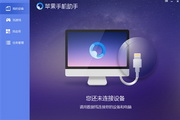
360 mobile assistant screenshot 360 mobile assistant screenshot

Highlights of 360 Mobile Assistant Android version software


Cross-device file transfer:

After connecting the mobile phone to the PC via a data cable, users can download a large number of applications through 360 Mobile Assistant, and import and export pictures, videos, music and other files.

After the connection is successful, a floating box of 360 Mobile Assistant will appear on the computer screen. Users can drag the files they want to upload to the mobile phone directly onto the floating box to achieve rapid transfer.

Personalization and Accessibility:

Provides a rich classification vocabulary and online skin resources to meet users' personalized needs.

Supports account synchronization of user lexicon, making it easier for users to switch between different devices.
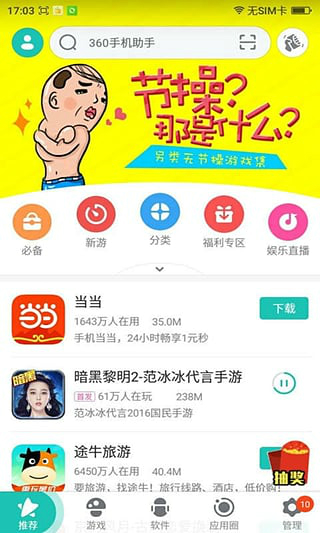
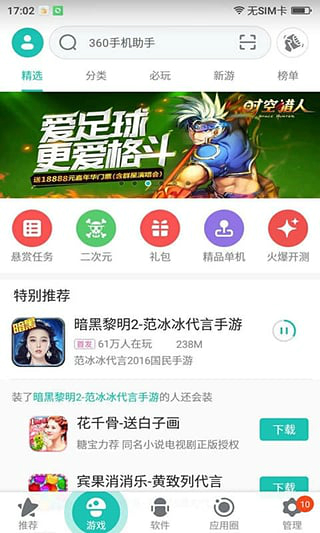
360 mobile assistant screenshot 360 mobile assistant screenshot

Frequently Asked Questions about 360 Mobile Assistant Android Version


Where is the Android version of 360 Mobile Assistant installed by default?
The system is installed in the phone memory by default. You can see it in my files.
How to connect the Android version of 360 Mobile Assistant to the computer?
1. Connect the mobile phone and computer through a data cable. Start 360 Complete Guard, select Software Manager, and click on the phone essential icon.
2. Then the smartphone system selection interface will pop up. Just select your own mobile phone system. The operations of each system are basically the same. At this time, use the Android system.
3. The 360 ​​Mobile Assistant interface will pop up immediately. Because it is the first time, you need to install the necessary drivers. Just select "Connect to my Android phone" to start the communication connection.

360 Mobile Assistant Android version update content


1. Downloading is actually polite, and the babies cry with joy
2. New gadget: you can make money even if you lock your screen
3. With this version, your phone will save more power.


Related topics

  • 360 mobile game special topic

    360 mobile game special topic

  • Kuaiyong Mobile Assistant Zone

    Kuaiyong Mobile Assistant Zone

  • 360 mobile assistant encyclopedia

    360 mobile assistant encyclopedia

  • 360 mobile guard encyclopedia

    360 mobile guard encyclopedia

  • 360 Assistant Series

    360 Assistant Series

FAQ