



- Green versionView
- Green versionView
- Green versionView
- Green versionView
- Green versionView
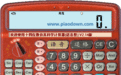
The Chinese voice prompts, keyboard and mouse operations are exactly the same as those of calculators commonly used in real life, so it is very easy to get started, especially for users who often use small keyboards for numerical input. It eliminates the previous embarrassment of looking at the computer screen and the calculator at the same time. The numbers on the display can be converted into the following forms for calculation at any time: hexadecimal, decimal, octal, binary, RMB Chinese capital form, RMB digital form (for example: 1435.75, RMB one thousand four hundred thirty five yuan seven cents five cents, ¥1435.75).
You can choose whether to automatically save the above various conversion and calculation results to the WINDOWS clipboard, and automatically output the current cursor position in other program windows, eliminating the inconvenience of pressing "Ctrl+V" and making it convenient for users. You can also grab selected formulas or data in other program windows at any time to participate in calculations. If you feel that the calculator has covered the content displayed on the screen, you can use the mouse to click on the LCD screen to convert it to a small window. The small window can be dragged and dropped at will, and can be automatically attached to the edge of the screen. Click the mouse again to restore it to its original state, which is very convenient. This calculator can perform a variety of scientific and logical operations, formula operations, personal income tax calculations, and various unit conversions. It has added various commonly used constant tables, and added angle and radian calculations. It is very powerful and is a powerful assistant for engineering construction, scientific calculations, financial management, and other applications! It is also useful for program design and game modification!
More than a dozen trigonometric function operations have been added (including various hyperbolic sine, cosine, secant, cosecant, etc. and related inverse functions), angle and radian calculations, displacement instructions, and various commonly used constant tables have been added, so that users no longer have to look through books when calculating some commonly used formulas. Various unit conversions have been added, and the unit conversion and screen calculation results are converted in real time, and the conversion unit can be changed in real time. You can freely choose whether to add thousands separators to the displayed data, and you can also freely determine the number of display digits for decimal precision. It has also modified some bugs in converting data into "RMB Chinese capital form, RMB numeric form (for example: 1435.75, RMB one thousand four hundred thirty five yuan seventy five cents, ¥1435.75), which greatly facilitates work in finance, bills, etc. Any data and calculation results entered can be automatically entered at the current cursor position in other program windows, just like being integrated with other programs.
If users often do calculation input work in application software (such as various word processing, tabulation, engineering calculations, stocks, etc., wherever calculation data and results need to be entered), then this function will make the work very convenient! (If you do not need this function, right-click the LCD screen and cancel the "Automatic data input into other windows" item in the pop-up menu!) The expression calculation function has been added, and complex formula calculations can be performed. For example, enter the following formula "2+(18-10)/7^2+sin(1)+sqrt(sqrt(5),3)*2", and press the calculation button or press Enter to automatically get the final result. In addition, a "single-step solution" option has been added, which can be solved in one step
Shows the calculation process of the formula in one step. Various trigonometric functions are supported, and the result of the operation can be selected as a radian or angle value, depending on the angle | radian button selection of the calculator. The steps to open the expression calculation function are: right-click the LCD screen and select "* Expression (formula) calculation *" in the pop-up menu to open this function.









Useful
Useful
Useful