




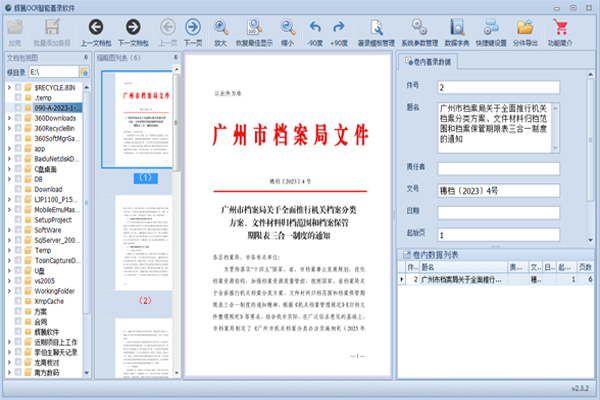
Features of OCR intelligent description software
档案OCR智能着录软件,主要面向档案数字化加工行业(也可用于其他行业的文字识别),包括文书档案、不动产档案、公检法档案、科技档案等等档案类型的快速着录功能。
Features of Phaeton Intelligent OCR Intelligent Description Software
1) 1500+ good notes every day;
2) Automatically divide files into pieces;
3) High accuracy recognition of text under the official seal;
4) Custom formatting of recognized dates;
5) Document number automatic octagonal character conversion;
6) Comply with a variety of file identification;
7) Support automatic recognition of cover catalog images;
8) Custom template printing of cover catalog;
9) Supports JPG, TIF, PDF, OFD format description and format conversion with metadata;
Phaeton Intelligent OCR intelligent recording software and hardware configuration
1) Processor: I3 fourth generation or above
2)Memory: 4GB and above
3) Operating system: win7/win10/win11
OCR intelligent description softwareInstallation method
Download the Phaeton Intelligent OCR Intelligent Description Software Standard Edition software installation package from Huajun Software Park, unzip it, run the "exe file", double-click to open, enter the installation wizard, click Next
The default selection, no need to make any changes, click Next
The software is already being installed, please wait a moment
When the following interface appears, click I agree to the license terms and conditions, and click Install
如果出现设置失败,没有关系,这是电脑上已经安装过类似程序了,点击关闭
If you have completed the previous step of installation and officially entered the main program installation, click Next
Select the installation path, the default is C drive, click Next
When the following picture appears, click Install
Wait for about 10 seconds, the installation is completed
The software has been installed, click to close
OCR intelligent description software update log:
1. The details are more outstanding!
2. BUG gone without a trace
Huajun editor recommends:
OCR intelligent description software is an excellent software for file conversion. The editor strongly recommends it to you. Once you download it, you will know how good it is. The editor has also prepared for youQuick PDF converter,Beidou PDF Converter,PDF365,WinScan2PDF,PDF cat PDF to PPT




Your comment needs to be reviewed before it can be displayed