

If you are looking for software to use, go to Huajun Software Park! software release AI product list

Hello, if there is a need for software inclusion, please package the software and attach the software name, software introduction, software-related screenshots, software icon, soft copy, business license (if you do not have a business license, please provide the front and back of the corresponding developer ID card and a photo of yourself holding the ID card), and send it to email http://softwaredownload4.com/sbdm/user/login

Close >>

Send to email:news@onlinedown.net

Close >>

Location: Home pagePC softwareSystem softwareFile conversion WinScan2PDF
WinScan2PDF

WinScan2PDF 3.16

QR code
  • Software licensing: shareware
  • Software size: 0.06MB
  • Software rating:
  • Software type: foreign software
  • Update time: 2024-12-23
  • Application platform: Winxp/vista/win7/2000/2003
  • Software language: English
  • Edition: 3.16

Download the service agreement at the bottom of the page

Software introduction Related topics FAQ Other versions Download address

Basic introduction
WinScan2PDF paragraph first LOGO
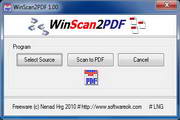
WinScan2PDF is a very small and portable PDF document conversion tool. WinScan2PDF can easily save files scanned by a scanner directly into PDF format. WinScan2PDF allows you to use any installed scanner on your computer to scan files and save them as PDF.

WinScan2PDF usage methods and tips:

First, open the program interface, check the "Multiple Pages" option, click the "Select Source" button to open the source selection window, check the scanner model used, click the "Select" button to complete the device selection, then click the "Scan" button to open the scanning operation interface, spread the document and click the "Capture" button, and then click the "Send" button. The first page of the document will enter the interface list, and then scan other documents according to the same operation!

Secondly, after all documents are scanned, close the scanning operation interface, click the to PDF button on the WinScan2PDF interface to open the "Save As" dialog box, select the save location of the document and name it, click the "Save" button, all document pages will be merged into a PDF file, and appear in the predetermined location!

FAQ

