





- Green versionView
- Green versionView
- Green versionView
Things to note:
Sometimes you will encounter errors when downloading and installing Mac software. Now the editor of Huajun will sort out the more common error situations and provide answers. Friends who encounter errors can refer to the following solutions:
1. "The xxx software is damaged and cannot be opened. You should move it to the Trash"
2. "The xxx software cannot be opened becauseApple can't check if it contains malware"
3. "Cannot open... software because it is from an unidentified developer"
The solution is as follows:
1. Set up on your Mac computerOpen any source.
2. If the error cannot be resolved by opening any source, it means that the application is subject to Apple's restrictions on unsigned applications and needs to bypass application signature authentication by executing command line code. Execute command bypassiosnotarizationGatekeeper.
3. If neither of the above two methods works, then you need tocloseSIPSystem integrity protection.
iSnapshot for MacFunction introduction
The snapshot note function allows users to add notes and snapshots for better understanding, including the main functions as follows
-Support text tools, add/edit/delete, etc.
-Supports cutout tools and customizes various cutout formats.
-Supports shape tools, adds various shapes including squares, ovals, etc., and supports self-drawn/customized shapes.
-Supports templates, different colors for different purposes.
-Supports straight line tool, sets all types of lines, including dashed line, solid line, dotted line, dotted line, etc.
-Supports arrow tools and sets various arrow types.
-Supports snapshot filtering function, combined with brightness and contrast adjustment, including dozens of templaterature and color effects.
-Support the United Nations to do more.
-Supports multi-glyph arrangement, movement, copying, etc.
iSnapshot for MacSoftware features
- Full screen mode: Just customized shortcuts are required and all content on full screen will be preserved.
- Window mode: Users only need to move the cursor to the target window and click the left mouse button to take a screenshot.
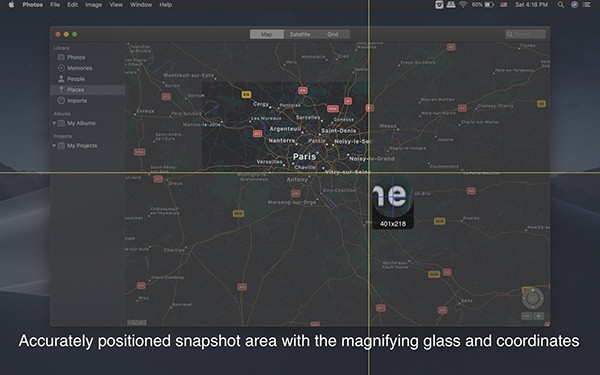
- Customized selection mode: Users can select the target area by moving the cursor and zoom in during the dragging process for more precise capture.
- Delay mode: Users can customize delay settings, and the software will automatically take screenshots. In this mode, users can capture pop-up menus based on user actions.
iSnapshot for MacSoftware description
It provides rich customization options for user-friendly attention, such as custom screenshot shortcuts, delay settings, capture window shadow, capture current cursor. Notably, it allows smooth copying and pasting in different applications.
Making tutorials is a complex problem that requires a lot of snapshot resources. In order to better manage resources, there is also software management. It allows all past snapshots to be easily found, browsed, deleted and batch exported among other functions. The quick preview function allows users to check the actual export effect, which not only saves the trouble of exporting, but also greatly improves browsing efficiency.
It supports export/batch export of various image formats, including but not limited to JPEG2000, PNG, GIF, BMP, TIFF, etc.
iSnapshot for Mac update log
1: Brand new interface, refreshing, simple and efficient
2: Performance is getting better and better
Huajun editor recommends:
iSnapshot for Mac is a software that is simple to operate, powerful, and easy to use. You can download it and try it. Everyone is welcome to download it. This site also providesResearcher,Adobe Photoshop Lightroom For Mac,scissor master,iQiyi video player,ORB Producer Suite intelligent arrangement plug-in setWaiting for you to download.




Useful
Useful
Useful