





- Green versionView
- Green versionView
- Green versionView
Things to note:
inmacWhen downloading and installing software, you will generally encounter the following three error situations. Now the editor of Huajun will give you the answers. If you encounter errors, please read them carefully:
1."...The software is corrupted and cannot be opened. You should move it to the Trash"
2."Can't open...software because it comes from an unidentified developer"
3."Can't open...software becauseAppleUnable to check if it contains malware"
When encountering the above three situations, we should:
1. First set:Open any source
2, most software settings can be downloaded and installed normally after opening any source; a small number of softwareiosRestrictions on unsigned application permissions require the execution of command line code to bypass application signature authentication. Therefore it is necessary to:Execute command bypassiosnotarizationGatekeeper.
3. If none of the above operations can solve the problem, then you need to:closeSIPSystem integrity protection.
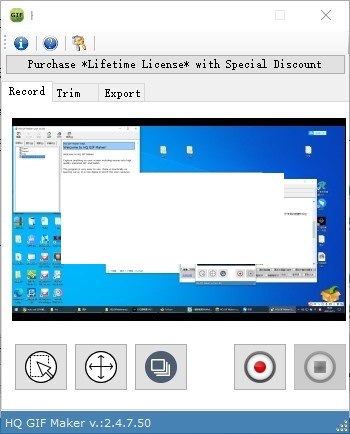
Giffer Mac software features
You can convert everything playing on the screen into animated GIFs.
er is ideal for converting movies into animated GIFs.
Also great for recording step-by-step tutorials into animated GIFs.
Create custom color palettes for your recorded content based on the 256 most commonly found colors to create the best quality animated GIFs.
Has a simple user interface with just one process: you select the area of the screen you want to capture - click to record - stop when done - trim it - and export it.
Optimal color selection is automatic, so high quality is guaranteed.
If you don’t want the GIF resolution to be equal to the recorded resolution, you can set it.
With HQ GIF Maker, you can choose the capture frame rate, for movies it should be higher and for tutorials it should be lower to keep the file size small.
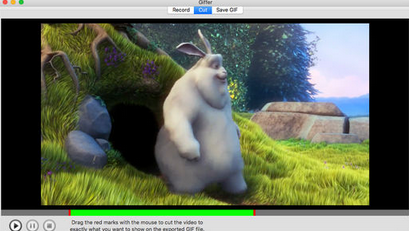
Giffer Mac software features
1. Ensure high-quality output.
2. Configurable frame rate.
3. Capture everything playing on the screen as animated GIF in three steps: record, trim and export.
4. Ability to crop the recorded content before exporting, which enables you to discard unwanted parts.
5. Do a two-step export starting with the best color selection and then encoding.
6.HQ GIF Maker allows you to create gifs from videos, create gifs from screenshots, all in one convenient, easy-to-use package.
Giffer Mac software advantages
The simple user interface of Giffer Mac version consists of 3 tabs: Record, Cut and Export GIF. First, record your full screen or part of the screen at the frame rate you need. You can then crop the video recording if you want to select a specific part of the capture. Finally, you can export your videos to animated GIF format to share them on social media.
Giffer The Mac version is the easiest way for you to make gifs, with custom area recording and cropping, and one-click export of your animated gif images.
Giffer Mac update log
1. Fixed other bugs;
2. Optimized software compatibility.
Huajun editor recommends:
Giffer Mac is a software that does not require learning to use. It is a very simple tool. Users in need can download and use it in the Huajun Software Park. You are guaranteed to be satisfied. In addition, there are many similar software of the same type available for download, such as:YiMeiBao,Adobe Photoshop Lightroom For Mac,scissor master,iQiyi video player,ORB Producer Suite intelligent arrangement plug-in setWait.




Useful
Useful
Useful