





- Green versionView
- Green versionView
- Green versionView
Things to note:
Sometimes you will encounter errors when downloading and installing Mac software. Now the editor of Huajun will sort out the more common error situations and provide answers. Friends who encounter errors can refer to the following solutions:
1. "The xxx software is damaged and cannot be opened. You should move it to the Trash"
2. "The xxx software cannot be opened becauseApple can't check if it contains malware"
3. "Cannot open... software because it is from an unidentified developer"
The solution is as follows:
1. Set up on your Mac computerOpen any source.
2. If the error cannot be resolved by opening any source, it means that the application is subject to Apple's restrictions on unsigned applications and needs to bypass application signature authentication by executing command line code. Execute command bypassiosnotarizationGatekeeper.
3. If neither of the above two methods works, then you need tocloseSIPSystem integrity protection.
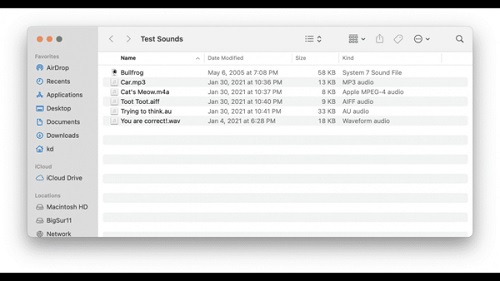
Play Sounds Mac software features
Drag files onto the app’s icon and they will be queued for playback. You can also right-click the file in Finder and select Open With → Play Sounds; or add the application to the Dock and drag the file to the application's Dock icon; or use the Finder's Get Info panel to play Sounds are designated as applications so that a specific file (or all files of a specific type) opens when the file is double-clicked.
Play Sounds is not intended to be an iTunes replacement, so it has no user interface and does not allow for pause/resume, volume adjustment, etc. However, you can stop it from playing: Just double-click the app's icon, or click the icon in the Dock (if you have one).
Play Sounds was inspired by an app called Play Sound by David Blache, and unfortunately, when macOS This application was abandoned when Catalina gave up on 32-bit applications. If you're still using macOS Mojave or earlier, we recommend that old app.
Play Sounds Mac software features
The operation is very simple, you only need to place the required audio tray in the interface to queue up playback
You can complete the playback and pause work by double-clicking the icon
Works well for playing sound samples, ringtones and other types of audio files, including classic System 7 sounds
Simply double-click the app’s icon, or click the icon in the Dock (if you have one)
Play Sounds Mac update log
Developer GG said there are really no bugs this time~
Huajun editor recommends:
After continuous official iterations, Play Sounds Mac has become very stable and powerful, meeting all your needs. The editor has also prepared for youYiMeiBao,Adobe Photoshop Lightroom For Mac,scissor master,iQiyi video player,ORB Producer Suite intelligent arrangement plug-in set




Useful
Useful
Useful