




- Green versionView
- Green versionView
- Green versionView
- Green versionView

SoftTree SQL Assistant software introduction
SQL Assistant is a powerful SQL assistant software from SoftTree. It has advanced SQL code intelligent perception functions, including database objects, parameters, script variables and syntax elements, etc. It can help database developers speed up the development process and improve code quality and accuracy. Not only that, it can also automatically generate SQL statements, intelligently prompt code errors, format SQL statements, keyword prompts, table name prompts, etc. It is of great help to those who are new to database. SQL Assistant 9 can support Oracle, SQL Server, DB2, Sybase, MS Databases such as Access, PostgreSQL, Redshift, Teradata, Netezza, Greenplum, SQLite and MySQL are easy to operate and have practical functions.
SoftTree SQL Assistant function introduction
1. Has a visual SQL query builder.
2. Complex SQL queries can be easily constructed.
3. Supports formatted SQL query text layout.
4. Have powerful SQL query parsing and analysis methods.
5. It has comprehensive Unicode support and Lua and Pascal script support.
SoftTree SQL Assistant software features
Improve SQL developer efficiency.
Improve code quality and accuracy.
Many SQL and non-SQL editor integrations.
Provides interactive SQL reference and SQL code assistance system.
Provides advanced SQL code intelligent perception capabilities, including support for databases, objects, parameters, script variables, syntax elements, etc.
Including code formatting and beautification; SQL syntax verification, code structure view for fast code navigation, etc. .
Supports 10 major database systems: Oracle, SQL Server, DB2 UDB, DB2 for iSeries, Sybase ASE, Sybase SQL Anywhere, Postgre SQL, Amazon Redshift, MySQL, Microsoft Access and so on.
: : Low disk and memory usage.
Easy to install and not prone to interruption.
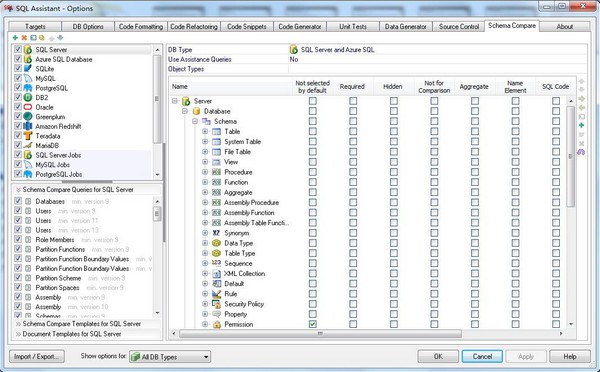
SoftTree SQL Assistant Instructions for Use
1. Oracle database connection and settings
Before connecting to the Oracle database server, you must be running SQL Install Oracle client software on your computer. Client software must be installed and configured correctly. Its network configuration file must include the connection settings for any Oracle server it will connect to. These files must be located in the ORACLE_HOME directory, whose name is referenced by the ORACLE_HOME variable in the system registry. This variable is stored in the registry key HKEY_LOCAL_MACHINE SOFTWARE ORACLE.
If you have multiple versions of the Oracle client installed on your computer, you can choose which version to use with it. On the dialog box, click the "Options>>" button and select the appropriate ORACLE_HOME from the Oracle Home drop-down list. Make sure the configuration file for the client you choose contains all required Oracle server connection settings. You can verify the connection settings in TNSNAMES.ORA, usually located at [ORACLE_HOME] /NETWORK/ADMIN directory.
Supports both regular user connections and connections from users with SYSDBA privileges. When connecting as the SYS user, the SYSDBA type must be selected. -The "Connect As" option on the "Connect" dialog box allows you to select the database connection type. Note that for SYSDBA connections, the assigned schema is SYS. For SYSOPER, regardless of the actual Oracle username provided, the assigned schema is PUBLIC.
Important Note: When using Oracle's preconfigured targets (such as * Plus), the existing connection is silently intercepted and used to access Oracle catalog tables and views. When using a user-defined target, a new connection to the database server is opened, which is not shared with the target application. This secondary connection can be opened using the same or different user credentials. Before closing the target editor or In this case, the secondary connection is automatically closed.
2. Database connection and settings
When connecting to a database server, use the Microsoft ODBC driver that is preinstalled by default on all Windows systems, or use the Server that is typically installed with management tools ADO.NET Server provider. As Microsoft Server Management Studio or Microsoft Visual Studio. The connection method depends on the method used by the target editor.
Supports 2 types of Server connection user authentication:
Windows Authentication – In this case, you will not be prompted for user credentials. Instead, use the access token assigned when the user logs in with a Windows account. Assistant only prompts for target when trying to connect The name of the Server instance.
Database Authentication - In this case, the user is required to specify the login name, password and the name of the target instance when trying to connect.
When using certain Server pre-configured targets that use ODBC connections (such as Query Analyzer), the existing connection will be silently intercepted and used to access the Server catalog tables and views.
With Server Management Studio or Server Management Studio connected using ADO.NET When used with Express, existing connections are silently intercepted and used to access Server catalog tables and views.
When using user-defined targets and targets that do not use known connection types, A new connection to the database server will be opened, which will not be shared with the target application. This secondary connection can be opened using the same or different user credentials. Before closing the target editor or In this case, the secondary connection is automatically closed.
Important note to Azure users: For some internal operations involving reverse engineering of database schema objects, depend on the Server Management Object (SMO) installed by Studio (SSMS) and Microsoft Server Management Studio Express (SSMSE). . To support Azure Database, Cumulative Update Pack 7 or higher is required. If you are using an older version of SSMS or SSMSE, please do the following:
If you are using SSMSE 2008 R2 or older, please download and install the latest version from.
If you are using a version of SSMS 2008 R2 other than Express, please install Cumulative Update Package 7 or install Service Pack for Server 2008 R2 1.
3. Apache Hive connection and settings
Supports Apache Hive version 2.x and higher. It uses ODBC connection to communicate with Hive system. ODBC connection requires Apache to be installed on the Hive cluster master node Thrift server.
Hive ODBC drivers are available from many vendors, including Microsoft, Amazon AWS, HortonWorks Cloudera, and others. In theory, the ADO.NET interface can also be used for connections. However, at the time of publication of this user guide, Hive ADO.NET connectivity has not been formally tested using Hive.
The following is a reference to the ODBC drivers available at the time of the release of version 11.0:
Amazon AWS EMR ODBC Driver
4. Apache connection and settings
Assistant supports Apache 2.2 and higher. It uses ODBC connection to communicate with Apache Spark system. ODBC connection requires Apache Thrift server is installed on the Spark cluster master node.
Spark ODBC drivers are available from many vendors, including Microsoft, HortonWorks Cloudera, and others. In theory, the ADO.NET interface can also be used for connections. However, at the time of publication of this user guide, Assitant has not been formally tested using Spark ADO.NET connectivity.
This is a reference to the ODBC driver available at the time of the 11.0 release
Microsoft SparkSQL ODBC Driver
5. Database connection and settings
Currently supports database server version 5.1 and higher. To connect to the database server, use the native client interface (if available) or the ODBC or ADO.NET driver. These drivers are not part of. Connectors and/or drivers must be preinstalled before using Assitant with a target. Available from Oracle Corporation obtains client and ODBC drivers.
Important Note: For ODBC-based connections, ODBC driver version 3.5 is required. Please note that at the time of writing this manual, ODBC driver v5.0 is available for download as a beta version, it is not fully ODBC compliant and does not support some of the required standard ODBC features.
When using a preconfigured target (such as a query browser), existing connections are silently intercepted and used to access catalog tables and views. When using user-defined goals, Open a new connection to the database server using the ODBC driver or native client. This secondary connection is not shared with the target application. It can be opened using the same or different user credentials. If the target editor is closed or , the auxiliary connection will be closed automatically.
6. MariaDB database connection and settings
Currently supports MariaDB database server versions 5.5 and higher. In order to connect to the MariaDB database server, Use the MariaDB native client interface (if available) or the MariaDB ODBC or ADO.NET driver. These drivers are not part of. The connector and/or driver must be preinstalled before use with MariaDB targets. Available from MariaDB Foundation Get the MariaDB client and ODBC driver.
Important Note: For ODBC-based connections, ODBC driver version 3.5 is required.
When using a preconfigured target or a user-defined target for the MariaDB target, Open a new connection to the database server using the ODBC driver or the native libmariadb client. This secondary connection is not shared with the target application. It can be opened using the same or different user credentials. If the target editor is closed or , the auxiliary connection will be closed automatically.
7. DB2 database connection and settings
Currently supports DB2 UDB for Linux, Unix and Windows version 7 and above, as well as DB2 for iSeries. It also works with DB2 for zSeries, but the latter requires minor adjustments to the database catalog queries provided in Settings. To connect to a DB2 database server, you can use the DB2 ODBC driver or the DB2 The ADO.NET client, neither is part of. One of these drivers must be preinstalled before using it with a DB2 target. The DB2 driver is usually installed with the DB2 client software and is part of the DB2 license. Drivers are available from IBM Corporation.
Important Note: When using DB2 user-defined targets, A new connection to the database server will be opened, which will not be shared with the target application. This secondary connection can be opened using the same or different user credentials. Before closing the target editor or SQL In the case of Assistant, the auxiliary connection is automatically closed.
8. Netezza database connection and settings
Currently supported IBM Netezza 7.0 and higher. Older versions are not supported. To connect to a Netezza database server, SQ can use Netezza ODBC driver, it is not part of . The ODBC driver must be preinstalled before using it with the Netezza target. The Netezza driver is usually installed with the Netezza client software and is part of the Netezza license. They are not publicly available and you will need to contact Netezza's support to obtain a copy of their ODBC driver.
Important note: When using Netezza's user-defined targets, a new connection will be opened to the database server that is not shared by the target application. This secondary connection can be opened using the same or different user credentials. The auxiliary connection is automatically closed when the target editor or is closed.
SoftTree SQL Assistant update log
Code provides quick navigation and real-time syntax checking.
Provides real-time code performance analysis and recommendations.
Supports 9 of the most popular database systems.
With many integrated SQL and non-SQL editors.
Provides an interactive SQL code help and assistance system.
SQL editor provides a complete set of functions, code execution, data browsing and SQL scheduling.
Provides a comprehensive, database source code control interface.
Provides an advanced database schema and database data comparison and fully customizable tool
Comparison rules and pattern change synchronization templates.
Provides an advanced toolset for code generation and deployment to multiple database servers.
Huajun editor recommends:
SoftTree SQL Assistant is a software that is completely fool-proof and super simple to operate. I also recommend it.SQL Server automatic installer,Data Loader,SQLyog,access tools,DBF CommanderDownload and use related software.




Useful
Useful
Useful