




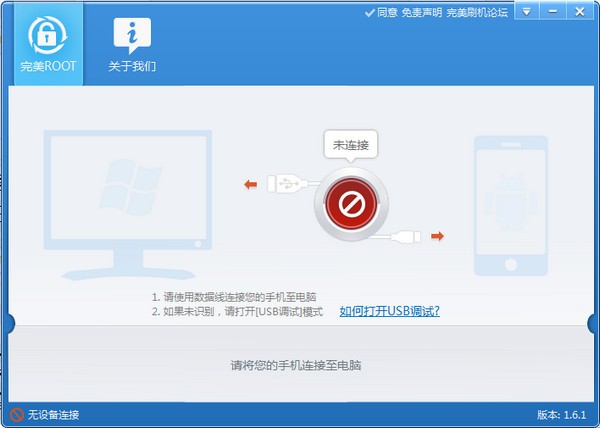
Perfect ROOT software functions
One click root
No preparation required
Massive models
Supports rooting on more than a thousand models of eight major brands
Highest success rate
The most stable root tool
Perfect ROOT software features
1. The most secure: comprehensively protect your phone from malicious program permission applications.
2. The most comprehensive: supports more than 500 brands and 14,648 models.
3. The most efficient: We will continue to update the ROOT solution to improve the success rate.
4. The purest: takes up little memory and runs quickly.
5. The most stable: Exclusive support for ROOT component upgrade services to ensure the security and stability of ROOT authorization.
Perfect ROOT installation steps
1. Download the perfect ROOT official version installation package from Huajun Software Park, unzip it, and double-click the exe program
2. Click to select the installation path and click to start the installation

3. The software is being installed, please wait patiently.

4. Perfect ROOT installation is completed, click to run immediately

Perfect ROOT FAQ
Question: Can’t connect to the phone with perfect root?
Answer: Method 1. The mobile phone cannot be connected to the computer. Please check whether the USB debugging of the mobile phone has been turned on.
Method 2. Replace the USB interface and data cable. This may occur due to dust accumulation and other reasons.
Q: Perfect root failed, how to solve it?
Answer: 1. The most likely problem when flashing fails is that the USB data cable and USB connection port are unstable.
Therefore, when flashing fails, we will recommend that your first priority is to replace the data cable and USB connector. It is best not to make the data cable too long, because too long a data cable can easily cause signal attenuation and unstable transmission. In addition, poor quality of data cables often causes file transfer failures.
Computer USB interfaces often suffer from insufficient power supply, which can also lead to failed flashing. Generally speaking, the USB interface at the rear of the chassis is more stable. We recommend that you connect to the rear interface when flashing.
2. Reconnect to your phone
Sometimes flashing fails due to unstable connection. In this case, you only need to re-plug and unplug the USB cable to connect the phone to solve the problem.
3. The phone cannot enter the system and cannot be flashed?
mbmbmbmbmbmbpps You may need to enter FAST manually BOOT mode, or RECOVERY mode, and then connect the phone to the perfect flash software to start flashing.
4. Restart the software
In some cases, restarting the software can solve the problem, so it is recommended that you try to restart the perfect flash software when you find that flashing fails.
Perfect ROOT update log
1. Fixed other bugs;
2. Optimized software compatibility.
Huajun editor recommends:
A very good Android software. I also use this software. It is powerful, green and safe. This site also providesSelf-identifying courier number query,Lightning simulator,Computer assistant,Huawei Mobile Assistant (HiSuite),Dual-open assistant WeChat opens multiple clonesWaiting for you to download.










Useful
Useful
Useful