





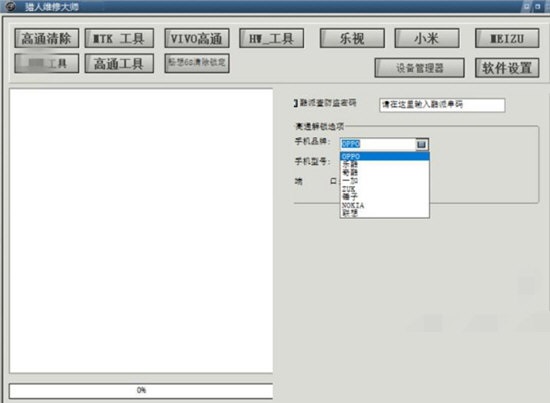
Hunter Maintenance MasterSoftware function
1. mtk mobile phone professional tools
2. Vivo data protection unlocking
3. Xiaomi perfectly solves account lock
4. The mobile version is changed to full Netcom
5. Unlock Qualcomm platform mobile phones from OPP, LeTV, OnePlus, Smartisan, Lenovo and other brands
6. One-click operation tool for Meizu mobile phones
7. BBK vivo Qualcomm toolset
8. oppo tool set
9. oppo unlocking tool set
10. Hunter electronic map
11. Factory reset: delete all data on the phone, including phone lock
12. Deep factory reset: delete all data on the phone, including phone lock + account lock
Hunter Maintenance MasterSoftware features
Stable and reliable, no need to queue, available 24 hours a day
Hunter Machine Repair Master, the flagship product of Hengxi Technology in 2016, will have more powerful functions than other software. We either don’t do it, we will do our best if we do it, and we will never make a disposable product that is reviled! Hengxi Maintenance Assistant will still be upgraded for free after 7 years. This is its vitality.
When choosing software, in addition to functions, please don’t ignore one more thing: whether the software is viable. Even if you buy a one-time product, it will be expensive even if you spend a small amount of money. Hunter Maintenance Master, with permanent free upgrades, will never be outdated!
Functions and models are constantly increasing
Hunter Maintenance MasterInstructions for use
Meizu: Method 1: With the phone turned off (full black screen), select the platform, click Start, press and hold the tone button, and connect to the computer! Let go after the red progress bar appears!
Note: After unlocking the Meizu phone, you need to change the serial number before you can connect to the Internet.
Technique 2: No matter what state the phone is in, press and hold the power button and volume button of the phone at the same time, click the platform to start, and release the power button after the progress bar appears.
Oppo/vivo Qualcomm: The phone enters 9008 mode (power off, press volume - and + and hold down to connect to the computer, the phone enters 9008 Port 9008 can be seen in the device manager and the driver is not installed). Select the platform model and click Start Unlocking to unlock it.
vivo平台上没有找到的机型,选技平台的旧机型,手机进fastboot(音量-加开机)进行操作
Oppo/vivo MTK: Open the mtk tool and select the brand. No need to select the model. Click Start. When the phone is turned off, press Volume + or - without connecting to the computer to unlock it.
Xiaomi Qualcomm account lock for old models ( Xiaomi 4 and below), the mobile phone enters rabbit mode, connected to the computer, the platform does not need to select the model, click No BL model unlock, it can be unlocked.
For new models (with BL lock Mi 5 or above), enter the 9008 mode, use engineering wires or short circuits, use the Xiaomi perfect unlock platform, select the model, and operate with one click. There is no flash unlock package for the model
部分机型解了账户锁,开机还有锁的,请操作解话机锁即可,
Down
小米MTK:mtk的下载资料包刷机,平台上选择 格式化+下载
Huawei (HiSilicon Qualcomm): Turn on the phone; enter *#*#2846579#*#* in the emergency call Select background settings->usb port->production mode, platform point, unlock account, and you can unlock it.
If there is a screen lock, enter rec to factory reset and then operate
Huawei has a total of three platforms. The top one is a self-developed all-Chinese platform. It can change the string, change the entire network, change the account lock, and change the bl lock.
The following platforms are official platforms and can only unlock account locks. If you only unlock account locks, it is easier to use the official platforms below. There is no need to select a model or port for this platform.
Huawei mtk: All mtk phones are the same. Open the mtk tool, turn off the phone and press volume-hold, select the Huawei model on the platform, and click to start unlocking
Nokia: Nokia’s 9008 is a bit special. You need to use the Xiaomi engineering cable. Turn off the phone and press and hold the volume - and +. Then press and hold the engineering cable switch to connect it to the computer.
For other mobile phones, as long as the method to distinguish mtk and Qualcomm is the same as above
Hunter Maintenance MasterFAQ
How to avoid Bricks in Hunter Maintenance Master?
If the xloader size is different, we have to think about it carefully if the size of the xloader is different. Be sure to find information on the same CPU. Compare the size of XLOADER. You must have the same size to brush!!! To avoid brushing into bricks.
Hunter Maintenance MasterChange log
V3.57(April 30)
<增加 华为读密码功能(华为工具-->华为解锁工具-->保资料)
View code reading tutorial
<增加 畅玩8 10E 9A等华为新款MTK秒解(华为工具-->华为线刷工具-->解账户锁--开机操作)
<Repair Huawei wire flash tool (9X new version MATE30 30 PRO NOVA6 and other fastboot switching to erecovery failure problem)
Huajun editor recommends:
Hunter Repair Master is very simple to install, has powerful functions, and has no installation garbage. It is specially recommended to everyone. Everyone is welcome to download it! This site also hasSelf-identifying courier number query,Lightning simulator,Computer assistant,Huawei Mobile Assistant (HiSuite),Dual-open assistant WeChat opens multiple clones, available for you to download!










Useful
Useful
Useful