
-
Quick editing software
- Size: 42.9M
- Language: Simplified Chinese
- Category: video editing
- System: WinAll






The official version of Quick Editing Software is a video editing software recently launched by 360. Quick Editing Software is completely free and very easy to use. It can also be easily operated by users without video editing experience. The quick editing software has built-in functions such as video recording, video beautification and processing, and one-click sharing, providing users with a simple and convenient experience. Provided by Huajun Software ParkQuick editingOfficial version download service, everyone is welcome to download and use.
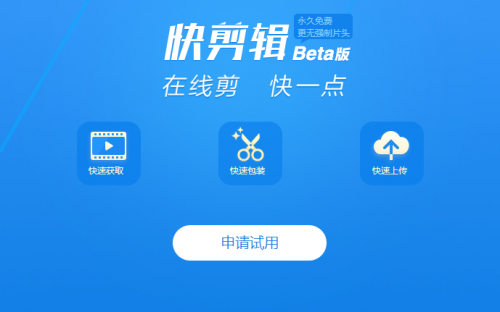
Quick editing software features
Record short video
Quick editing software supports recording all videos on the entire network. As long as it can be played, it can be recorded.
Video beautification processing
Quick editing software has a variety of beautification functions, is easy to operate, and can quickly create short videos
Share to multiple platforms with one click
: Share to multiple platforms with one click, which is fast, convenient and worry-free
Quick editing function introduction:
Online editing is always free, ad-free and more practical
There are many non-linear video editors on the market, but the cost of using these software is not low. Users either need to pay high download or membership fees, or endure a large number of advertisements. In comparison, "Quick Editing" is very kind. It can not only meet the actual needs of users for online editing, but also does not contain advertisements, which can effectively improve user experience and editing efficiency. What's more, this editing software promises to be free forever, so users don't have to consider the cost no matter what special effects or templates they use.
The operation is simple and easy to use, turning a novice into an editing expert in seconds
For most short video creators, post-editing is quite a headache. However, the advantages of "Quick Editing" in this aspect are very obvious. Users do not need to master the basic knowledge of video editing, nor do they need to understand various professional vocabulary and skills such as "timeline" and "non-linear editing" to become an excellent editor easily. Use the software’s built-in templates and special effects to plan and design your own works as you like.
“Quick Editing” supports two modes: online editing and local video editing. If the material you need comes from an online video, you only need to copy the video link into the software and you can cut while watching. The "Quick Editing" interface is clear and easy to understand, and each button has a clear function label. Even a novice can become an editing expert in seconds.
The recording screen size can be adjusted arbitrarily and high-definition images can be easily output.
People who often watch videos know that the resolution of the video directly affects the picture quality. "Quick Edit" online video editor can realize online high-definition recording and editing. Whether it is a movie, TV series or variety show, as long as there is a web link, you can record and output high-resolution videos. Moreover, it can also adjust the size of the screen recording frame at will, which is convenient for users to customize and adjust to obtain video materials.
Quickly beautify clips and video packaging takes no effort
Interesting videos are inseparable from special effects, creative subtitles and other elements. For example, when Gu Amo makes a commentary video, he needs to turn off the original sound of the movie and add his own sound effects later; or when making an MV-style short video, he needs to add a song as a background sound to the video. For novices with no basic knowledge, these operations are time-consuming and laborious, but it is very easy to achieve through "quick editing". Its massive built-in resources can help users quickly add a variety of special effects, beautify video materials, and greatly shorten the time for users to edit videos.
Catch all mainstream formats and convert video formats at will
In terms of video output format, "Quick Edit" covers almost all mainstream video formats such as MP4, AVI, FLV, GIF, etc. Users can edit freely without downloading special video decoding software separately. In addition, "Quick Cut" supports video output format adjustment, and users can convert the video format they need at will. For example, if you want to make a set of "Brothers from the Republic of China" emoticon packs, you only need to find online video resources, adjust the screen recording size to record, and finally output the GIF.
No opening and closing watermarks, personalized logo can be made at will
Unlike other software on the market that forces the addition of titles and endings, "Quick Cut" allows users to design and add titles, watermarks, logos, etc. according to their own preferences. As long as you have good ideas, you can show them through "Quick Cut". If you have no inspiration or are in a hurry to produce a video, "Quick Cut" has many built-in title special effects, which can be used for free, and you can create a blockbuster effect with one click. In addition, Quick Clip also thoughtfully provides users with practical functions such as quickly removing watermarks and adding mosaics.
Publish to multiple platforms with one click, video sharing comes and goes freely
Usually, after the video is completed, the creator needs to publish it on different platforms one by one. But if you use "Quick Editing", users can select a platform with one click and publish short videos on multiple platforms at the same time. "Quick Editing" connects multiple media platforms such as iQiyi, Youku, and Toutiao, which can help video creators publish faster and save a lot of time and cost.
In addition, the editor personally tested and found that "Quick Edit" is not only fully functional and easy to operate, but the software itself is only 40 MB in size, occupying almost no hard drive capacity, has low memory consumption, and is super streamlined.
Quick Clip Installation Tutorial
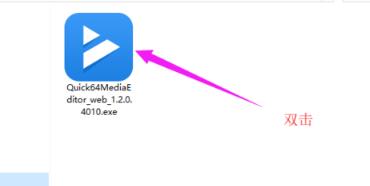
1. Download the quick editing software package from Huajun Software Park, double-click to open it to install, as shown in the figure:
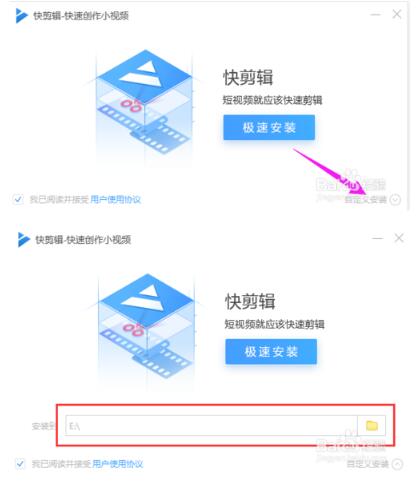
2. This window pops up, click on the custom installation path to change it, and save it to a disk other than the C drive, as shown in the figure: (Editor’s warm reminder, the C drive is the system disk, installing software will occupy resources and run slowly, it is recommended to modify the installation path)
3. Then, click "Quick Installation", then you can see the installation progress bar, just wait for the installation to be completed, as shown in the picture
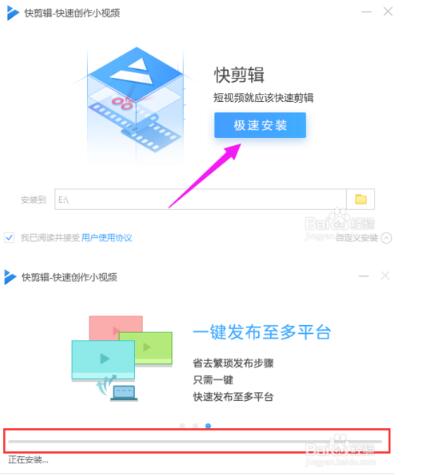
4. Wait for the installation. The editing software will be installed successfully after a while.
Quick editing instructions:
1. Record video. After installing the new 360 Secure Browser, when playing any video, place the mouse in the video box, and the short video recording option will appear in the upper right corner of the video. The plug-in provides three recording modes: ultra-clear recording, high-definition recording, and standard-definition recording. You can also customize area recording. After the video is recorded, the plug-in also provides simple video processing functions, including cropping, special effects subtitles, watermark removal, etc., which can simply process the video.
2. After recording the video, it also provides video beautification and processing functions and multiple beautification functions. It is simple to operate and can quickly create short videos.
3. Share to multiple platforms with one click, eliminating the need for tedious uploading and sharing operations. Sharing to multiple platforms with one click is fast, convenient and worry-free. Quick editing, this plug-in supports online editing. It can directly edit press conferences, new product launches, etc. The plug-in is associated with many self-media accounts. After the editing is completed, it can be directly uploaded and published. It will definitely become a video moving tool for self-media people.
4. After the recording is completed, you can click "Quick Edit" in the lower right corner of the webpage to pop up "My Recorded Videos".
Quick editing FAQ:
How to edit videos using Quick Cut?
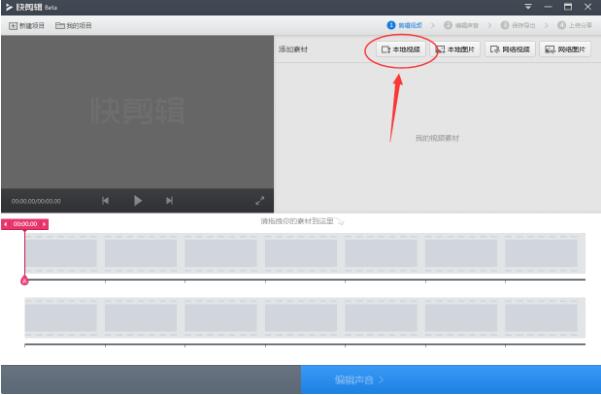
1. First open the quick editing software on your computer, then click "Local Video" in the upper right corner of its interface and add the video you want to edit;
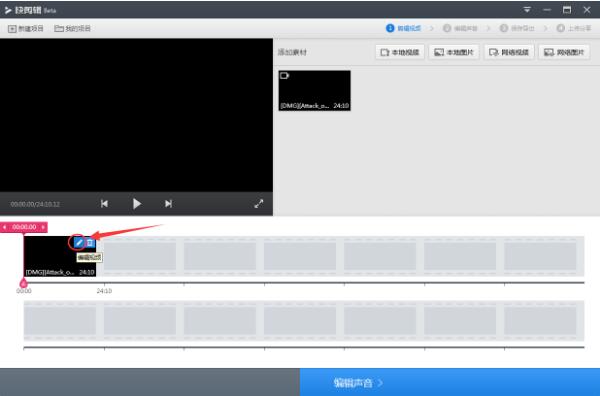
2. After adding the video, you can see the video we just added in the quick editing video material list. At this time, click the "Edit Video" button in the upper right corner of the video;
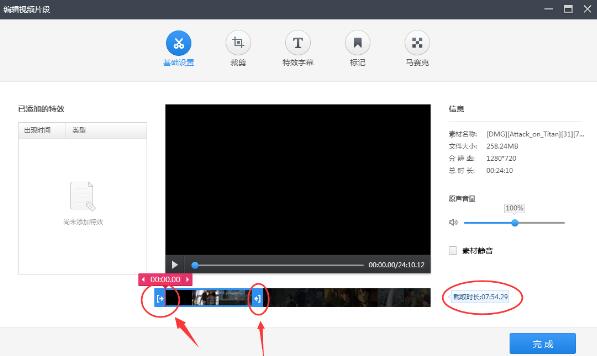
3. After coming to the "Edit Video" interface, you can edit the video. We only need to drag the two buttons on the progress bar below the video to select the interception position. After selecting, click "Finish", as shown in the figure below:
4. After that, we can click "Edit Sound" → "Save Export" in the lower right corner of the quick editing interface.
Which one is better, Quick Editing or Love Editing?
1. Software size
love clipsIt is 283MB, and the fast clip is 42.3MB. From here, we can see that the fast clip is cleaner and smaller. However, from an objective point of view, since "Quick Editing" itself has not been launched for a long time, 360 may not have given it too many video editing functions. On the other hand, "Love Editing" is considered to have matured, so let's put aside the prejudice for the time being and experience it in detail after installation.
2. Interface comparison
Love Editing. After running the software, the software presents a compact interface. Within the framework, we can see various functions listed in sequence. The functions are too specialized, and the function annotation vocabulary is a bit unfamiliar, making it difficult for ordinary users to get started quickly. Moreover, the area of the video playback box is not large, and the details in the video clips are difficult to see with the naked eye. Speaking of the overall page design, the iClip interface gives people a skeuomorphic style from previous years. Although it is classic, it still gives users a sense of alienation. In addition, functions are stacked on the interface, and menu options are opened when editing videos, and more functions are available.
The outline of the quick editing interface is a modern editing style. It is not an exaggeration to describe it as "simple and fresh". You can count the interface function buttons with your fingers. The function introductions are more colloquial and down-to-earth. There are no so-called professional terms such as "superimposed material", "timeline", "non-linear editing", etc. Even technical novices can easily get started. The video box is of a moderate size, and dragging the video to watch quickly is effortless. When adding a video to the quick editing software, the video on the left can be dragged on the progress bar below to start production. There are also sound editing options at the bottom to allow users to quickly process the audio.
It is said that software development is easy to add, but subtraction is often difficult, but if the essence is retained, it can often give users a more direct experience. The comparison between Love Editing and Quick Editing may win because of the seemingly rich functional options, but it loses because the speed of getting started with the software is not as good as Quick Editing.
3. Video resources
Uselove clipsWhen making videos, users can only add local videos and spend a lot of effort to find and download local video resources before uploading them to the software for editing. If some video websites encrypt their own video sources, users must also transcode them, which adds another troublesome process.
Quick editing supports two modes: network video editing and local video editing, which directly eliminates the tedious process of "finding, downloading, and converting formats" for many videos. If the video required by the user is an online resource, the user can directly copy the link into quick editing, and then use the screen recording function of 360 Secure Browser to cut while watching. Click the recording function button floating on the Internet video to start recording the video, and save the required video locally to directly beautify the edit. This method undoubtedly allows users to click wherever they need to record, so easy. Once users start editing videos, the size and clarity of the recording frame in the quick editing software interface can be set independently, giving them more DIY features.
4. Function experience:
360 allows browsers and quick editing software to be interoperable, so users can quickly record video resources by pasting the video link into the “Quick Editing Plug-in” of the 360 secure browser and start editing videos immediately. iClip can only add local videos. The convenience shown by the two softwares in obtaining material can be said to be a clear distinction between the two softwares.
Some short videos have become more interesting after editing experts added a lot of special effects. Therefore, in order to allow novice users to edit the video effects they want, Quick Edit also has a variety of built-in rich functions. For example, there are various sound effects, as well as functions such as adding subtitles, mosaics, and tags. If you want to make a GIF emoticon package, find the video resource and adjust the screen recording size and clip, select the output GIF format, and you can get your own DIY personalized emoticon package.
It means that the massive built-in materials of Quick Cut can give users a variety of special effects when making videos, thereby achieving the beautification effect of short videos, ensuring the speed of user editing videos, and improving the final playback quality of the videos. In addition to videos, today’s most popular GIF animations can be created by users themselves.
On the other hand, iEditor, although its functions are rich, but users like me who have not had much exposure to video editing software, when comparing the two software, iEditor always has a cold feeling of "rejecting me thousands of miles away". After adding local videos, I have no way to start. A simple subtitle function setting, various options in the menu bar make a simple step seem complicated.
The other function bars are similar. Users need to try various functions in a large number of function bars to get special effects that satisfy them. However, some key functions are not available in Aiedit. For example, functions such as "Quickly removing watermarks and adding mosaics to videos" supported by Quick Clip are often used by users, but they prefer to edit multiple versions and have not yet added them.
On the other hand, for videos produced by AiClip, it is possible that the software is forced to add a large opening advertisement to the video for its own promotion. However, since it provides technical support, it is understandable to use the video to promote itself, but there is a gap in comparison. Quick Editing does not force the addition of opening and ending titles with brand logos, and also provides some opening materials: such as News Network, Radio and Television Dragon Label, etc., which users can use for free. In this way, when users look back at iClip, they feel that its large opening advertisement is a bit overbearing.
5. Video publishing/sharing:
Now that the video is produced, it’s time to talk about the one-click sharing functions of the two softwares. When it comes to the video sharing function options of the software, iClip is completely defeated by QuickClip in terms of functionality. You can tell the truth at a glance if there are pictures.
Quick editing can realize one-click publishing on multiple platforms. The produced video can be directly shared to popular video/information media platforms such as iQiyi, Youku, and Toutiao with one click. After users share it on these platforms, they can use their one-click sharing mechanism to spread the short video to more platforms to increase exposure. Looking back, the sharing function of quick editing not only saves time and cost, but also enhances the good experience.
There is no harm without comparison, and the video sharing function of Love Editing is too simple. The edited short video does not support one-click publishing on multiple platforms, and can only be shared with the Love Editing community. Comparing the community influence with the high popularity of iQiyi/Youku video platform, the judgment will be made immediately.
So back to the user’s perspective, if you need to disseminate short videos, you must log in to major video ports through PC/mobile phone, and then select the corresponding sharing platform to manually upload the video. Not only is the process complicated but also inefficient.
Editor’s summary:
经过多方功能对比,爱剪辑和快剪辑虽然同属视频剪辑软件,但两者发展方向却有明显差别。 iClip is more geared towards professional users, and novice users cannot get started in a short time; KuaiJiang has opened its arms to provide functional services that novice users can use immediately; some users feel that iClip has many built-in special effects materials, which is undeniable, but if they meet professional video editing users, they will definitely choose other software with more powerful functions, and will not set iClip as the best choice.
如今快剪辑的出现,体现出各种视频剪辑软件在功能定位上更加明细,如果国外专业级视频剪辑软件地位已经无可撼动,360更想打造一款人人都能用的“国民软件”:它既免费,功能丰富操作起来还容易上手,没有强制片头广告推广,软件大小迷你定位轻量;上帝对每个人都是公平的,如果你想一天24小时做事更有效率,必须做到“工欲利其事必先利其器”。
“ Short video production must not only maintain quality but also quantity. The article mentioned many optimizations of Quick Clip’s own functions, which help users save considerable time costs. Therefore, in emergencies, this software can also play a role in providing on-the-spot emergency rescue to professionals. However, everyone has their own preferences, and users should start based on their own needs. For example, if you have adapted to the entire operating logic of love editing, quick editing may not be very attractive to you. If you focus on more efficient short video editing, you should still choose quick editing. Different users can ultimately judge which software is more suitable for you based on their own needs.
Quick Clip Update Log
1 The quick editing software optimizes saving and exporting, and adds a new judgment on the long and short sides of the current frame.
2 The word limit for changing the title when uploading and sharing is 30 characters.
3 Fixed several issues reported by users: some video and audio out of sync issues; moving timeline material stuck issues; optimizing the download speed of subtitles, music, etc.;
4 Fixed the problem that different accounts will affect each other when automatically uploading and sharing
5 Quick editing software fixes the problem that the resolution cannot be selected when downloading videos
Huajun editor recommends:
As a free and widely used software with powerful functions, Quick Editing software has received unanimous praise from many netizens for its functions. It is highly recommended for everyone to download and use it. In addition, Real file repairer, CD to MP3 format converter, and Silencer Magician are also recommended for everyone to download and use.
Version: 1.0.0.2064 latest version | Update time: 2024-12-30
Similar recommendations





Latest updates





How to use quick editing - How to use quick editing to delete redundant segments of video
How to use Quick Cut - Steps to use Quick Cut to merge two videos
How to use quick editing - How to use quick editing to add a title to a video
How to remove watermark in Quick Editing - Detailed steps to remove watermark in Quick Editing
How to use quick editing-explanation on how to use quick editing
Tutorial on how to quickly delete redundant parts
Detailed steps for capturing clips with quick cuts
Quick editing process to quickly delete unwanted parts of the video
Tutorial on how to quickly cut the middle section of a video
Quick editing software review
-
1st floor Huajun netizen 2021-03-10 08:45:58Quick editing software is very useful, thank you! !
-
2nd floor Huajun netizen 2021-09-29 06:19:45Quick editing software is very easy to use, downloads quickly and is very convenient!
-
3rd floor Huajun netizen 2022-02-15 22:00:28Quick editing software is awesome! 100 million likes! ! !
Recommended products









- Diablo game tool collection
- Group purchasing software collection area
- p2p seed search artifact download-P2P seed search artifact special topic
- adobe software encyclopedia - adobe full range of software downloads - adobe software downloads
- Safe Internet Encyclopedia
- Browser PC version download-browser download collection
- Diablo 3 game collection
- Anxin Quote Software
- Which Key Wizard software is better? Key Wizard software collection




