





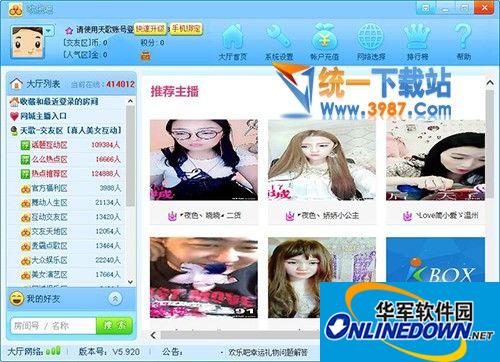
Happy Bar multi-person video chat is a large-scale comprehensive entertainment chat platform launched by happy88.com that integrates video chat, games, and interactive entertainment. The platform brings together a large number of celebrities, music and beautiful hosts, and also brings interactive dating and video game functions, giving young netizens a new online life of talking, singing, watching, playing and making friends.
The Happy Bar 100-person video chat room has opened client-based video chat, webcast, film and television playback, IM, 100-person chat room, online video recording, online games and other interactive settings. It is a popular and relatively complete multi-person video chat platform on the Internet.
Features of Happy Bar software
Enter the "FAQ" in the upper right corner, and there is a video demonstration of the software's usage to help users integrate into the community environment in the shortest possible time.
2. Beautiful interface:
The avatar during registration is automatically randomly selected and replaces the existing avatar system
3. Large video chat room with hundreds of people:
The official version of the Happy Bar Chat Room adopts the host mode to provide a stage for performers.
4. IM point-to-point chat, multiple types of private microphone connection methods:
It has functions such as casual chatting, chatting and making friends, karaoke, opera and dance, and entertainment games.
5. Colorful gift props:
Brand new functional props, detonating a new way to play video chat.
6. Video taking and saving functions:
Adopting efficient video compression and encoding technology to ensure high-quality, high-definition audio and video images.
7. Featured posts from the embedded forum:
The small speaker area in the chat room continuously updates the essence of information.
How to use Happy Bar
1. How to register
Double-click the Happy Bar icon to open the Happy Bar
Click the button to register a new account on the login interface

Fill in details
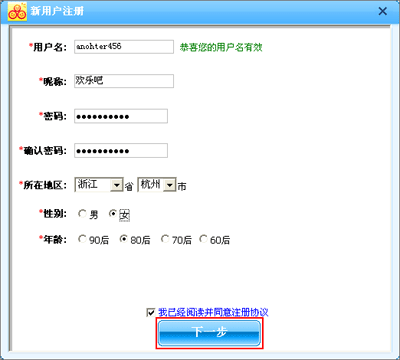
After successful registration, the system will tell you your ID number. The ID number is equivalent to your ID number in Happy Bar, please keep it properly

Click to log in, and the system will automatically jump to the Happy Bar lobby. Exit the game and log in again, choose to log in and start experiencing the fun

2. How to add friends
After logging in, click the Add Friend button on the left side of the IM interface
Special reminder: Only users with level 6 or above can add friends.

In the pop-up window, you can choose to find or directly add friends.
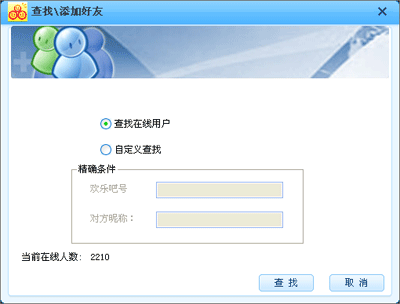
After selecting the corresponding search method, click the Next button, and the search results page will appear.
Select the friend you want to add and click the Add as Friend button. After confirmation, you will successfully add the other party as a friend and you can start chatting!
3. How to chat with friends
Double-click the friend in the friend list on the IM interface
Or right-click on the friend and select "Send Instant Message" in the pop-up menu.
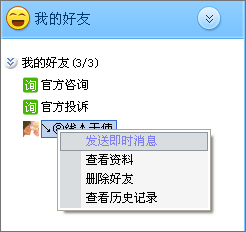
In the pop-up chat window, you can happily chat with your friends
4. How to enter the chat room to chat
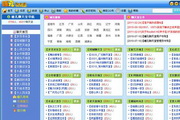
Select a category in the chat room classification, double-click, and the room will display all chat rooms in that category. Select your favorite chat room in the room's chat room list, click the enter room button, and start your happy journey.
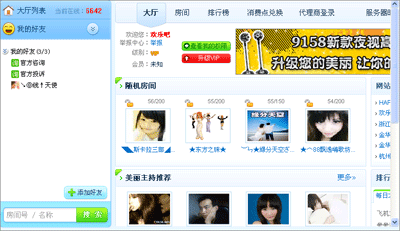
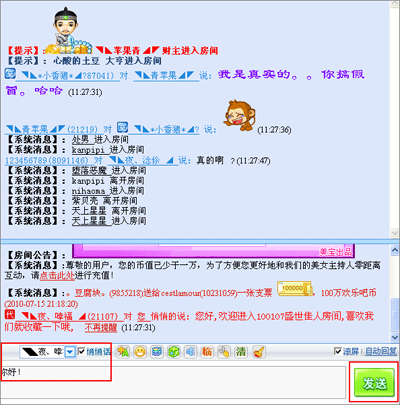
After entering the chat room, you can choose to chat with all users in the chat room, and the conversation content will be displayed on the chat room's conversation record. You can also choose a user to whisper, and only you and your chat partner can see the conversation content. After selecting the chat partner, type what you want to say in the conversation bar, click Send, and you can chat easily.
Happy Bar update log:
1. World item TIPS prompt price changes;
2. Modify the interface for sending world props;
3. World speaker messages are sent when world props are sent;
4. Add settings for sending world prop prompt sounds and blocking prompt sounds;
5. Modify the prompts for large props;
6. World item capture time ranking list;
7. World speaker interface modification;
8. Add text floating window track;
9. Add ranking tips;
10. Send large props in batches;
11. Addition or deletion of seals;
12. Add login window advertising banner;
13. Pop-up window information content settings;
14. When selecting the chat user, do not select the gift user;
15. The number of gifts can be configured by the platform;














Useful
Useful
Useful