




- Green versionView
- Green versionView
- Green versionView
- Green versionView
- Green versionView
QQ game hall features
Massive game library
Classics and popular games coexist: Covering traditional board and card games such as Landlords, Mahjong, and Chinese Chess, as well as casual competitive games such as "QQ Dragon Ball" and "Russian Rush". In recent years, the popular "Chicken Eating" game has been introduced to meet the needs of different age groups.
Cross-platform experience: Supports PC, Android, and iOS synchronization, and mobile user activity continues to increase, attracting young players to join.
Prominent social attributes
Real-time interaction: built-in voice, expression, and chat functions, players can form teams to challenge, share experiences, and enhance team collaboration.
Community ecology: Establish a game community where players can discuss strategies, share videos, and meet partners. The average number of daily active users reaches tens of millions.
Honor comparison: Supports QQ friend honor comparison to stimulate competitive motivation.
Incentive mechanism and innovation
Tasks and Achievements: A task system is launched regularly. Players who complete challenges can receive generous rewards to enhance their sense of participation.
Online events: organize professional teams and e-sports enthusiasts to participate in competitions, provide a competitive stage and expand the influence of the platform.
Technical optimization and security
Performance improvement: Adopt a new architecture design to achieve ad removal, multi-account login, interface optimization, and improve startup speed and game loading efficiency.
Security: Cooperate with multiple security agencies to strengthen game environment monitoring, effectively prevent cheating and malicious behavior, and achieve high account security satisfaction.
QQ game hall software features
Diverse game types
Covering more than 123 games such as chess and card games (such as Landlords, Mahjong, and chess), leisure competitions (such as "Tiantian Love Match" and "Happy Match"), strategy tower defense, and role-playing games, it meets different age groups and interests.
Classic games such as "Landlords" have over 10 million daily active users, and emerging games such as "League of Legends Mobile" and "Peace Elite" and other popular IPs are updated simultaneously to keep the content fresh.
Intelligent recommendation system
Based on user behavior and popularity, games are dynamically recommended to reduce selection costs. For example, novice players will first see casual games with simple operations and strong social interaction, while hardcore players may be recommended new competitive games.
Cross-platform experience
Supports PC, Android, and iOS synchronization. Mobile users can play anytime and anywhere through the mobile QQ game hall, and communicate with computer data (such as game progress and achievements).
QQ game hall installation steps
1. First download the official installation package of qq game hall from this site. After the download is completed, you will get the exe installation file. Double-click the exe file with the left mouse button to enter the qq game hall installation interface, as shown in the figure below. The installation interface has three options: install immediately, agree to the user agreement, and customize the installation. Users can click on the user agreement to read it first, and then continue the installation after reading is completed.

2. When installing, users can directly click the Install Now option on the interface. The QQ Game Hall software will be installed to the system C drive by default, or click Custom Installation in the lower right corner of the interface, select the appropriate installation location and then click Install Now. (The editor recommends that users choose custom installation and install the software to a drive other than the system C drive.)

3. The installation of QQ Game Hall is completed. When the interface below appears, it means that the software has been successfully installed on the computer. There are additional bundling options at the bottom of the interface. If the user does not need to uncheck and click Experience Now, he can open the software to experience it.

How to use QQ game hall
How to download games in QQ game hall?
1. First, after downloading and installing the qq game hall software on this site, there will be a shortcut to open it on the computer desktop. After we find it, double-click with the left mouse button to run the qq game hall and enter the login interface. The user needs to enter the account password and then log in.

2. Entering the QQ game lobby login interface, we can directly enter the QQ account password, and then click to log in immediately. If the user has a QQ account on their computer, then click the quick login option in the lower right corner of the interface to automatically detect the login, or click the QR code logo at the bottom of the interface, and the user will scan and log in via QQ on his mobile phone.

3. After successful login, we will enter the main interface of the QQ game hall, as shown in the figure below. On the left side of the interface, there are options such as homepage, game library, and store. When moving to the right side, My Games contains the games that users usually play. In the middle of the interface, there are recommended games, guess you like, editor recommendations and other games for users. On the far right are popular ranking game recommendations. Users can find games that suit themselves in these recommendations.

4. If the user does not find the game he wants to play in the recommendations, he can enter the game name he wants in the search box at the top of the interface, and then click search. The search results will appear in the middle of the interface. The user finds the game he wants to play and clicks the start game option. In the picture below, the editor takes Doudizhu as an example. After searching for the game Doudizhu, click to start the game.

5. After clicking to start the game, the user will first download and install the game. As shown in the figure below, the lower left corner of the QQ game lobby interface shows that the game is being downloaded and installed. The user needs to wait patiently for the installation to be completed before automatically entering the game and starting to play happily.

6. After downloading, enter the game interface and click [Quick Start] on the left to start playing the game.

QQ Game Hall FAQ
Question: How to change the avatar in QQ game lobby?
Answer: 1. First, we need to log in to the QQ game lobby and enter the main interface of the software. The user's avatar will be displayed in the upper left corner of the interface. Because we want to change the avatar, we need to move the mouse to the image. Do not click and wait for a second or two. The information introduction interface will pop up. We click on the cartoon character to enter the next step.
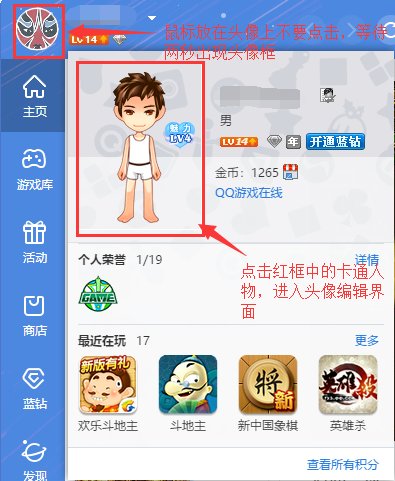
2. Enter the change game show interface. As shown in the figure below, you can edit game show, edit photo show, and edit video show. We select edit photo show, and then click edit photo show to set the avatar picture.

3. Enter the replacement avatar interface, we can select a local photo or a selfie avatar. If it is a selfie avatar, you need to open the computer's camera to take the photo. The editor chooses a local photo, click the Select Photo option in the interface, and then the option box pops up. We select the replacement avatar and click Open below to replace it.

4. After the avatar photo replacement is completed, the interface in the picture below appears, prompting the user that the upload is successful and needs to wait for manual review. The review result will be notified to the user through QQ messages, and the user can wait patiently.

Question: Why does opening the QQ Game Hall client show a failure?
Answer: This situation occurs because you exited abnormally before. It is recommended that you exit the game room (not the game lobby) when encountering this situation, then re-enter, click on the game table and try (it may take a few more attempts) to enter the game. If the problem persists after multiple attempts, it is recommended to exit the game normally and restart the machine. This method can also solve the problem. However, to avoid encountering this problem again in the future, it is recommended that you click Close in the upper right corner to exit the game normally to avoid another unpleasant gaming experience.

Question: I can’t enter the game in the QQ game lobby, but it always says that another room has been opened?
Answer: Only 2 rooms can be opened in the same game at the same time. When you enter the third room, the system will prompt you that the room cannot be opened. It is recommended that you close the previous room and log in.

Comparison of similar software
4399 Game HallThe official version is the most complete stand-alone game warehouse, containing thousands of classic green stand-alone games and tens of thousands of popular online mini-games. The 4399 game hall updates new fun games every day. The new version adds web games and large-scale online game sections, allowing you to enjoy a rich and colorful game world.
yy game hallThe official version is a game client integration tool created for gamers. The computer version of yy Game Hall collects many game resources such as chess and card games, casual games, and web games. The yy game hall also combines the powerful function of YY voice. The yy game hall allows players to communicate with others while playing games, and can also make various game friends.
Huajun editor recommends:
QQ Game Hall provides users with different types of game content. Through the game hall, users can play landlords, mahjong, chess and other ways to play. QQ game hall andPingxiang City Game Hall,Ora star modifier,Rock Kingdom Feifei Auxiliary latest version,Kunshan city games,Mini World Angel AssistantThese are all very good software, welcome to my site to download and experience!















Useful
Useful
Useful