If you are looking for software to use, go to Huajun Software Park! software release AI product list

Hello, if there is a need for software inclusion, please package the software and attach the software name, software introduction, software-related screenshots, software icon, soft copy, business license (if you do not have a business license, please provide the front and back of the corresponding developer ID card and a photo of yourself holding the ID card), and send it to email http://softwaredownload4.com/sbdm/user/login

Close >>

Send to email:news@onlinedown.net

Close >>

Location: Home pagePC softwaredesktop softwarealarm clock Red leaves automatic time adjustment
Red leaves automatic time adjustment

Red Leaf Automatic Time Adjustment v3.6.1 Green Free Edition

QR code
  • Software licensing: shareware
  • Software size: 0.65MB
  • Software rating:
  • Software type: Domestic software
  • Update time: 2024-12-30
  • Application platform: Win All
  • Software language: Simplified Chinese
  • Edition: v3.6.1 Green Free Edition

Software introduction Related topics FAQ Other versions Download address

Recommended for you:- Red leaves automatic time adjustment

Basic introduction
The first logo of the red leaf automatic calibration period
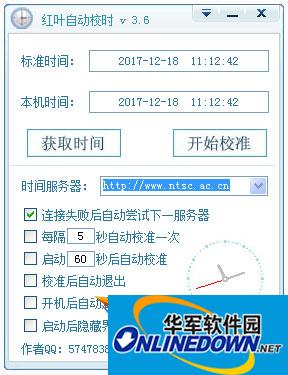
Hongye Automatic Time Adjustment is a simple and practical automatic time adjustment tool. The Hongye Automatic Time Adjustment function is simple and can help users automatically correct the computer time through the Internet. The software time adjustment is very accurate. Friends in need come and download it and try it!

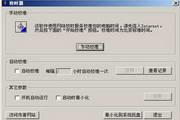
Red leaves automatic time adjustment screenshot

Function introduction

You only need to connect to the network. Whether it is automatic or manual time adjustment, the software will automatically select the time server for automatic calibration. I believe you will like it^_^ Features: It can be set to automatically start at boot, automatically calibrate after startup, and automatically exit after calibration. Everything is automated. (Especially suitable for those users whose time is always inaccurate or whose time is inaccurate due to motherboard battery problems)

Change log

1. Optimize the logic of time adjustment

2. Software update: after startup, it will detect whether there is an update. If there is a new version, the user will be prompted to upgrade.

3. When doing online proofreading, it will connect to the website specified by the user to retrieve the network time and the computer time used for proofreading.

4. QQ’s temporary session URL, users can directly open QQ’s temporary session window.

FAQ

Associated version

Red leaves automatic time adjustment

Red Leaf Automatic Time Adjustment v3.6.1 Green Free Edition

close