



Software connection
After the cable is connected, the computer's Microsoft Activesync prompts that it is connecting, and then prompts "Do you need to establish a partnership?" Select "Cancel". Then Microsoft Activesync will prompt you, just press "OK". The connection is now successful. If it is the first time to connect, the computer prompts that the driver needs to be installed. Just install the wince driver according to the computer instructions. The driver is in the "Driver GIS Handheld Driver" on the accompanying CD.
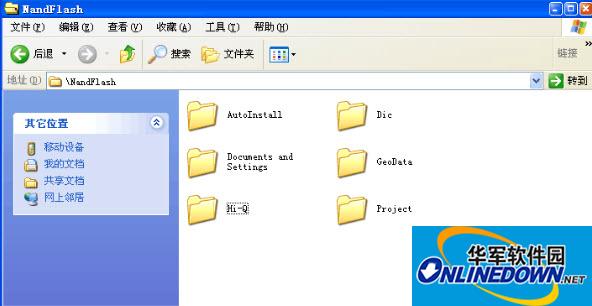
Click the "Browse" button of Microsoft Activesync to open the resource browser of the Q series high-precision GIS data collector. Enter NandFlash and copy the relevant files into this directory.
Update instructions
1. Repair the SBAS age setting. Due to motherboard reasons, the Q5 differential age can only be set to 6-60. Other settings have no effect, and there will be a maximum delay of 4 seconds.
2. Fix the offset collection bug.
3. Add HDOP prompts for parameter calculation.
4. Add point data layer backup and recovery.
5. Solved the bug that the coordinates were mistaken for flying points after exiting from the demonstration mode.
6. Updated the coordinate system (added national 2000 coordinate system) and data dictionary (added industry data dictionary).
7. When Qmini1 Qmini3 is in SBAS state, the differential age is 0, which means it is normal (binary data is used, and there is no differential age in it).
8. Hi-Q uses binary data by default on Qmini1 and Qmini3, and reverts to ASCII data when exiting.
9. Added the judgment that custom data fields are not allowed to be empty.
10. Fixed the bug of jumping point (latitude and longitude is 0) when the understanding state is single point positioning.
11. As long as one element is modified, the software exits when another feature point is deleted.
12. Modify the photo storage name and store it in the format of machine number + year, month, day, hour, minute and second.
13. Solve the problem of incorrect photo taking time
14. Modify "When no file is selected, clicking "Upload" will prompt "The file is occupied and opening failed". After clicking "OK", it will prompt that the upload is successful."
15. When selecting a fragment library, selecting a non-fragment file will cause the software to exit.
16. Repair non-QCOOL machines and obtain the bug of incorrect machine type
17. The scroll bar does not scroll when Q8 is connected to CORS.
18. BUG of seconds and elevation jumps in the satellite view of some Q8 machines




Useful
Useful
Useful