




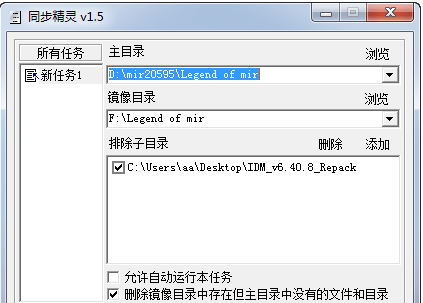
Sync Wizard softwareSoftware function
1. If there are only a few files in the two directories that are different, the program will automatically analyze and judge, and only synchronize the files that are different. Therefore, if there are many files in the two directories, using this program to synchronize will be much faster and more efficient than direct copying.
2. In order to achieve the goal of making the main directory and the mirror directory completely consistent, the program provides the function of automatically identifying files that exist in the mirror directory but not in the main directory, and can automatically delete these redundant mirror files. With this function, any modification, addition, or deletion of files/directories in the main directory will be directly synchronized to the mirror directory, which is particularly convenient to use. However, please note: once you enable this function, everything in the mirror directory that is different from the main directory will be deleted, so you must be careful when using it to avoid unnecessary data loss.
3. Sometimes we may not want to synchronize one or several subdirectories under the main directory. In this case, you can use the exclude subdirectory function provided by this program. The excluded subdirectories will not be synchronized to the mirror directory.
4. It supports multiple tasks and can automatically save settings. You can add operations that you often need to synchronize to different tasks. Every time you need to synchronize in the future, just select the corresponding preset task to achieve the purpose of quick synchronization. Isn’t it very convenient?
5. After the synchronization operation is completed, the program will give detailed synchronization operation summary information, such as prompting you how many files/directories have been synchronized, how many files/directories have been deleted, how many directories have been created, the number of mirror files/directories that cannot be deleted, etc. You can even check which files/directories have been synchronized, created and deleted.
6. If you want the program to automatically back up the specified directory, you can use the automatic execution function. Set the corresponding options for the tasks you need to perform automatically, add the "-Auto" parameter to the command line when the program is started, and then add this to the scheduled tasks of Windows. This function is available in this version.
7. You can choose multiple tasks to execute together. This function is provided in this version.
Sync Wizard Software Software Review
The software is a tool for backing up and synchronizing files. It supports users to create multiple tasks at the same time for synchronized backup, improves the efficiency of use, and allows files to be better saved and managed on local devices, free and safe.
Sync Wizard software software update log
1.Fix some bugs
2. Optimized some functions
Huajun editor recommends:
After seeing the introduction provided by the editor of Huajun Software Park above, are you already ready to take action? Then quickly download the synchronization wizard and use it. Huajun Software Park also providesLenovo Filez,PDF Editor Abdio PDF Editor,PocoMaker,Dianju AIP general document processing system,FileLocator ProWaiting for you to download and use.




Useful
Useful
Useful