



- Green versionView
- Green versionView
- Green versionView
- Green versionView
- Green versionView
Introduction to LiveProfessor software
LiveProfessor is a professional rack software that provides users with a variety of commonly used sound effects and allows you to sing without a separate sound card. by liveprofessor The setting function of the karaoke effect software integrates many sound plug-ins to design a perfect sound controller.
The liveprofessor rack effect package suitable for Aiken Mobileu, Utrack, 4nano, and UPORTS4 sound cards adopts the latest Chinese version of LiveProfessor rack, which supports direct player ducking and rack-direct microphone mute functions.
LiveProfessor FAQ
What is rack software? Which sound card supports rack?
1. The rack is just a carrier software and has no effect on its own. The software itself is not even called a rack, but is actually called host software. Rack is just a visual name for sound card players, so why is it called a rack? The so-called rack software can be used to load various VST effect plug-ins. It can be said that as long as it can be used to load multiple VST plug-ins at the same time, we can call it rack software.
2. The connection between the rack and the sound card is made using ASIO technology, which is a professional sound card driver. by Steinberg Company development. A widely used professional driver for personal computer sound cards. Its full name is Audio Stream Input Output, directly translated, means audio stream input and output interface. Using ASIO technology can reduce the system's delay in audio stream signals and enhance the processing capabilities of the sound card hardware. Not all sound cards support ASIO. ASIO not only defines the driver standard, but also requires hardware support from the sound card main chip to be implemented.
LiveProfessor usage tutorial
1. There is no need to install the software. After downloading LiveProfessor, double-click the startup file and it will be OK.
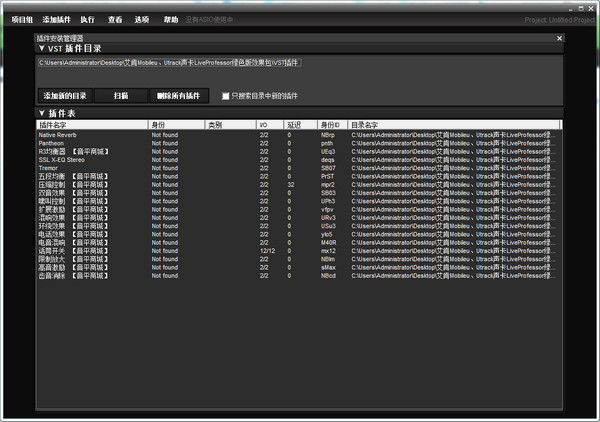
2. Double-click to enter the Lviefessor rack interface. The rack is blank without any preset effects, and there are no plug-ins installed. It is easy to find that the reason why the software is so small is that it is simple and easy to use.
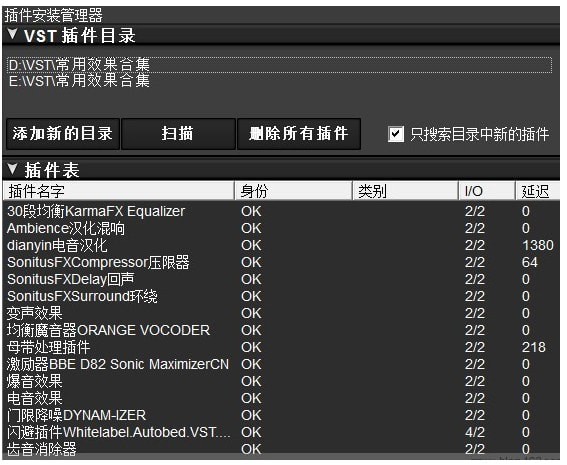
3. Start importing the effect plug-ins you need, click the option in the navigation, and select the first "Plug-in Installation Manager" software to pop up the plug-in installation manager.
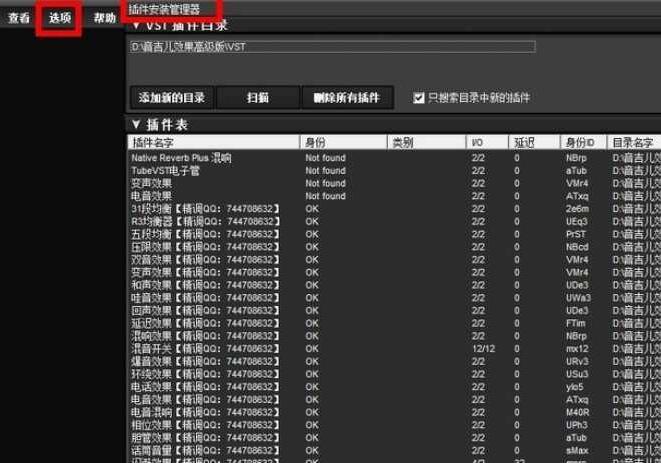
4. Add the path to the added effect plug-in, and the software will automatically import it into the rack. As shown in the picture below, the red box on the left shows that the import is in progress, and the imported effect plug-in is displayed on the right.
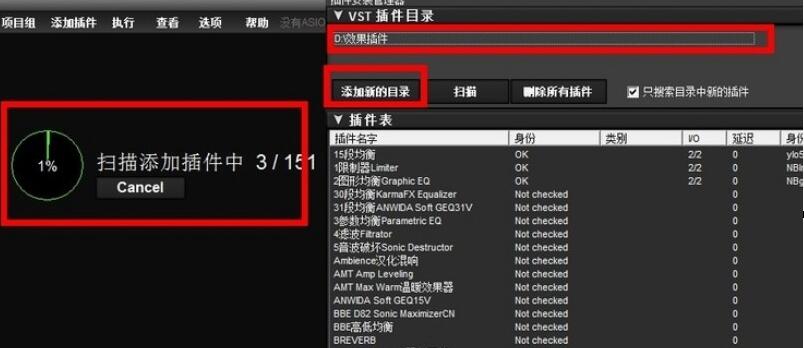
5. After the effect plug-in has been imported into the rack, the ASIO channel of the software needs to be set. This is a critical step. AISO channels allow the Livefessor rack to be connected to your sound card. Let the sound be transmitted to the rack through the sound card, and then transmitted back to the sound card through the rack effector modification.
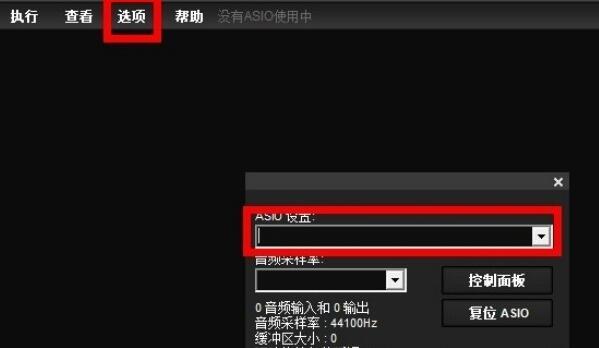
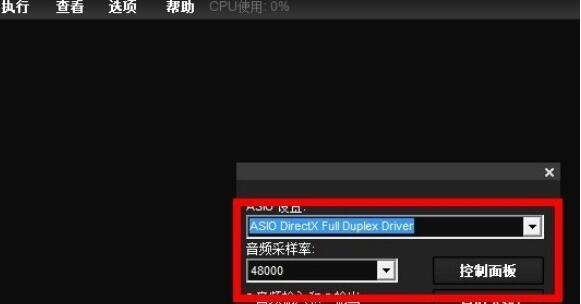
Click on the option to bring up the drop-down menu, double-click the second ASIO setting and a new window will pop up (as shown above). A black input box appears below the AISO settings. Click the drop-down button on the right here, and the ASIO driver options included in your computer will pop up. Select your sound card driver option and click OK when correct. As shown below:
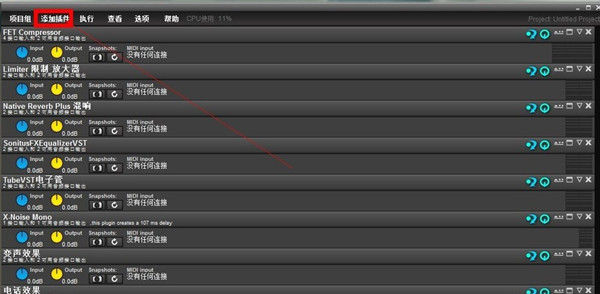
6. Create a rack effect file and add the required effect plug-ins. If there is already an effect file, directly import the debugged effect. As shown below
LiveProfessor software settings
1. System sound settings: Change "Virtual Audio" 1" as the default playback device. In this way, you can use any conventional playback software to input sound into LiveProfessor.
2. Kugou audio settings: Settings--Sound effect settings--Audio output, audio output selection "Virtual Audio 1"
3. Language software audio settings (such as YY): In the mixer at the bottom left of the channel, click Advanced, click Audio Settings, and select "Virtual Audio 1" for the microphone option.
4. Speaker option selection: MidiPlus Studio WDM 2.9.86.37, (if you need special effects such as ducking, etc., you can set it to "Virtual Audio" 1", it can also be set in the settings on the YY main interface)
LiveProfessor update log
The developer of GG said that there are really no bugs this time~
Huajun editor recommends:
LiveProfessor, produced with conscience, guaranteed performance, personally tested by the editor, I believe you can try it on my children's shoes! There are more useful software in our Huajun Software ParkAdobe Audition CC,CD to MP3 format converter,silence magician,Composer Master music software simplified musical notation and five-line musical notation combined version,MP3 original song elimination software DartKaraoke!




Useful
Useful
Useful