




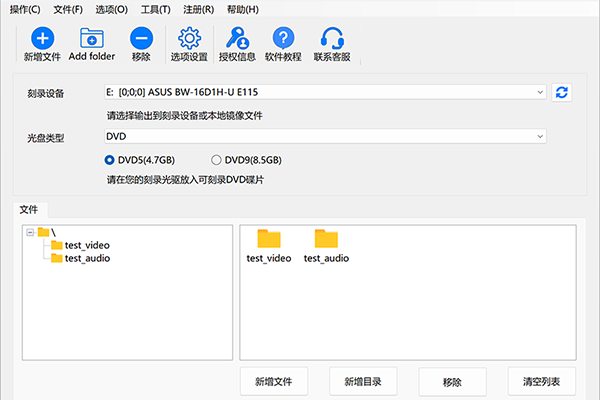
Software features
Professional-grade burning and compatibility
Multi-format support: Compatible with CD, DVD, BD Blu-ray and other recordable discs, meeting the needs of data backup, music collection, film and television production, etc.
Anti-burn technology: Use advanced technology to ensure a stable burning process and avoid failures caused by insufficient cache or disc quality issues.
Cross-platform adaptation: supports Windows 7 to Windows 11 systems, compatible with 32/64-bit environments, and adapts to mainstream optical drive devices.
Multifunctional integration
One-stop solution: integrated data burning, disc copying, ISO image production/burning, CD ripping, music CD creation and other functions without the need to switch between multiple software.
One-click operation: Provides one-click burning images, one-click erasing discs and other shortcut functions to simplify the operation process and improve efficiency.
Efficient data management
Fast erasure and reuse: Supports complete/fast erasure of rewritable discs (CD-RW/DVD-RW), customized erasure speed, and flexible management of storage space.
Format conversion capability: DVD/CD can be converted to mainstream audio and video formats such as MP3 and WAV. There is no quality loss in the extraction process and it is suitable for playback on multiple devices.
User friendly design
Intuitive interface: flat design, clear operation path, novices can get started quickly.
Detailed tutorials and support: Provide official usage guides and customer service assistance to solve problems encountered by users during use.
Software function
disc burning
Multi-type support: burning data files, music CDs, film and television DVDs, etc., and supports custom burning speeds (such as 24x, 16x).
Intelligent buffering: Dynamically adjust the cache to avoid burning interruptions and ensure data integrity.
ISO image processing
Create and burn: Generate ISO images directly from physical discs or local files, and support burning ISO files to physical discs.
Format compatibility: Supports multiple image formats (such as ISO, BIN/CUE) for easy archiving and distribution.
CD/DVD Ripping and Extraction
Music extraction: Convert CD audio to MP3, WAV and other formats, suitable for playback on mobile phones and car-mounted devices.
Video extraction: Extract high-quality video files from DVD and support output to mainstream formats (such as MP4, AVI).
Disc copy and erase
1:1 accurate copy: Supports copying disc content to the same optical drive or across optical drives to ensure data consistency.
Secure Erase: Provides full erase (completely clears data) and quick erase (retains format) options to protect privacy and security.
FAQ
Burn failed
Problem description:
During the burning process, the software prompts that the burning failed.
Solution:
Check the disc quality to make sure it has no scratches or stains.
Choose an appropriate burning speed to avoid using too high a speed which may lead to unstable data writing.
Close other programs that occupy system resources to ensure that the burning process proceeds smoothly.
Burning speed is slow
Problem description:
The burning speed is much lower than expected, affecting efficiency.
Solution:
Reduce the burning speed to ensure stable data writing.
Check the interface connecting the recorder and computer to ensure the transfer speed is normal.
Jinfeiyi Disc Burning Master update log:
Working day and night just so you can be happier
Mummy, Mummy, coax~all the bugs are gone!
Huajun editor recommends:
It is one of the best in burning software. It has won unanimous praise from users for its comprehensive functions and simple operation. Come and download it and give it a try. The editor has also prepared for youDisc Burning Master,Disc Burning Master Free Edition,Nero BurnLite,Nero8,Disc Encryption Master




Your comment needs to be reviewed before it can be displayed