
-
UltraISO floppy disk pass
- Size: 2.98M
- Language: Simplified Chinese
- Category: burning software
- System: Win All







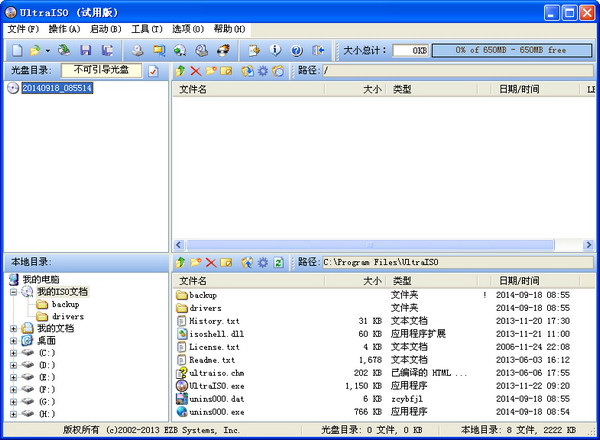
UltraISO floppy disk passIt is an ISO file editing tool similar to WinISO. UltraISO floppy disk pass is easy to operate and has a simple interface. Users can use it to create startup files.CDimage. Not only that, UltraISO can also be used to processISO fileboot information and burn discs as you like. Huajun Software Park provides you with UltraISO floppy disk download. Friends who need it, please download and use it quickly. UltraISO floppy disk pass 2024 free download.


UltraISO floppy disk productionU diskboot disk
Step 1. First, after downloading and installing the UltraISO floppy disk pass software on this site, find the shortcut on the desktop and double-click the left mouse button to run the software to enter the main interface. Then click the menu [File] in the upper left corner of the interface, and then enter the Open iOS file interface, select your ISO path, and after selecting, click the Open option at the bottom of the interface;

Step 2: After adding the ISO file, the user clicks on the startup disc option on the software interface, and then finds the write option in the pop-up drop-down option.hard driveImage option and click to enter the next interface.

Step 3: Enter the writing hard disk image interface, select the hard drive (that is, your U disk drive letter) at the bottom of the interface; after the selection is completed, click Format at the bottom of the interface to format the U disk. After the formatting is completed, the user will be prompted that the format is complete, and the user can click OK.


Step 4. After the U disk is formatted, the user still needs to select the writing method in the hard disk image writing interface. The options are: USB-HDD/USB-ZIP/USB-HDD+/USB-ZIP+ (the editor chose HDD+, click Write after selecting); then wait for the program to prompt the message that the burning is successful, which means the creation is successful.

UltraISO floppy disk related issues
How to delete UltraISO virtual optical drive?
1. Right-click UltraISO floppy disk pass;
2. Select "Run as administrator"→Options→Configuration→Virtual Disc Label→Number of Devices→Select None;
3. The virtual optical drive will disappear after restarting the computer.
Problems encountered when using UltraISO to burn a USB flash drive as the startup disk for installing the system.
The error is displayed as follows:
Class name: TtaoHoverTimer
Error type:EOS
Error Message: System Error.
Code: 5.
Access Denied.
Reason:
Lack of permissions
Solution:
When running UltraISO, right-click on the software and select "Run as administrator".
Introduction to UltraISO floppy disk pass software
UltraISO is a powerful and convenient and practical floppy disk file creation/editing/ConvertTools, UltraISO Floppy Disk Pass can directly edit floppy disk files and extract files from floppy disks, and can also create directly from CD-ROMfloppy diskOr make the files on the hard disk into ISO files. At the same time, you can also process the boot information of the ISO file to create a bootable disc. Using UltraISO, you can create/edit floppy disk files as you like, and use the disc burning software to burn the discs you need.
UltraISO floppy disk pass function introduction
UltraISO can graphically create and edit ISO files from CDs and hard drives. UltraISO can do:

1. Create a disc image file from CD-ROM.
2. Make hard disks, CDs, and network disk files into various image files.
3. Extract files or folders from ISO files.
4. Edit various image files (such as disc image files produced by Nero Burning ROM, Easy CD Creator, Clone CD).
5.UltraISO can create bootable ISO files.
+) New ISO file processing core, more stable and efficient
+) Super restore function, which can accurately restore edited files and ensure that ISO files are not damaged
+) Can create 1.2M/1.44M/2.88M floppy disk emulation boot CD
+) Complete help file (CHM format)
+) Implement the function of reopening the file list
+)Supports the creation of CD image files under Windows 2000
+) Fixed the error that sometimes the directory cannot be opened after disk burning. Using UltraISO, you can create/edit disc image files as you like, and use the disc burning software to burn the disc you need.
6. Create and edit music CD files
Features of UltraISO floppy disk pass software
It can write the hard disk image, so that you can make a bootable USB disk (new version, such as 9.2, 9.3). The bootable USB disk boot types include USB-HDD, USB-HDD+, USB-ZIP, USB-ZIP+. It is recommended to choose USB-HDD.
UltraISO floppy disk pass can directly edit ISO files
● Can extract files and directories directly from disc images
● UltraISO软碟通支持对ISO文件任意添加/删除/新建目录/重命名
● You can make files on the hard disk into ISO files
● You can copy the disc sector by sector and create a complete image file including boot information.
● Can process CD boot information, you can directly add/delete/get boot information in the ISO file
● UltraISO supports almost all known disc image file formats (.ISO, ..BIN, .CUE, .IMG, .CCD, .CIF, .NRG, .BWT, BWI, .CDI, etc.) and saves them as standard ISO format files
● You can directly set the hidden attributes of files in the disc image
● UltraISO软碟通支持ISO 9660 Level1/2/3和Joliet扩展
● Automatically optimize ISO file storage structure to save space
UltraISO floppy disk support supports shell file type association. ISO files can be opened in Windows Explorer through double-click or right-click menu.
●Dual-window operation, very convenient to use
● With optional plug-ins, you can achieve N-in-1 bootable CD production, CD image file management, and even floppy optical drives, making it more powerful.
UltraISO floppy disk installation steps
1. First download the UltraISO floppy disk pass software package from this site, double-click the exe file with the left mouse button to enter the UltraISO floppy disk pass installation wizard interface, as shown in the figure below, click Next to continue the installation.

2. Enter the UltraISO floppy disk license agreement interface. The user needs to read the agreement first and then click I accept the agreement in the lower left corner of the interface before proceeding to the next step. If the user chooses not to accept the agreement, the installation cannot be performed. So after checking "I accept", click the next option at the bottom right of the interface.

3. Enter the UltraISO floppy disk installation location selection interface. Users can choose the default installation and click Next directly. The software will be installed to the system C drive by default, or click Browse to select a customized installation, select the appropriate installation location and click Next. (The editor recommends that users choose custom installation and install the software to other disks. The C disk is the system disk. Too many software will cause the computer to run slowly.)

4. Enter the UltraISO floppy disk drive start menu folder selection interface. The user can select the default folder, or click Browse to select other folders. After completing the selection, click Next at the bottom of the interface.

5. Enter the UltraISO floppy disk pass additional task selection interface. The additional tasks include three options: creating an icon on the desktop, establishing an association between UltraISO and .iso files, and installing a virtual iOS drive. Users can select the check box according to their own needs and click the next option at the bottom of the interface.

6. Enter the UltraISO floppy disk preparation preparation interface, as shown in the figure below. The user needs to check whether there is any problem with the content in the interface selection box. If it is the same as his own settings, he can click the installation option at the bottom of the interface to install. If you have any questions, you can click the previous step to return to make changes, then return to this interface and click Install.

7. The UltraISO floppy disk pass software is being installed. Users need to wait patiently for the installation progress bar to complete before the installation can be completed. The editor personally tested that the installation speed is very fast, and users only need to wait for a while.

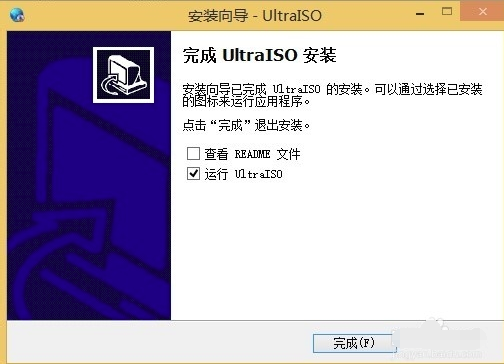
8. When the interface in the picture below appears, it means that UltraISO Floppy Disk Pass has been successfully installed on the user's computer. There are two options on the interface: view the README file and run UltraISO. The user can uncheck the first one, and then click Finish to close the installation interface and open the software.
Comparison of similar software like UltraISO floppy disk pass
Which virtual optical drive is better to use?
1.UltraISO:
UltraISO can directly edit disc images and extract files directly from the image. It can also create disc images from CD-ROM or make files on the hard disk into iso files.
Download address:http://softwaredownload4.com/soft/27820.htm
2.Rubik's Cube Virtual CD-ROM Drive:
The soft media virtual optical drive supports a variety of common image formats such as iso, cue, img, nrg, etc., and can be associated with right clicks. Cube Computer Master also has a virtual optical drive function, so I extracted this soft media virtual optical drive, which is small and green and can be used to load images to create virtual optical drives.
Download address:http://softwaredownload4.com/soft/1109871.htm

3.Daemon Tools:
The virtual optical drive (DAEMON) 910 supports ps and encrypted discs. It can be used without booting after installation. It can back up SafeDisc-protected software and open image files of virtual optical drives such as CUE, ISO and CCD.
Download address:http://softwaredownload4.com/soft/3617.htm

These are all virtual optical drive software, each with its own characteristics. Users can choose the appropriate software according to their own needs and click the link in the download address to download and use it.
UltraISO floppy disk update log
+ Can edit Windows 7/8 x64 ISO image files containing EFI boot records
+ You can create a Mac OS X Mountain Lion bootable USB drive directly from the dmg image
+ A new bootpart driver has been added to UltraISO Floppy Disk Pass, which supports access to the boot partition in Windows (PE) environment (deep hiding)
+ UltraISO floppy disk pass supports high-end hidden boot partition (bootmgr)
+ Support copying bootable USB disk (RAW mode)
+ Sector alignment when formatting U disk as FAT file volume
+ UltraISO Floppy Disk Pass can detect and use DVBFab virtual optical drive
- UltraISO Fixed a bug in handling Fedora 17 and CentOS 6.2 ISO image files
- Fixed an error in splitting image files under VMWare Fusion(Mac) or Wine(Linux) environment
- Some minor improvements and bugfixes
Due to copyright and manufacturer requirements, Huajun Software Park provides the official download package of UltraISO Soft Disk Pass
Huajun editor recommends:
UltraISO Soft Disk Pass, Disc Burning Master, Disc Burning Master Free Edition, Batch Manager, etc. are all very good software. Welcome to our site to download and experience!
Version: v9.7.6.3860 | Update time: 2025-10-23
Similar recommendations






Latest updates





How to burn a CD with UltraISO Floppy Disk Pass? How to burn a CD with UltraISO Floppy Disk Pass
How does ultraiso extract ipsw firmware from dmg? How does ultraiso extract ipsw firmware from dmg?
How to install and use UltraISO Floppy Disk Pass? UltraISO Floppy Disk Pass installation steps
How to create a USB bootable disk with UltraISO floppy disk
Detailed operation explanation of burning disc with UltraISO floppy disk
Operation process of installing win7 system through UltraISO floppy disk
Graphical steps for installing ISO files through UltraISO floppy disk
How to delete history in Video Pioneer? -How to delete history records by Video Pioneer
UltraISO floppy disk pass review
-
1st floor Huajun netizen 2021-07-23 15:23:19UltraISO floppy disk pass is very useful, thank you! !
-
2nd floor Huajun netizen 2021-09-22 12:44:33UltraISO floppy disk pass is great! 100 million likes! ! !
-
3rd floor Huajun netizen 2021-09-04 12:58:34UltraISO floppy disk pass is not bad, the download is very fast, I give you a good review!
Recommended products








- Diablo game tool collection
- Group purchasing software collection area
- p2p seed search artifact download-P2P seed search artifact special topic
- adobe software encyclopedia - adobe full range of software downloads - adobe software downloads
- Safe Internet Encyclopedia
- Browser PC version download-browser download collection
- Diablo 3 game collection
- Anxin Quote Software
- Which Key Wizard software is better? Key Wizard software collection




