



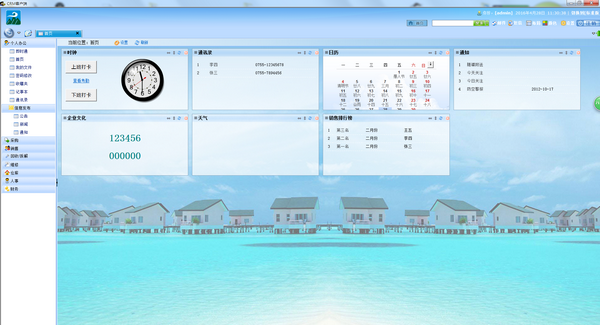
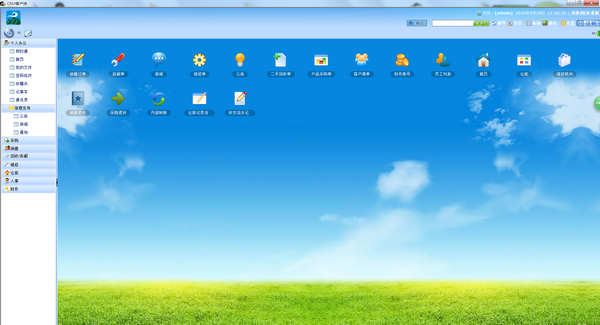
Function introduction
1. Personal office:
1. SMS management: It stores SMS messages sent by customers, which can be easily found, searched, etc.
2. Email management: It stores email information sent by customers, which can be easily found, searched, etc.
3. Instant Messenger: built-in online chat tool.
4. Home page: The home page of the workspace. Some important information can be placed on the top of the home page.
5. My files: The uploaded files are stored.
6. Password modification: The user changes the password when logging in.
7. Favorites folder: You can collect the information you need on a daily basis.
8. Notepad: can record the information you need in daily life.
9. Address book: can record the contact information of contacts.
10. News: You can view information released by managers.
11. Announcements: You can view announcements issued by managers.
12. Notice: You can view the notices issued by the administrator.
2. Procurement:
1. Product purchase order: Add information such as merchant company name, product name, product quantity and price.
2. Purchase returns: Add purchase return company name, reason for return, return quantity and other information.
3. Product suppliers: Manage supplier names, contact information, sources and other information.
4. Purchase details: mainly view purchase details and purchase return details.
3. Sales:
1. Sales order: Fill in the order information sold and submit it to the financial review after completion.
2. Sales returns: Fill in the order information that was returned after the sale, and submit it to the financial review after completion.
3. Customer list: record customer information, and perform addition, deletion, modification and query operations.
4. Contact record: Fill in the contact record with the customer.
5. Details: There are detailed records of sales and sales returns.
4. Recycling/Dismantling
1. Second-hand recycling form: fill in the information of the recycled items, and submit it to the financial review after completion.
2. Disassembly form: Fill in the information of the disassembled items. The disassembled items must be shipped out of the warehouse first. The disassembled items can be put into storage (second-hand warehouse).
3. Recycling: detailed information on recycling of second-hand items.
4. Dismantle: disassemble the detailed information of the item.
5. Maintenance
1. Maintenance order: Fill in the maintenance customer, cost, consumables and other information here.
2. Repair consumables: Fill in the consumables information and remove the required consumables from the warehouse.
6. Warehouse
1. Sales return warehousing document: transferred from the sales return warehousing document, the return warehousing operation can be performed.
2. Sales product issue document: transferred from the sales receivable document, sales issue operation can be performed.
3. Purchase return issue note: transferred from the purchase return receipt note, purchase return issue operation can be performed.
4. Material purchase warehousing document: transferred from the purchase payable document, the purchase warehousing operation can be carried out.
5. Second-hand recycling receipt: transferred from the second-hand payment receipt, recycling and storage operations can be carried out.
6. Warehouse record flow: You can view the entry and exit records of all warehouses.
7. Storage: You can view the storage details of sales returns.
8. Outbound: You can check the outbound records of sales orders and the outbound details of purchase returns.
9. Warehouse management: You can manage warehouses, second-hand warehouses, and logistics information.
7. Personnel
1. Employee information: Employee information management supports addition, deletion, modification and query operations.
7. Finance
1. Sales receivable note: transferred from the sales order, you can choose whether to perform sales collection and submit it to the warehouse.
2. Purchase payable order: transferred from the purchase order, you can choose whether to make purchase payment and submit it to the warehouse.
3. Maintenance receipt: transferred from the maintenance receipt, you can choose whether to perform maintenance receipt.
4. Second-hand payment slip: transferred from the second-hand recycling slip, you can choose whether to pay for recycling and submit it to the second-hand warehouse.
5. Other payable documents: other information that requires payment.
6. Sales return payable note: transferred from the sales return note, you can choose whether to pay the return payment and submit it to the warehouse.
7. Purchase return receipt: transferred from the purchase return receipt, you can choose whether to perform return receipt and submit it to the warehouse.
8. Income and Expenditure Record Sheet: All financial income and expenditure information can be viewed.
9. Collection: You can view sales collection records, maintenance collection records, other down payment records, purchase return collection records, and perform corresponding collection operations.
10. Support: You can view purchase payable records, sales return payment records, second-hand payment details, salary payable records, and other payable records, and perform corresponding payment operations.
11. Others: You can manage financial accounts, internal transfers, view internal transfer out and transfer records, view monthly salary summary information, etc.




Useful
Useful
Useful