




E heard the latest version
E heard that the latest version is an English learning tool suitable for middle school students. E Hearing APP can provide users with listening training and other functions to help users better communicate in English listening and speaking. E Listening also has functions such as synchronous exercises, special training, mock tests, homework, etc., which can help you learn English better. Huajun Software Park provides download services for E-listening software. To download other versions of E-listening software, please go to Huajun Software Park!

E heard software function
(1) Unit synchronization
1. Phonetic symbol learning: fun and challenging design, practice the basics of pronunciation and gain preliminary phonetic awareness
2. Text reading/following reading: Modular consolidation of unit knowledge, intelligent scoring of reading/following reading, imitating good pronunciation habits, and helping to form a sense of language
3. Listening and speaking/listening synchronization: listening and speaking/listening training that is synchronized with the unit themes of mainstream textbooks to cultivate systematic listening and speaking strategies
4. Reading and writing synchronization: synchronize with the teaching materials, keep up with the unit topic knowledge and grammar knowledge, and cultivate reading and writing skills
5. Interesting dubbing: a large selection of English original audio videos, scenario-based character experience, and topic level matching
6. Unit test: a set of test questions synchronized with the unit theme of mainstream textbooks to consolidate unit knowledge points
(Second) Stage Review
1. Listening and speaking specialties: different question types in mainstream listening and speaking examinations, each one can be solved to reduce ineffective learning
2. Intelligent composition: take photos with one click, make intelligent corrections, and improve chapter writing skills
3. Listening and speaking simulation: The process and interface are consistent with the exam, and the simulation questions are carefully formulated to form good exam and question-taking habits.
4. Reading and writing simulation: training based on test questions, conducting staged diagnosis of academic status, and relying on text to enhance cultural awareness
(3) Consolidation of cold and heat
1. Graded reading: a graded learning course developed based on Lens levels and common exam topics, from easy to deep, to cultivate comprehensive application abilities
2. Winter and summer homework: designed according to the idea of "consolidation review + new lesson preview", incorporating interesting content such as dubbing and extracurricular readings to enrich winter and summer training

Features of E-hearing software
1. Customized high-quality learning resources: Based on the principles of closely following the exam syllabus, synchronizing teaching materials, matching topics, and matching difficulty, content resources suitable for middle school students from all over the country are customized to focus on high-quality materials and reduce inefficiencies.
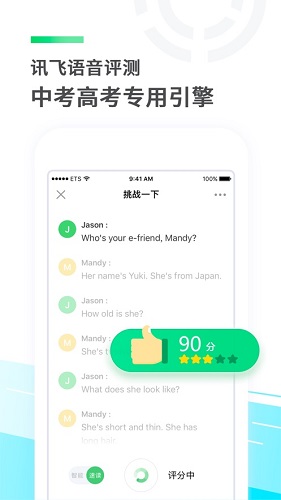
2. Examination standard assessment and correction: Using iFlytek's voice assessment technology, various oral training such as reading aloud, question and answer, and retelling are assessed and diagnosed according to the standards of the high school and college entrance examinations. Hand-written essays can be photographed and intelligently marked with one click.
3. Three stages and three steps for efficient score improvement: matching the teaching frequency band of school unit synchronization, stage review and winter and summer consolidation, intelligently supporting the learning path of independent learning (learning), homework training and academic analysis (practicing), and correcting and consolidating wrong questions (revision), effectively improving listening and speaking scores.

Features of E-hearing software
Synchronous exercises: synchronize words and short articles in textbooks to consolidate the basic content of the unit.
专项训练:针对中高考听说考试题型,实现各个击破。
Mock exam: The exam environment and interface are consistent with the high school and college entrance exams, allowing you to quickly become familiar with the exam process.
Homework assignments: Support teachers in assigning speaking assignments, intelligently display students’ recording results, and provide targeted comments.
How to use E
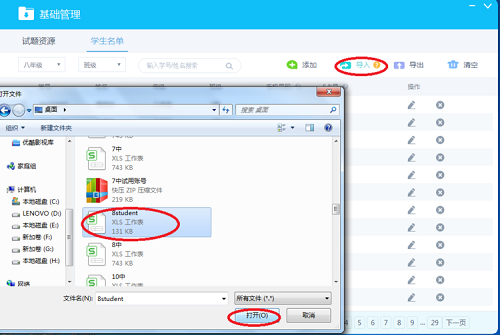
E听说中级班学生名单导入说明
Step 1: Open the English listening and speaking human-computer dialogue training system (class version) and click "Basic Management".

Step 2: Click "Student List".
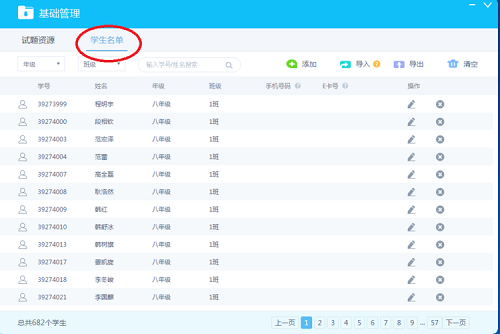
Step 3: Click "Grade" in the red circle and select "Eighth Grade" in the blue circle. A list of eighth grade students will appear in the student list.
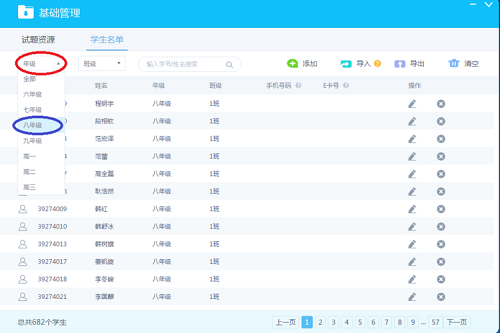
Step 4: Click "Clear".
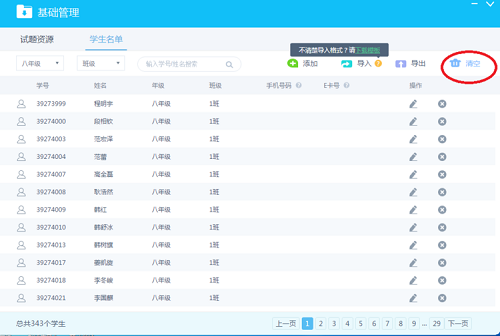
Step 5: Click on “Import” and then select the Excel table named “student” to import.
EHeard Frequently Asked Questions
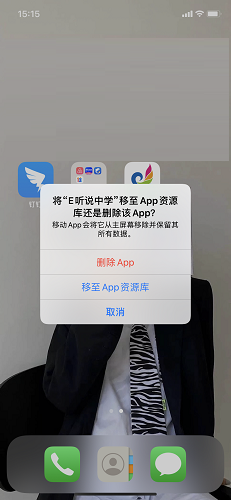
Question: How to uninstall eHeidi?
Answer: 1. We need to long press the eHeard’s logo on the phone screen, the options will pop up, and click Remove APP.

2. Then we need to click Delete APP to delete it!
Comparison of similar software
Challenge EnglishThe PC version is a very excellent and professional English teaching application. The PC version of Challenge English provides super practical word exercises, intelligent memory algorithms, and voice evaluation functions. If you are worried that your English pronunciation is not standard, just come and test it in the APP and you will know. The PC version of Challenge English also has an exclusive incentive mode. There are more than 40 sections for you to choose from, and there is always one that suits you! Every word will be matched with commonly used examples! Let you draw inferences and remember more firmly!
english weeklyThe Android version is a professional online English learning education software launched by Lingwei Technology. The official version of the English Weekly app covers English listening, grammar, pronunciation and other detailed content, helping users to use fragmented time to learn English anytime and anywhere. Through the English Weekly App, users can easily cope with IELTS, TOEFL, CET-4 and CET-6, etc. without attending training classes.
E heard update log
1. Support vocabulary homework and graded reading homework
2. Add help and feedback, support viewing frequently asked questions and contact customer service
Huajun editor recommends:
E Hearing APP can provide users with listening training and other functions to help users better communicate in English listening and speaking. E Listening also has functions such as synchronous exercises, special training, mock exams, homework, etc. The editor specially tested it for this purpose, and it works really well!




Useful
Useful
Useful