

If you are looking for software to use, go to Huajun Software Park! software release AI product list

Hello, if there is a need for software inclusion, please package the software and attach the software name, software introduction, software-related screenshots, software icon, soft copy, business license (if you do not have a business license, please provide the front and back of the corresponding developer ID card and a photo of yourself holding the ID card), and send it to email http://softwaredownload4.com/sbdm/user/login

Close >>

Send to email:news@onlinedown.net

Close >>

Location: Home pagePC softwareNetwork softwareproduction assistance Afuka buying assistant
Afuka buying assistant

Afuka Buying Assistant 1.0

QR code
  • Software licensing: free software
  • Software size: 0.63MB
  • Software rating:
  • Software type: Domestic software
  • Update time: 2024-12-26
  • Application platform: WinAll
  • Software language: Simplified Chinese
  • Edition: 1.0

Download the service agreement at the bottom of the page

Software introduction Related topics FAQ Download address

Basic introduction
Afuka’s rush to buy assistant’s first LOGO
Afuka buying assistantIt is a pure green software, no installation is required, and it is only 200KB, so you don’t have to worry about the system garbage caused by installing the software and the malware that cannot be uninstalled.

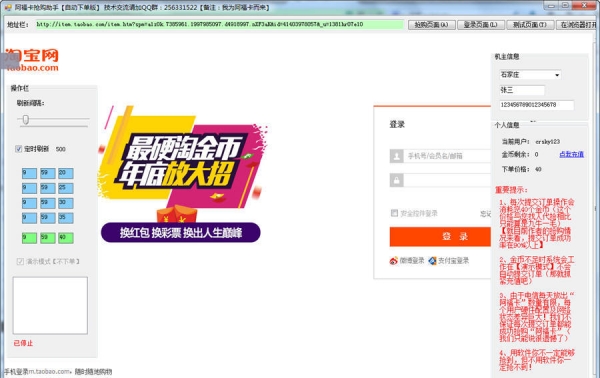
Screenshot of Afoka’s buying assistant

How to use

1. Set the machine time accurately (the error with Beijing time is less than 5 seconds)

2. Open the software and log in to the system (activate the software).

3. Fill in the machine owner information

4. Log in to Taobao account

5. Set the default shipping address

6. Click to enter the snap-up page (wait until 10:00, the software will automatically snap-up, no manual operation is required)

Tips:In order to improve the speed of software purchase. It is recommended to clear the IE cache, uninstall unnecessary plug-ins, and turn off the IE picture function.

FAQ

