





Problems solved by Microsoft Windows Installer
Windows Installer 4.5 resolves the following issues in earlier versions of Windows Installer:
1.Windows The SeBackupPrivilege user right is missing in the Installer service. Lack of this permission prevents any custom actions that require this user permission from being performed.
2. In Windows Vista, some case-sensitive service name comparisons in the InstallValidate operation resulted in an unnecessary message: "files in use".
3. After uninstalling the update program that added a new component, the component will also be uninstalled. This is true even when other products are sharing this component.
4.Windows Installer software installation technology. The technology includes Windows Installer Server for 32-bit Windows operating systems, and a new package file format for storing information about configuration and installation.
5. Windows Installer is not just an installation program, it is an extensible software management system. Windows Installer manages the installation of software, manages the addition and removal of software components, monitors file recovery, and maintains basic disaster recovery by using rollback.
Introduction to Microsoft Windows Installer functions
1. Multi-package transactions
In Microsoft Windows Installer multi-package transactions, you can create a single transaction from multiple packages. In a multi-package transaction, the linker is used to dynamically include the packages in the transaction. If no packages are installed as expected, you can rollback the installation.
2. Embedded user interface handler
You can embed a custom user interface (UI) handler in a Windows installation package. This makes custom user interfaces easier to integrate. You can also call an embedded user interface handler in the Add or Remove Programs control panel item. Alternatively, you can call an embedded user interface handler in a Windows Installer repair process.
3. Embedded reasoning chain
You can use the Microsoft Windows Installer embedded linker to add packages to multiple package transactions. You can use an embedded linker to facilitate the installation of multiple packages. For example, you can enable install on-demand events, repair events, and uninstall events on multiple packages.
4. Update the flexibility of alternation between old and new
Microsoft Windows Installer This feature enables you to correctly replace changes in the FeatureComponent table
Microsoft Windows Installer installation steps
1. First download the windows installer 4.5 installation package from this site, double-click to start the installation program.
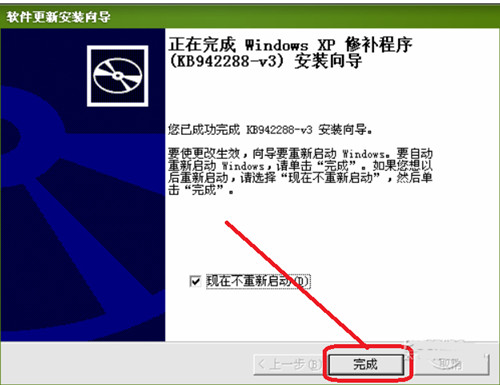
2. Open the Microsoft Windows Installer installation wizard, click Next, and then follow the installation wizard step by step. It is as simple as ordinary software installation.
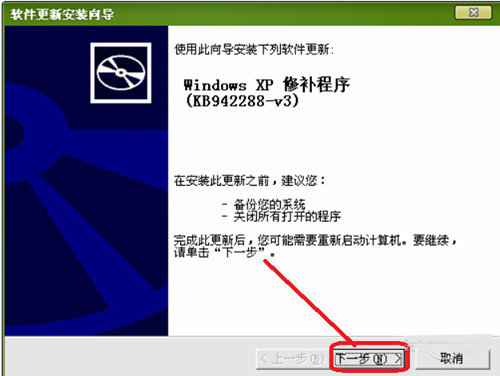
3. Wait for the installation to complete and run the windows installer 4.5 software.
How to use Microsoft Windows Installer
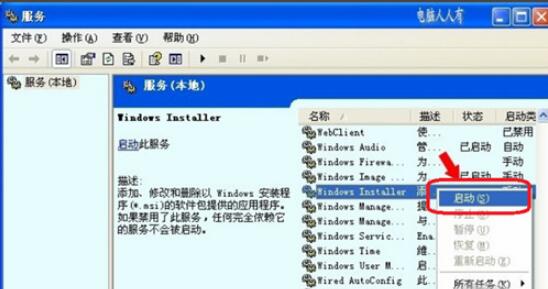
How to start Windows Installer?
1. Open the Start menu and find the Control Panel option. Then click Performance and Maintenance → Management Tools → Services. After opening the services panel, find the Windows Installer service in the list on the right, then right-click to start it.
Microsoft Windows Installer Notes
1. Windows Installer [System Requirements]
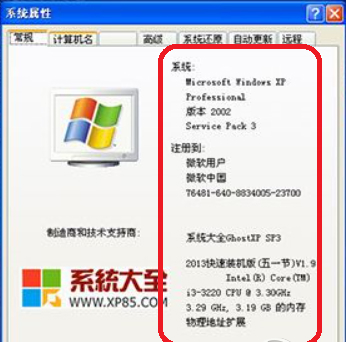
Windows XP Service Pack 2,
Windows XP Service Pack 3
Windows Server 2003 Service Pack 1
Windows Server 2003 Service Pack 2
Windows Vista, Windows Vista Service Pack 1
Windows Server 2008X86, X64 and IA64 flavors.
2. Windows Installer 4.5 is not available for these operating systems:
Windows 7
Windows 7 SP1
Windows Server 2008 R2
Windows Server 2008 R2 SP1
Windows 8
Windows Server 2012
Windows 8.1
Windows Server 2012 R2
Microsoft Windows Installer update log
1. Fix bugs
2. Add new functions
|
Huajun editor recommends: As a product of the Microsoft XP era, Windows Installer 4.5 is a relatively good add-on component that can help users manage and configure software. It has practical functions and users in need can download it. Huajun Software Park also provides you with free downloads of Windows Installer redundant file cleaning tool and Windows Installer CleanUp Utility. |
1. Microsoft has stopped maintaining this version of Office software and no longer provides genuine maintenance;
2. In order to provide users with a better experience using genuine software, we provide you with the download version: Office 365/Office 2016 version;
3. There are legal risks in using pirated software, so it is recommended to use genuine software.




Useful
Useful
Useful