






Tomato Assistant Software Introduction
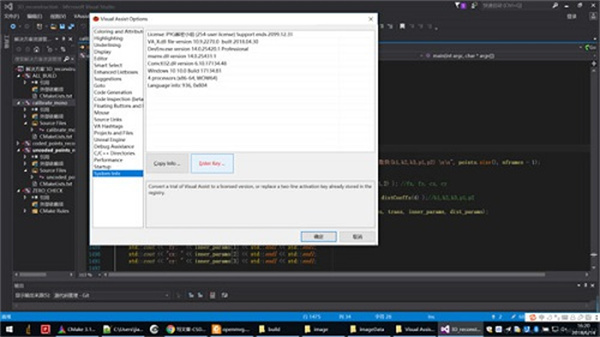
Tomato Assistant is a feature-rich code editing software, its English name is Visual Assist. Since the icon of this software is a tomato, the Chinese name is called Tomato plug-in. Through this software, users can effectively help Visual For development, Studio software supports the direct installation of plug-ins into VS. When needed, you can edit the code by directly calling the plug-in from the VS editing tool. When developing software, you need to edit a large amount of code and calculate function formulas. It is wasteful to edit the complete code. Use this VS2017 to help you complete the editing of code snippets. In other words, you only need to enter a part of the code and the complete function code will appear for you to choose. It is as convenient as typing, which increases the editing efficiency of the software.
Tomato Assistant software functions
1. Intelligent reminder
Reminds of keywords, existing function names, class names, and class members.
2. Code highlighting
Keywords, class names, function names, etc. are displayed in different colors for high-brightness and easy-to-code reading.
3. Quick tracking
Quick and automatic jumps to declaration and completion, and quick conversion of .cpp and .h files.
4. High-efficiency search
Search for folder names and identifiers.
5. Code optimization
Rename the identifier, automatically add the Set/Get method of the member function, and automatically add the annotation of the function.
Features of Tomato Assistant software
1. Powerful
If you understand the ways of Microsoft Visual Studio, and especially if you understand its boundaries, you will find that Visual Assist has features you'd like to standardize in your IDE. This extension makes the IDE a reality.
2. Understand
If you're already a fast coder, go one way or another, and are skeptical of plug-ins and extensions, you'll really appreciate Visual Assist's low-end interface. This product does not meet your requirements
3. Response
If you’re comfortable with the idea of another parser running while editing, you’ll be impressed by the speed of Visual Assist. The plugin does not consume resources and simply tells you that you are violating formatting standards.
4. Code understanding
With a variety of tool windows, browsers, and fields, you can work with complex codes or codes anytime and anywhere, without you being exposed to any information for a long time.
5. Debugging assistance
Reduce the time it takes to debug native C/C++ with the VA Memory View and VA Step Filter included with Visual Assist.
6. Code generation
Generating code is faster than you think, even if you only use some of the features in Visual Assist. As you become a proficient user, write and update code faster.
7. Coding assistance
Writing code faster, with help that doesn’t get in your way, especially when you’re scrolling. Visual aids suggest completion only if they save you from serious typing and quietly correct your mistakes.
Tomato Assistant Software Advantages
1. Unassuming
If you’re already a fast servo motorist, your methods are a bit cumbersome, and you’re skeptical of software and Google extensions, you’ll especially appreciate VisualAssist’s unobtrusive page. This product does not meet your requirements
2. Quickly
If you’re pessimistic about the idea of another online analysis that runs while you write, you might be impressed by the speed of VisualAssist. The software does not consume resources just to tell you that you violated the factory reset specification.
3. Convert to coding faster
Converting to code is faster than you think, even if you only use a few functions in VisualAssist. Once you're a proficient client, share ways to improve visual aids that will get you there quickly.
4. Quick access
Easily move your code around any document, method, markup or reference in your projects and solutions. Let VisualAssist remember everything from anywhere to anywhere.
5. Rebuilding is very easy
Reduce code complexity, improve readability, and make it extensible without changing its external behavior. Restore legacy code, inherited code, or the first version of your own work.

6. Numbering assistance
Write code quickly to help you reach consensus, especially when flipping. Visual aids are recommended only if they relieve you from serious typing and safely correct your mistakes.
7. Understand immediately
Use a variety of tool dialogs, browsers and fields to give information complex encodings or codes when you need them, meaning you haven’t been exposed to it for a long time.
8. Special tool dialog box
Search codes from 30,000 inches and reorder them for easier understanding and maintenance. Tool dialogs in VisualAssist combine the best features of IDE tool dialogs, including coding exam outlines, hover class browsers, and article title browsers.
9. Encoding highlights
Extended to frequently input string constants through a more powerful version of similar naming functionsin the IDE. Includes markup from the current context, prompts users to type, and writes string constants in a custom editor.
10. Equipment
Adjust the many functions in Visual Assist to suit your programming environment and habits. Find your favorite effect and buzz it to get the biggest production workhorse.
11. Properly automatic
Monitor VisualAssist for appropriate errors, especially marking status and hand marking errors. Type entirely in lowercase letters and watch as VisualAssist corrects all symbols. Save your defined shift keys.
Tomato Assistant update log
Optimize user feedback issues and improve detailed experience
Huajun editor recommends:
Tomato Assistant, word-of-mouth software, is guaranteed to solve all your problems! The editor highly recommends! There are similar software on this siteFast table software,AlphaEbot action editing software,He Xiaoxiang programming client,Automated testing tool AutoRunner,Little turtle LOGO language, if you are interested, you can download it!









Useful
Useful
Useful