



How to use Winsock expert (packet capture tool)
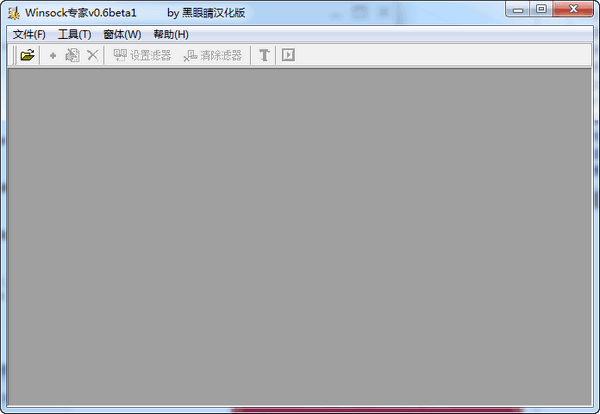
1. First run this software and the network application that needs to be monitored, then click the file icon and select the correct program to open. A sub-window will be created. You can monitor multiple processes at the same time using the same method.
2. By default, the process just opened has started monitoring data. If necessary, you can manually press the "Start/Stop Capture" button on the toolbar to switch between monitoring/non-monitoring. If you find that monitoring is not automatically performed at the beginning, you also need to switch manually.
3. Use the modify and add buttons to add/modify filter conditions, which can be used to automatically modify the data sent out by the application. The specific usage method is similar to that of WPE.
4. After creating the filter conditions, you need to press Set Apply, otherwise these filter conditions will not take effect.
5. You can save/load filter conditions in the right-click menu on the filter list.
6. By switching the data packet button, you can switch the display mode of the data packet: text mode and hexadecimal mode.
Winsock Expert (Packet Capture Tool) Frequently Asked Questions
1. How to run WSockExpert under win7?
During installation, right-click on Properties Compatibility, try VISTA and then select "Run this program as administrator" to find the installation file and select the same compatibility mode as before for all files in the program ending with EXE. There are many compatibility modes above, and generally VISTA will do! If that doesn't work, switch to another compatibility mode!
2. The download address of the movie cannot be captured, only the playback address is captured. When the address bar is opened, the ancient player will automatically pop up. How can I capture the real address through this software?
There is a problem with the anti-virus software or firewall. It treats wsockexpert as a Trojan horse. You can set it in the anti-virus software.
Winsock expert (packet capture tool) update log
v0.6 update log (2016-10-12)
1. Adjusted the filtering function of Filter to support fuzzy rule settings. For example: you can use a filter condition such as FF 3F.
2. Added different colors to distinguish received and sent data packets.
3. Fixed the problem that error messages may appear when receiving data packets.
4. Fixed the problem that the corresponding text content cannot be displayed correctly when the data packet is displayed in HEX mode.
5. Set it to start capturing packets as soon as a process is opened.
Huajun editor recommends:
What? If you haven’t used Winsock Expert (packet capture tool) yet, do you know that all your good friends are using it? Come and download it. The editor also prepares for youXinlan IP automatic changer,Batch IP query,Ping detection tool (Friendly Pinger),IP address switching tool (IPWhiz),LAN IP detector













Useful
Useful
Useful