
-
Adobe Illustrator CS6
- Size: 2.6M
- Language: Simplified Chinese
- Category: image processing
- System: WinAll







Adobe Illustrator CS6It is a convenient and practical vector illustration tool with a simple interface developed by Adobe. It is mostly used in publishing houses, online images, multimedia, etc. Adobe Illustrator CS6 adopts a more intuitive and modern user interface, as well as a new image tracking engine and many new features that allow users to work more efficiently.Adobe Illustrator CS6It improves the accuracy, speed and stability of processing large and complex files, making it easier for users to process large and complex or difficult-to-process image files. adobe Illustrator CS6 allows users to freely try out various ideas and convey unique creative concepts. Friends in need, come to Huajun Software Park to download it!
-
Powerful and practicalView
-
Picture editing softwareView
-
Professional vector graphics design and production softwareView
-
Image processing softwareView
-
Very powerful functions and simple interfaceView
adobe illustrator cs6 frequently asked questions
adobe illustrator cs6How to draw a stacked bar chart?
For details, please click:http://softwaredownload4.com/article/10020972.htmHow to solve error 16 in adobe illustrator cs6?
This problem occurs because there is a problem with compatibility mode and permissions. Please follow the prompts to find the icon of the software and right-click [Properties] - [Compatibility], check "Run this program in compatibility mode" and "Run this program as administrator"

How to extract photos from adobe illustrator cs6?
1. First, you need to edit the picture you want to save, and then select [File] - [Export] in the upper left corner.
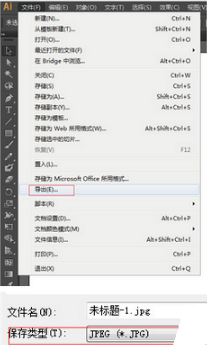
2. After entering the image export interface of Adobe Illustrator CS6, please set the directory to be saved, then select the save type and click the [jpg] format in the drop-down menu.
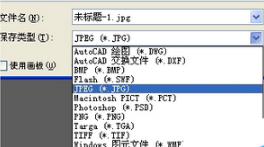
3. If you need other format suffixes, just choose.
For more information about Adobe Illustrator CS6, please pay attention to Huajun Software Parkhttp://softwaredownload4.com/!
How to use adobe illustrator cs6
1. First open Adobe Illustrator CS6, then select the button in the red box on the left and double-click to open it. Then set the required parameter values according to the prompts.

2. Document settings
Open Adobe Illustrator CS6 and select [File] - [New] in the upper left corner. After creating the new document, if you are not satisfied with some parameters, please select [File] - [Document Settings] to set various parameters.
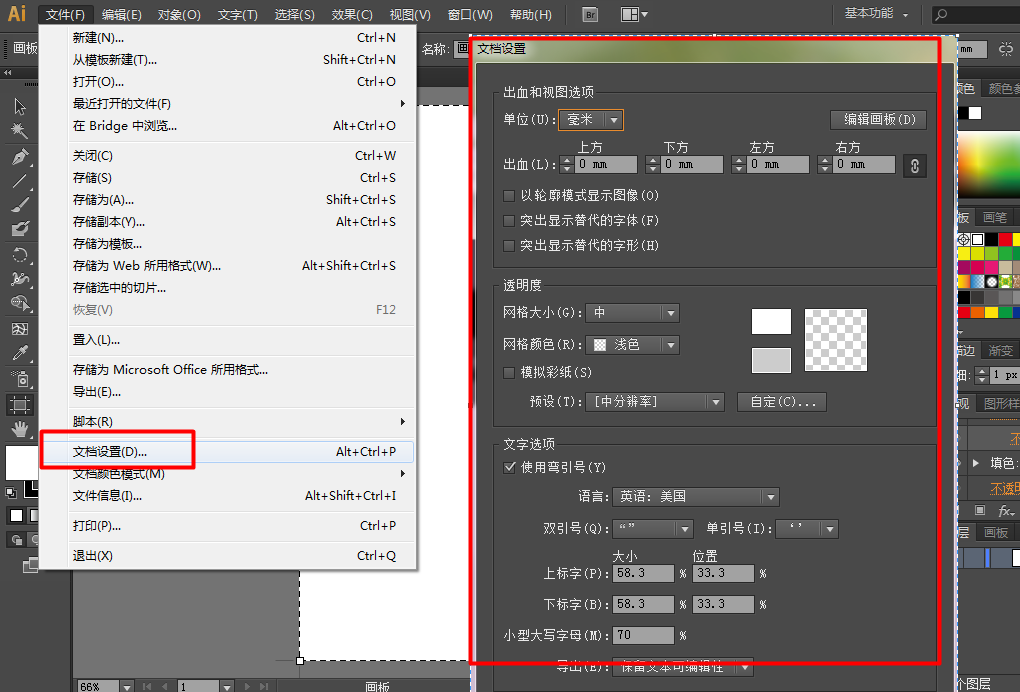
3. User interface settings
Please open adobe illustrator cs6 and select [Edit] - [Preferences] - [User Interface]
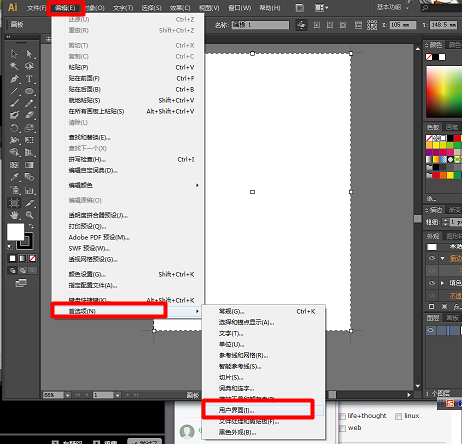
4. Double-click to zoom
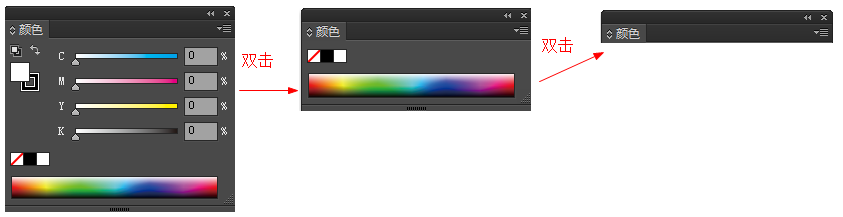
If a panel feels that it takes up too much space and needs to be reduced, double-click with the left mouse button to zoom. As follows: Double-click the left mouse button to switch between the three modes: "Merge" - "Simple version" - "Maximize".
5. Save the workspace
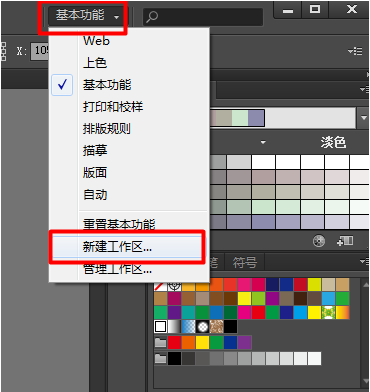
If you want to retain the working environment of the current editing operation, please select [Basic Functions] on the upper right side of the Adobe Illustrator CS6 interface, select [New Workspace] and save it to select the workspace the next time you use it.

Adobe Illustrator CS6 software features
Adobe Mercury Performance System
Native 64-bit support: CS6 introduces native 64-bit support for Mac and Windows for the first time, significantly increasing processing speeds.
Stable operation: Optimize memory management to reduce the risk of lags and crashes when processing large files (such as high-resolution images, complex vector graphics).
Real-time preview: Filters, special effects, and multi-node patterns render faster, so designers don’t have to wait for long progress bars.
Image tracing engine upgrade
Precise conversion: The new engine converts bitmap images (such as photos, low-resolution logos) into editable vector files, with clearer lines and fewer nodes for easy fine adjustment.
Complex image processing: Supports vectorization of complex images such as portrait photos, and the conversion results are closer to the original images, improving design efficiency.
Adobe Illustrator CS6 function introduction
Adjustable user interface brightness
Customize the background: Use the slider to adjust the grayscale of the interface background (from dark gray to light gray) to match the visual style of other Adobe tools (such as Photoshop, After Effects) and reduce visual interference.
Text contrast optimization: The background and text colors are automatically adapted to ensure readability.
Streamlined panels and tools
Gaussian blur, color, deformation and other panel enhancements: integrate more control options and support real-time preview effects.
Pinned and hidden tools: Frequently used tools can be pinned to the toolbar, hiding infrequently used tools and saving screen space.
Independent workspace: Supports the creation of customized workspaces for different tasks (such as typesetting, illustration) to improve operational efficiency.
Pattern Creator
Seamless pattern design: Quickly generate seamless patterns by dragging and dropping repeated elements (such as shapes, images), supporting real-time editing and preview.
Creative Experimentation: Provides a variety of repeating patterns (such as grids, bricks, mirrors) to inspire designers to explore new styles.
Gradient on Stroke
Path gradient control: Set gradient position, direction, and opacity along path length, width, or the stroke itself to achieve complex visual effects.
Simplified operation: Instead of manually drawing multiple shapes or paths, a single line can complete your road map or decorative element with gradients.
ImageTrace (replaces Live Trace)
Smart tracing: Automatically identify image edges and color areas, generate editable vector paths, and support adjusting thresholds, path simplification and other parameters.
Batch processing: suitable for converting a large number of hand-drawn sketches or scanned images into vector format to improve work efficiency.
adobe illustrator cs6 highlights
graphic design
Create posters, business cards, packaging designs, etc. Vector graphics can be infinitely scaled without distortion, adapting to different output needs.
Combine with typesetting tools such as Adobe InDesign to complete multi-page document design.
Illustrations and Comics
Create high-quality vector illustrations using drawing tools (pen, pencil, brush) and special effects (gradients, blends).
Supports the Live Color function, generates coordinated color combinations based on color matching theory, and adjusts the overall tone with one click.
Logo and brand design
Provides shape drawing and editing tools (such as envelopes, symbols), supports a variety of text and graphic effects, and creates eye-catching logos.
The output file format has strong compatibility (such as AI, PDF, EPS), making it easy to collaborate with printing manufacturers.
font design
Design custom fonts with text editing tools, adjust character spacing, line height and style, and export as font files that can be embedded in other software.
Web and UI Design
Create interface elements such as buttons, navigation bars, and icons to ensure clear display at different resolutions.
Supports exporting to SVG format, adapting to responsive web design.
adobe illustrator cs6 installation tutorial
1. Please find the download address on this page and select any address to download the adobe illustrator cs6 software package locally. After downloading, double-click and decompress to run the .EXE format program in the package.
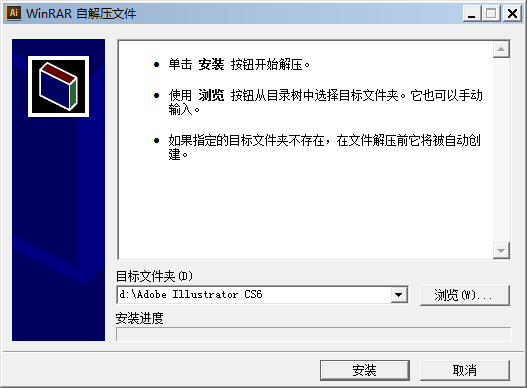
2. The installation process is very simple, just follow the prompts to install. If you encounter the following screenshot interface, please set the specific storage location of the Adobe Illustrator CS6 installation file and click [Browse] to set it.
3. Then enter the Adobe Illustrator CS6 installation interface and select [Install].
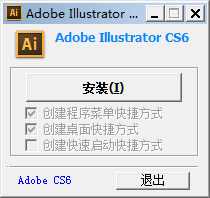
4. Finally, after the installation of Adobe Illustrator CS6 is completed, the following interface will appear. Please select the [X] in the upper right corner to close it.
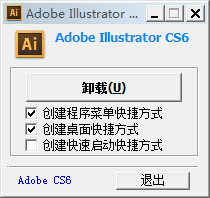
5. If you choose to uninstall, I can only trouble you to choose to install it again.
Adobe Illustrator CS6 common shortcut keys
Toolbox
Move Tool: V
Add anchor point tool: +
Rectangle, rounded rectangle tool: M
View pan, page, ruler tool: H
Selection tool: A
Delete Anchor Point Tool: T
Pencil, Smooth, Erase Tool: N
Default fill and stroke colors: D
Pen Tool: P
Polygon Tool: L
Rotary, turning tools: R
Toggle fill and stroke: X
Adobe Illustrator CS6 configuration requirements
System requirements
Windows
Intel® Pentium® 4 or AMD Athlon® 64 processor
Windows Microsoft® Windows® XP* Service Pack 3 or Windows 7 Service Pack 1. Adobe Creative Suite 5.5 and CS6 applications also support Windows 8. For more information about Windows 8 support, see CS6 FAQ. *
32-bit requires 1GB of memory (3GB recommended); 64-bit requires 2GB of memory (8GB recommended)
2GB of available hard drive space for installation; additional free space required during installation (cannot install on removable flash storage devices)
1024x768 screen (1280x800 recommended), 16-bit graphics card
DVD-ROM drive compatible with dual-layer DVD
Some features in Adobe® Bridge rely on a DirectX 9-capable graphics card (with at least 64MB VRAM)
Mac OS
Intel multi-core processor (supports 64-bit)
Mac OS X version 10.6.8 or 10.7. When installed on Intel-based systems, Adobe Creative Suite 5, 5.5, and CS6 applications support Mac OS X Mountain Lion (v10.8). *
2GB memory (8MB recommended)
2GB of available hard disk space for installation; additional free space required during installation (cannot install on volumes or removable flash devices using case-sensitive file systems)
1024x768 screen (1280x800 recommended), 16-bit graphics card
DVD-ROM drive compatible with dual-layer DVD
Recommended software similar to Adobe Illustrator CS6
1. KeyShot official versionIt is a very excellent professional 3D rendering tool. KeyShot software has powerful functions and can help users easily perform interactive ray tracing and global light rendering. The KeyShot operation interface is quite simple, allowing you to 3D render your works as you wish, meeting our various needs for work and study, and making everyone's work more effective with half the effort.
Download address:http://softwaredownload4.com/soft/1225412.htm
2.CorelDRAW X5It is a professional vector graphics design and production software launched by the Canadian Corel company, referred to as cdr x5. CorelDRAW X5 is powerful. It has fast running speed, precise color control and various practical drawing tools. Users can experience a sense of interactivity while using this tool, so CorelDRAW X5 enables users to achieve rich special effects with a simple operation.
Download address:http://softwaredownload4.com/soft/631983.htm
3.Sketchup2019 Chinese versionIt is a powerful 3D drawing software. The official version of Sketchup 2019 can help users design, record and convey ideas in 3D form, present high-quality 3D images, and experience a diverse 3D production environment. Sketchup2019 software optimizes the online modeler and 3D warehouse, and improves the dwg import and export functions to meet users' various drawing needs.
Download address:http://softwaredownload4.com/soft/10030849.htm
Huajun Software Park provides you with the download of the Adobe Illustrator installation assistant. There is no bundling for online installation, so please feel free to use it.
Huajun editor recommends:
Adobe Illustrator CS6 software is a software with excellent performance, which is obvious to all. Huajun Software Park also hasKeyShot 9,Portraiture filter,Photoshop CCWaiting for related software that is definitely worth downloading and using, come and choose your favorite one!
Version: Chinese version | Update time: 2025-12-02
Similar recommendations





Latest updates





How to use full screen mode in Adobe Illustrator CS6-How to use full screen mode
How to draw a five-pointed star in Adobe Illustrator CS6-How to draw a five-pointed star
How to set keyboard increment in Adobe Illustrator CS6-How to set keyboard increment
How to use the Width Tool in Adobe Illustrator CS6 - How to use the Width Tool
How to use the Transform Tool in Adobe Illustrator CS6 - How to use the Transform Tool
How to scale graphics in Adobe Illustrator CS6 - How to scale graphics in proportion
How to draw a rectangular grid in Adobe Illustrator CS6 - How to draw a rectangular grid
How to use the Inflate Tool in Adobe Illustrator CS6 - How to use the Inflate Tool
Adobe Illustrator CS6 Review
-
1st floor Huajun netizen 2020-02-10 17:42:46Adobe Illustrator CS6 is very useful, thank you! !
-
2nd floor Huajun netizen 2021-08-11 07:28:03The overall feeling of Adobe Illustrator CS6 is good and I am quite satisfied with it. The installation and operation are very smooth! It went very smoothly following the installation step-by-step guide!
-
3rd floor Huajun netizen 2020-03-17 17:05:42Adobe Illustrator CS6 hopes to get better and better, come on!
Recommended products





- Diablo game tool collection
- Group purchasing software collection area
- p2p seed search artifact download-P2P seed search artifact special topic
- adobe software encyclopedia - adobe full range of software downloads - adobe software downloads
- Safe Internet Encyclopedia
- Browser PC version download-browser download collection
- Diablo 3 game collection
- Anxin Quote Software
- Which Key Wizard software is better? Key Wizard software collection




