
-
Memo (desktop memo)
- Size: 5.42M
- Language: Simplified Chinese
- Category: Note management
- System: Win All






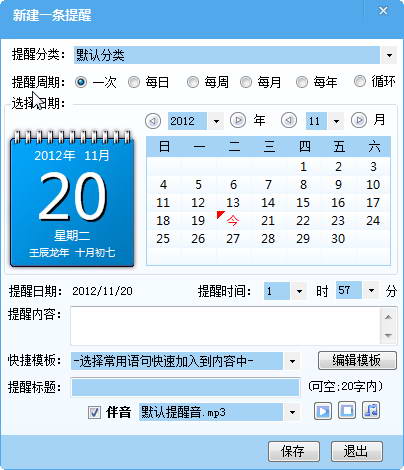
MemoKe (formerly known as Shangpin Memo) is the first software in China to support win7 desktop note and scheduled reminder cloud synchronization. The software is simple to operate. You only need to add the things you want to do to your computer. The Memo Club software will automatically remind you of the things you want to do to prevent you from forgetting. It is very convenient. Huajun Software Park provides you with memo client downloads, welcome to download.
Memo is composed of 3 major modules
1. Support win7 desktop notes;
2. Accurate one-time, day, week, month, year, cycle timed reminders, adding reminder ringtone import, personalized reminders;
3. Simple document management module;
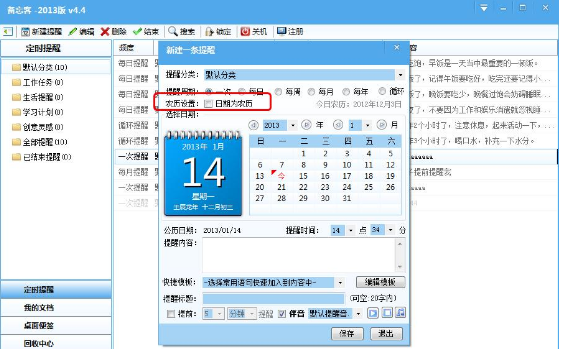
Memo (desktop memo) software functions
1. Memo Guest supports the arrangement and management of various work matters.
2. Effectively overcome procrastination.
3. Memo Client supports scheduled processing of automatic computer shutdown.
4. Accurate reminders at one time, day, week, month, year, and cycle.
5. Reminder supports custom reminder ringtones to personalize your reminders.
6. Memo Manager supports the display and hiding of desktop notes, making it convenient to jot down to-do items.
7. Memo Book supports the collection, summary and organization of documents, and is a powerful tool for accumulating documentation.
8. Data is synchronized in the cloud. With the same account, you can write a plan at home, synchronize it with one click when you arrive at work, and continue working.

memoSoftware features
1. You can choose to customize the sound of the reminder. It’s not because I’m lonely that I miss you..mp3, Super Erhu Mary.mp3
2. You can choose the ringtones that come with the system: SMS ringtone.mp3, Doraemon theme song.mp3, default reminder tone.mp3, soothing and melodious.mp3
3. You can set a voice broadcast time countdown reminder task
4. Able to set a scheduled shutdown to shut down your computer
Memo Guest installation method
1. After downloading the Memo Guest software from this site, get a compressed package locally on your computer. After decompressing it using 360 compression software, double-click the .exe file to enter the software installation guide interface, and click [Next] to continue the installation.

2. Select the installation location of Reminder. You can click [Next], and the software will be installed automatically, or you can click [Browse]. In the installation location interface that opens, you can select the installation location of the software. After completing the selection, click [Next].

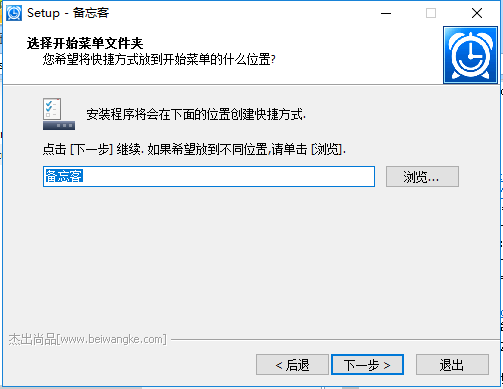
3. Select the installation location of the MemoKeeper shortcut, and click [Next] after completing the selection.
4. When preparing to install Tiwangke, you can first check whether the installation location you selected is correct. If it is correct, click [Install].

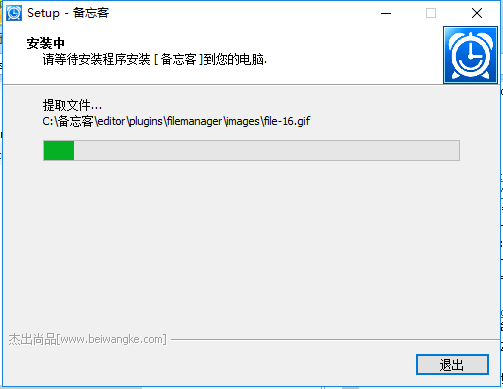
5. Memo is being installed, you need to wait patiently for the software installation to be completed.
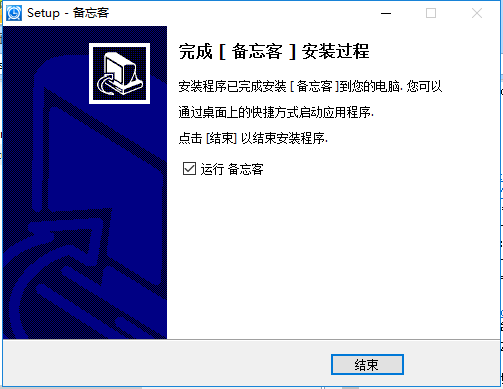
6. The installation of Memo Guest is completed, click [End] to open the software.
How to use Reminder
1. Open the memo software downloaded from this site, and enter the main interface of the software after opening the software. The left side of the software is the categories, the right interface is the things to be reminded, and the top of the software is the function options.

2. If you want to create a new reminder, you can first select a category. There are work reminders, life reminders, study plan reminders, etc. You can choose by yourself. After the selection is completed, click the [New Category] option in the upper left corner of the software.

3. In the new reminder, select the period you want to be reminded, once, daily, recurring, etc. You can choose according to your own needs, select the time of the reminder, and the content to be reminded. After the input is completed, you can also select the ringtone for the reminder, check "Sound", and click [Save] after the selection is completed.

Memo (desktop memo)Software update log
1.[Scheduled reminder] supports the creation of lunar calendar reminders
2. Voice time reporting function [Turn on in settings]
3. Add scheduled shutdown strategy
6. [Desktop Notes] Fixed the problem of double-clicking the border to full screen
Huajun editor recommends:
The editor of Huajun Software Park recommends that you download MemoKe (desktop memo). The software is simple to operate and easy to use. You can use MemoKe software to record the work you have to do every day, so that you can complete your work tasks efficiently. In addition, the L-Vision, Thinking Scheduler, and .NET provided by Huajun Software Park are also pretty good software. If necessary, you may wish to download and try it!
Version: 4.4 Official version | Update time: 2024-12-23
Similar recommendations





Latest updates



How to add background music in python-How to add background music in python
How to configure environment variables in python - How to configure environment variables in python
How to run python - How to run python
How to create a project in python - How to create a project in python
How to make a blue sky background with scratch-How to make a blue sky background with scratch
How to create a linked list in scratch-How to create a linked list in scratch
How to add local programs to scratch-How to add local programs to scratch
How to input Chinese in scratch-How to input Chinese in scratch
How to fire bullets in scratch-How to fire bullets in scratch
Notes (Desktop Notes) comments
-
1st floor Huajun netizen 2022-01-15 13:54:28The interface design of Memo (desktop memo) is very easy to use and has rich functions. I highly recommend it!
-
2nd floor Huajun netizen 2020-05-03 16:01:45Memo (desktop memo) software is very easy to use, the download speed is very fast, and it is very convenient!
-
3rd floor Huajun netizen 2022-02-20 10:43:07Memo (desktop memo) hopes to get better and better, come on!
Recommended products
-

Windows software packages
-

Evernote
-

Mini timed reminder tool
-

Performance Memo
-

Logistics warehouse visitor registration management system software
-

Time-based one-card cashier management system software
-
Memo (desktop memo)
-

Employee points system management work task management system
-

Visitor Management System Software
-

URNotes Desktop Notes
- Diablo game tool collection
- Group purchasing software collection area
- p2p seed search artifact download-P2P seed search artifact special topic
- adobe software encyclopedia - adobe full range of software downloads - adobe software downloads
- Safe Internet Encyclopedia
- Browser PC version download-browser download collection
- Diablo 3 game collection
- Anxin Quote Software
- Which Key Wizard software is better? Key Wizard software collection




