



Seewo teaching whiteboard latest version
The latest version of seewo Teaching Whiteboard is an information-based online learning platform suitable for teachers and students. Seewo teaching whiteboard has built-in rich course resources and supports courseware production, video recording, video editing and other functions to meet the service requirements of teachers for lesson preparation and teaching. Seewo Teaching Whiteboard uses computers to replace blackboards and chalks, perfectly realizing multimedia teaching. Huajun Software Park provides the download service of Seewo Teaching Whiteboard. To download other versions of Seewo Teaching Whiteboard, please go to Huajun Software Park!

Seewo teaching whiteboard software functions
【Integrated preparation and teaching】
Simple functional design makes teaching preparation more efficient. Different elements and animation settings only require simple dragging and clicking, and multiple tools can be called with one click.
【Massive subject resources】
Seewo Whiteboard 5 has launched the "Courseware Library" function, with 1,000+ subject-quality series courseware available for download at any time, as well as 5,000+ course videos, 300,000+ question banks, 800+ mathematical sketchpads, simulation experiments and other course resources.
【Fun classroom activities】
Rich classroom activity templates make it easy to create interactive classes, where teachers and students can participate together, effectively enhancing students' desire to learn.
【Mobile teaching】
Supports mobile phone screen projection, flexibly displays more content, and displays student results at any time; mobile phone controls courseware page turning, mobile phone annotation, and large-screen simultaneous display to better realize mobile teaching.
Features of seewo teaching whiteboard software
1. Generative teaching, classroom has never been so interesting
①Basic tools
There are a variety of tools and animations for you to choose from, and the operation is simple and easy to get started.
②Discipline resources
5,000+ course videos, 300,000+ question banks, 800+ mathematical sketchpads, simulation experiments, etc., covering multiple disciplines.
③Classroom activities
Game-based teaching improves students’ attention and participation.
④Cloud storage
Carry the courseware with you and insert commonly used lesson preparation resources with one click.
2. Seeing the big from the small, the teaching effect is unique
① Mobile phone control large screen
By logging into the same account on your mobile phone and computer, you can achieve dual-screen synchronization, use your mobile phone to control courseware page turning, and use mobile phone annotations to be displayed simultaneously on the large screen...More diverse mobile teaching methods allow teachers to control them freely.
②Show students’ achievements
Use your mobile phone to take photos and upload them to the big screen to display students’ learning results in real time in the classroom. You can also use your mobile phone camera to live broadcast and fully present behavioral details.
3. New views on courseware, control them anytime, anywhere
①Seamless connection of multiple devices
The courseware supports compatible displays on computers, all-in-one computers, web pages and mobile phones.
②Easily share and receive
Supports one-click sharing and receiving courseware, breaking through time and device limitations.
Seewo teaching whiteboard installation steps
1. Download the seewo teaching whiteboard from the Huajun Software Park and unzip it to the current folder. Click the EasiNoteSetup_5.1.19.3676_seewo.exe application to enter the installation wizard interface, and then click the custom option in the lower right corner.
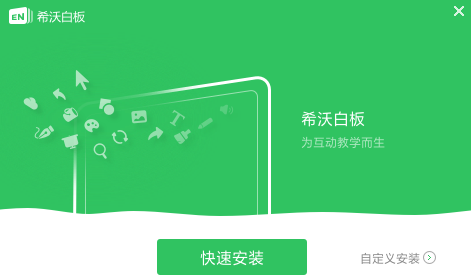
2. Select the software installation location interface. Huajun editor recommends that users install it in the D drive, select the installation location and click Install.

3. The installation of Seewo Teaching Whiteboard is complete, click Finish.
How to use seewo teaching whiteboard
希沃白板5中插入幂函数的图象
First, we open the software and then open a courseware.

Then click on the "Function" pointed by the green arrow in the picture below.
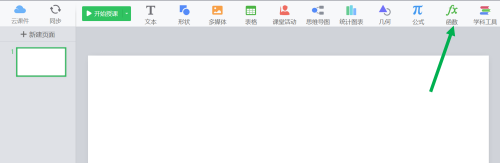
It provides some commonly used function graphs.

At this time we choose "power function".

Then click “Insert Function” in the lower right corner.

The image of a power function is inserted into the courseware.

Seewo Teaching Whiteboard Frequently Asked Questions
Q: Can seewo Whiteboard 5 import PPT?
Answer: Yes. Users can import PPT in the form of pictures through "Cloud Courseware - New Courseware - Import PPT with Background".
Question: Can Seewo Whiteboard 5 be used without internet connection?
Answer: 1) Smart tablet users can use seewo Whiteboard 5 without network connection;
2) When personal PC users use Seewo Whiteboard 5 for the first time, they need to connect to the Internet, register and log in to their account;
After logging in, you can use seewo Whiteboard 5 without network connection.
Question: Can the Seewo Whiteboard 5 account be logged in on multiple devices at the same time?
Answer: Yes. The same account can be used by multiple teachers.
Comparison of similar software
electronic whiteboardIt is completely independently developed, can be OEM, and can change function points at will. The software is rich in functions, simple to operate, and has a friendly interface. It supports common functions such as annotation, whiteboard, material library (pictures and flash), history playback, handwriting input, screen recording, network whiteboard, compass, triangle ruler, spotlight, curtain, etc.
365 electronic whiteboardIt is a small, green and free software that assists teaching. It is used for slide presentations. During live teaching, it is convenient for the speaker to explain and explain on the screen with the mouse. It has functions such as electronic pointer, screen writing, screen drawing, screenshots, partial amplification and other functions.
Seewo Teaching Whiteboard Update Log
【Optimization】
-Mind maps support inserting formulas and mixing them with text
-Formula supports custom colors
-Writing in desktop mode is smoother
Huajun editor recommends:
Seewo teaching whiteboard has built-in rich course resources and supports courseware production, video recording, video editing and other functions to meet the service requirements of teachers for lesson preparation and teaching. Seewo Teaching Whiteboard is very easy to use. The optimized operation interface allows you to easily find the functions you want. Come and download it.




Useful
Useful
Useful