




Network disk resource search artifact software function
Ability to search for shared resources on more than a dozen domestic network disks
You can share your favorite resources with your friends as you like
Support online collection of resources to the cloud for viewing at any time
Quickly record text, synchronize text information between computers and mobile phones, and use safe and reliable cloud notes
Chat with network disk friends, quickly add address books, and make nearby people friends
Multiple device login management, application lock, my TV box, and more surprises are waiting for you to discover
Log in to the network disk safely/receive network disk gift packs/access web links/add QR code address book, all to make your use easier
Supports sending voice/picture/text/large files, and supports multi-person group chat. Chat records automatically roam, making communication more seamless
Features of network disk resource search artifact software
RES(千万资源一网打尽)在“搜百度盘”APP中,你可以搜索任何想要的资源。 Baidu cloud disk resources with tens of millions of data volumes, there is always something that will satisfy you.
CLCT (online collection available for review at any time):
In the "Sou Baidu Disk" APP, you can selectively collect any resources you want online and view them at any time; in addition, the "Sou Baidu Disk" APP allows you to log in to your Baidu cloud disk account only once, and then keep saving resources online, eliminating the trouble of frequent logins. Of course, you can optionally log out of your account manually.
SHARE (share complementary resources as you wish):
In the "Sou Baidu Pan" APP, you can selectively share any resources online with your friends; long press a result item to share complementary resources as you like.
SKIN (personalized skin customized by you)
"Sou Baidu Pan" APP interface is minimalist in design, simple and beautiful; in addition, in "Sou Baidu Pan" APP, you can choose any color you like as the background color of the APP interface. With so many colors, there is always one that suits you.
Network disk resource search artifact installation instructions
1. Download the network disk resource search artifact from the Huajun Software Park, and you will get a software compressed package.
2. Then we decompress the software compressed package and obtain the network disk resource search artifact .exe application.

3. Finally, double-click to open the network disk resource search artifact.exe application, and you can use it directly.
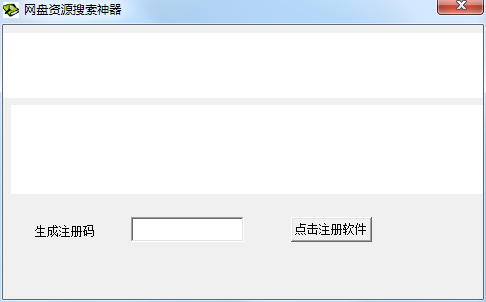
Instructions for use of network disk resource search tool
1. After opening the software, enter the resources you want in the keywords and click search.
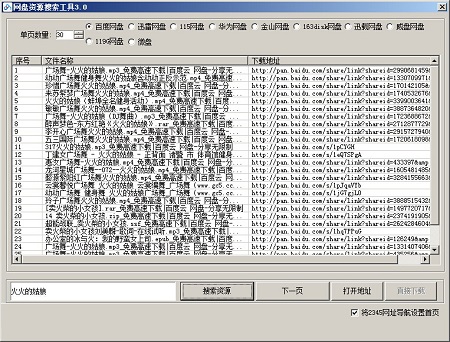
2. The search is in the list below. You can see the resources you are searching for. Double-click the resource to open the download address.
3. The software has added a casual search function, which automatically enters keywords after clicking.
Comparison of similar software
Lanzuo Cloud Resource SearcherThe official version is a more practical network backup software. Lanzou Cloud Resource Searcher supports scanning blue cloud resources and direct downloading. You can scan and get the resources you want. The functions of Lanzuo Cloud Resource Searcher are similar to those of similar network disk software, including: file upload, file download, breakpoint resume, historical query, and new folder creation, etc.
emule resource searcherIt is an eMule resource search engine platform search software. It is a completely free and open source P2P resource download and sharing software. It can search for eMule ED2K download addresses of various resources. The eMule resource searcher is a real eMule resource search artifact. The software has a built-in "otaku search mode".
Huajun editor recommends:
Network disk resource search toolThere are a large number of network disk resources in it. You can quickly search with one click and view various resources at any time. It supports online viewing and downloading. The network disk resource search tool is so easy to use. It is one of the best software among search engines. I believe friends who have used it will say it is easy to use.












Useful
Useful
Useful