





Things to note:
inmacWhen downloading and installing software, you will generally encounter the following three error situations. Now the editor of Huajun will give you the answers. If you encounter errors, please read them carefully:
1."...The software is corrupted and cannot be opened. You should move it to the Trash"
2."Can't open...software because it comes from an unidentified developer"
3."Can't open...software becauseAppleUnable to check if it contains malware"
When encountering the above three situations, we should:
1. First set:Open any source
2, most software settings can be downloaded and installed normally after opening any source; a small number of softwareiosRestrictions on unsigned application permissions require the execution of command line code to bypass application signature authentication. Therefore it is necessary to:Execute command bypassiosnotarizationGatekeeper.
3. If none of the above operations can solve the problem, then you need to:CloseSIPSystem integrity protection.
NetEase Youai For Mac main functions
Chat communication: Friendship group chat chat enhancementChatHistory Chat Filters Chat Bars Player Menu Enhancements
Combat interface: buff time, floating combat information, combo point displaySkillsSpecial effects alarm, extra action bar, gear health prompt...
Interface enhancement: avatar enhancement, drop-down menu enhancement, panel movementbuttonBeautify Recast Assistant Chocolate Message...
Items and equipment: backpack integration, one-click outfit change, backpack organization, equipment attribute conversion, gem aidHand automatic vending assistant...
Map missions: mission handover enhancement, rare elite detection, map enhancement, NPC mark
Team copy: small copyStrategy Team member information statistics, one-click dispersal, team alarm, damage statistics, world mark assistant...
Business transactions: auction search, automatic repair and sales, email enhancement...
Professional plug-in: combo point display and one-click dispersal
Features of NetEase Youai For Mac software
1. A picture tells the truth, a picture is worth a thousand words
Using the Youai plug-in, you can play in the gamescreenshot, and send it to other players.
Youai Screenshot supports secret words, battle network, guild channel, dungeon channel, team, group, battlefield... almost all chat types.
Use the graffiti function of Youai Screenshot to make your tactical command just "poke the screen with your hand"!
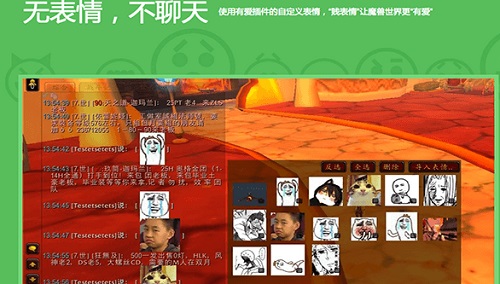
2. No expression, no chatting
Use the custom emoticons of the Love plug-in to make World of Warcraft more "loving" with "cheap emoticons".
3. You love the built-in browser and X-girl teaches you how to play World of Warcraft
Don’t know high-end players? It’s okay. If you have any questions, please use Baidu!
Players from the enemy camp can also view the hero list!
4. NetEase Youai cloud synchronization
No matter where you are, it’s the sameHave love"!
NetEase Youai For Mac FAQ
Sign-in steps:
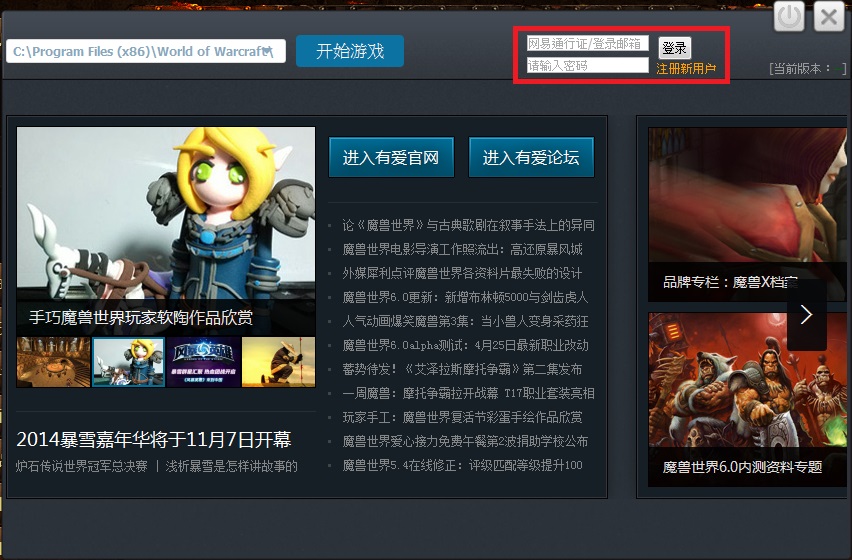
1. After opening the client, enter the NetEase Pass account/password in the upper right corner to log in. You only need to enter it once. You will automatically log in after opening the Youai client.
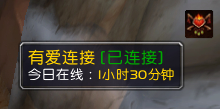
2. Click the "Start Game" button in the client and log in as the character to enter the game. At this time, Youai's sign-in buff will be displayed in the buff area in the upper right corner. If it is gray, you can wait for a few seconds and it will turn into a colored sign-in logo. If it is always gray, please confirm whether the Youai client is open.
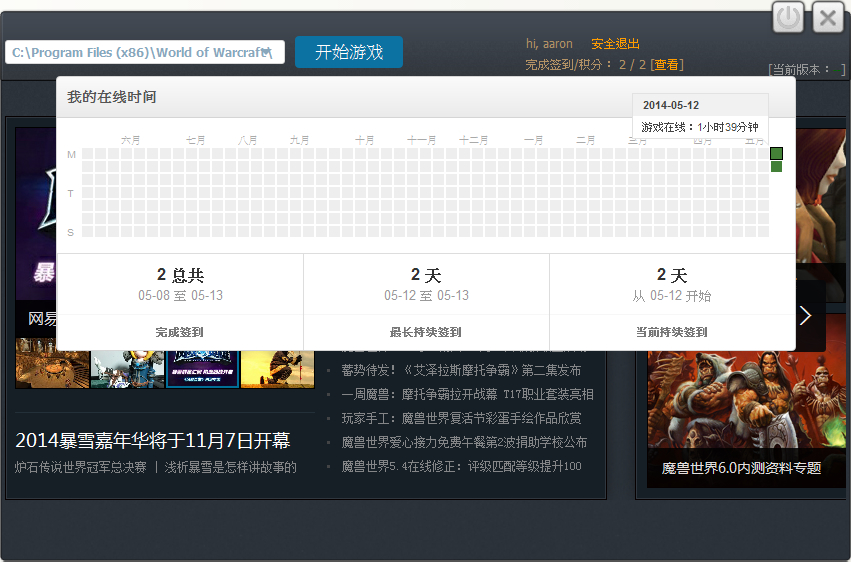
3. After being online for more than half an hour, it will be regarded as a successful sign-in and one sign-in will be accumulated.Points, the sign-in points can be exchanged for point cards or more exquisite gifts in the future.
NetEase YouAi For Mac update log
Routine updates
Disable the fade effect of the mouse prompt frame
Fixed the function of shielding numbers in floating battle information
Fixed the problem of transaction failure when moving the transaction record panel
Fixed the problem of invalid invitation button in right-click menu
职业快捷按钮新增盗贼速效药膏
Nostalgic version update
Team framework Grid2 settings page Chinese update
Huajun editor recommends:
Believe me, as long as you use NetEase Youai For Mac and other gaming and entertainment software, you can uninstall it, and it will definitely meet all your needs. The editor has also carefully prepared for youSTART-Tencent Cloud Games,vice city 2,Tencent Mobile Game Assistant,Wii emulator Dolphin,Close window Mac version












Useful
Useful
Useful