




- Green versionView
- Green versionView
- Green versionView
- Green versionView
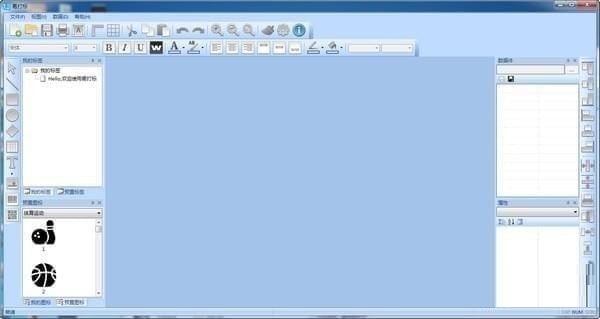
Basic introduction to Yimark barcode label printing software
The official version of Yimark barcode label printing software supports drag-and-drop operation. It is a powerful, professional, and easy-to-use label barcode printing software and batch printing tool. Suitable for: design, production and batch printing of e-commerce labels, anti-counterfeiting labels, logistics labels, commodity labels, sales labels, food labels, pharmaceutical labels, jewelry labels, book management labels, hang tags, cards, business cards, name tags, etc. Strictly follows the "look and feel" standards of Microsoft software design, so the operation is very simple. The barcode, text and graphic formats fully comply with the simple and intuitive mouse operation method. At the same time, it has powerful and flexible software integration, making it the leader in label design and printing software.
Easy to mark barcode label printing software software features
Extremely simplified design
Interactive design, rich controls, WYSIWYG effect.
Multiple barcode support
The official version of Yimark barcode label printing software is compatible with all types of commonly used one-dimensional and two-dimensional barcodes, and encapsulates ZPLII/PPLA/PPLB label-specific language parsers.
Print management
Ultra-lightweight resident service supports USB/TCP/LPT/COM and other mainstream printing port settings to achieve shared printing.
Data source configuration
Proprietary tag format file, tag content is dynamically bound to the data source, provides a data configuration engine, and can arbitrarily read authorized database records in the network.
Excel plug-in
An original Excel plug-in, after installation, an easy-to-mark function menu will appear in Excel, and the data table function of Excel can be used to realize label printing.
Application integration
The full API interface mode provides OCX plug-ins and rich API calls. Developers can easily and quickly integrate easy-to-mark functions and designers into various systems such as C/S and B/S.
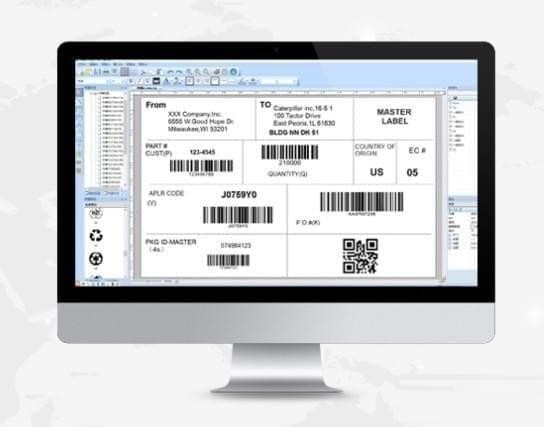
Introduction to the functions of EasyMark barcode label printing software
1. Overall introduction
1. The functional layout is clear and concise, and the navigation design makes it easy to get started;
2. The official version of EasyMark barcode label printing software has a built-in label wizard, multi-row and multi-column label format settings, and enables multiple prints in one line;
3. Provide single and multi-line text modes, Windows font support, inverse color, foreground and background color effects;
4. Can draw various graphic symbols such as lines, boxes, circles, diamonds, tables, etc.;
5. Vectorization of pictures, text, and barcodes, high-definition output, and arbitrary rotation;
6. Support mainstream one-dimensional and two-dimensional barcode formats and barcode parameter settings;
7. Provide N types of templates for logistics, export sales, e-commerce, clothing and other industries, with free one-click copying;
8. Hundreds of vector icons for industry, medical, packaging, certification, payment, etc. are preset for any use;
9. Not only labels, but also delivery orders, logistics orders, invoices and other documents are printed as well;
10. Users can create their own templates, upload icons, and share them to the public market with one click for communication and sharing;
2. Print settings
1. You can choose to print to a printer, file, or output the label as a picture;
2. Complete printing log audit and provide label reprinting function;
3. Support local/network shared printing, and adapt to the paper size when printing;
4. Configurable LPT/COM/USB/TCPIP and other forms of printing device connections;
5. Provides a print preview function, and can manually temporarily input or read the print content from an Excel file during preview;
3. Data source configuration
1. Data source ADO configuration, connect to SqlServer, MySql and other databases, or Excel, xml files;
2. By writing Sql or view and defining the data set from the data source, real-time data can be read from the database;
3. Text, barcode and other controls can be set as data files and assigned aliases to indicate dynamic reading of the content;
4. Finally, complete the association binding between the label data piece and the data set field, and the data can be retrieved from the database when printing;
5. The label of the data set is bound, and the data filtering interface will automatically pop up when printing. The user can customize the query conditions and randomly select the database records to be printed;
4. The Office label plug-in, unique to the entire network, turns Excel into a labeling tool in seconds
1. After the installation of Yimark V3.6 is completed, the Yimark proprietary menu can be implanted in Excel to achieve functional integration;
2. It has its own account system, which can be synchronized with the easy-to-mark account assigned by the cloud or local area network depending on the version;
3. The entry template can be dynamically generated based on the label data file, and the data can be directly entered for marking in Excel;
4. Label design operations can be performed directly in Excel, and label formats and print data can be synchronized with the cloud;
EasyMark barcode label printing software update log
Add pictures and change picture content
Huajun editor recommends:
Children's shoes, Yimark barcode label printing software can definitely meet your needs. From the software interface to the software functions, it is absolutely eye-catching. Welcome everyone to download and use it! There are similar software on this siteLightning PDF Virtual Printer,Lodop print control,Kaibo delivery note printing software,Jingda Express Invoice Printing Software,Easy to mark barcode label design and printing software!




Useful
Useful
Useful