




AIMPSoftware Highlights
Game soundtrack playback and collection
Players can use AIMP to organize and play classic game OSTs, support the creation of exclusive game music playlists, and use visual effects to enhance immersion.
Game development aids
Sound effect test: Use equalizers and plug-ins to adjust sound effect parameters in real time to quickly verify the rationality of the in-game sound design.
Resource management: Use the tag editing function to rename game sound effect files in batches, and unify naming standards (such as "SFX_Weapon_Fire_01.wav").
Live broadcast/screen recording background music
Low-latency playback combined with global hotkey control makes it easy for anchors to seamlessly switch BGM in the game.
MOD production and localization
When replacing the game soundtrack, AIMP's format conversion function can quickly convert the audio to a compatible format (such as converting FLAC to OGG to reduce file size).
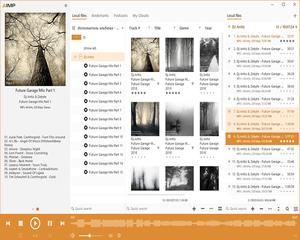
AIMP softwareFeatures
1. There is a Chinese version
Many foreign software do not have Chinese versions, but AIMP supports 79 total languages, which is similar to PotPlayer and 7Zip. Not Foobar2000, BeoPlayer never had a Chinese version.
2. Very little resource usage
The operation mode of AIMP is similar to the old player Winamp, but it has more advantages than Winamp. More and better features. AIMP has a gorgeous interface, but it is very resource-saving. AIMP takes up very little memory when executed. After being reduced to the system column, it takes up even less memory.
3.Support equalizer and DSP
and Winamp,KuGou MusicLike other music players, AIMP It has a built-in equalizer and provides some preset values, such as heavy bass, metal music, pop music, rock music, jazz, classical music, etc. However, I rarely use an equalizer or DSP plug-in to maintain the original state of the music. If you think the sound is not loud enough, you can use gain.

AIMP software features
Multiple format support
Supports playback of 30+ audio formats such as MP3, AAC, FLAC, WAV, OGG, MP4, M4A, etc., and is compatible with various background music and sound effect files in games.
Supports CUE index files, which can accurately split lossless audio albums, suitable for game development or localization testing that require high-quality sound effects.
Audio enhancement and processing
18-band equalizer: Customizable frequency bands can be adjusted to optimize the layering of game sound effects (such as enhancing low-frequency footsteps or high-frequency gunshots).
Sound effect plug-in support: further enhance sound performance through Winamp DSP plug-ins (such as DFX, Bass Boost), suitable for simulating surround sound effects in games.
Volume normalization: Automatically balance the volumes of different audio files to avoid sudden volume changes when the game switches scenes.
Playlist and tag management
Supports smart playlists (sorted by ratings, recently played, etc.) to facilitate the organization of game original soundtracks (OST) or sound effect material libraries.
The built-in tag editor can batch modify the metadata of audio files (such as title, artist, album cover) to facilitate game resource management.
Lightweight and low resource usage
The installation package is only about 10MB, and the memory usage is low during operation. It is suitable for reducing system burden when playing game BGM in the background.
AIMP software FAQQ: How to create a smart playlist?
A: Right-click the playlist area → select "New Smart Playlist" → set rules (such as filtering by ratings, play times, file paths) → automatically update the content after saving.
Q: The equalizer presets are not enough, how can I customize it?
A: Click "Add" on the equalizer interface to save the current settings as a new preset; right-click the preset name to rename or delete it. Supports import/export of preset files (.eqf format).
AIMP software update log
1. Fixed several bugs;
2. Optimize details;
Huajun editor recommends:
AIMP is a good game and entertainment software. If you are interested, please download it and use it. I believe you will definitely like it.Steam,Samurai Shodown II,5ea assistant,Fanggezi Net Entertainment Platform Internet Cafe Client,Fist of the North StarIt is also a good software and is recommended for students to download and use.













Useful
Useful
Useful