
If you are looking for software to use, go to Huajun Software Park! software release AI product list

Hello, if there is a need for software inclusion, please package the software and attach the software name, software introduction, software-related screenshots, software icon, soft copy, business license (if you do not have a business license, please provide the front and back of the corresponding developer ID card and a photo of yourself holding the ID card), and send it to email http://softwaredownload4.com/sbdm/user/login

Close >>

Send to email:news@onlinedown.net

Close >>

Location: Home pageAndroid softwareApplicationUtility tools Jinzhou projection screen

96.08%

3.92%
QR code

Scan the QR code to access the mobile version

Permissions: View

The following important permissions need to be called
uses-permission:'android.permission.SYSTEM_ALERT_WINDOW', allows the program to display the system window
uses-permission:'android.permission.SYSTEM_OVERLAY_WINDOW'
uses-permission:'android.permission.READ_LOGS', allows the program to read the system's underlying logs
uses-permission:'android.permission.ACCESS_COARSE_LOCATION', allows the program to obtain the user's erroneous latitude and longitude information through WiFi or mobile base stations
uses-permission:'android.permission.ACCESS_FINE_LOCATION', allows the program to receive satellite positioning information through the GPS chip
uses-permission:'android.permission.INTERNET', allows the program to access the network connection, which may generate GPRS traffic
uses-permission:'android.permission.CAMERA', allows the program to access the camera to take pictures
uses-permission:'android.permission.VIBRATE', allows the program to vibrate
uses-permission:'android.permission.RECORD_AUDIO', allows the program to record sound through the microphone of the phone or headset
uses-permission:'android.permission.CHANGE_NETWORK_STATE', allows the program to change the network status, such as whether it is connected to the Internet
uses-permission:'android.permission.CHANGE_WIFI_STATE', allows the program to change the WiFi state
uses-permission:'android.permission.ACCESS_NETWORK_STATE', allows the program to obtain network information status, such as whether the current network connection is valid
uses-permission:'android.permission.ACCESS_WIFI_STATE', allows the program to obtain the current WiFi access status and WLAN hotspot information
uses-permission:'android.permission.FOREGROUND_SERVICE'
uses-permission:'android.permission.ACCESS_NOTIFICATION_POLICY'
uses-permission:'android.permission.EXPAND_STATUS_BAR', allows the program to expand or shrink the status bar
uses-permission:'android.permission.REQUEST_INSTALL_PACKAGES', allows access to installed applications from unknown sources
uses-permission:'com.google.android.gms.permission.AD_ID'
uses-permission:'android.permission.WRITE_EXTERNAL_STORAGE', allows the program to write to external storage, such as writing files on the SD card
uses-permission:'android.permission.READ_EXTERNAL_STORAGE', the program can read files in the device's external storage space (built-in SDcard and external SDCard)

Jinzhou Screen 2.3.5

Special area
Software size:13.1 MB
software language:Simplified Chinese
Software rating:
Software type:Domestic software
Software licensing:shareware
Update time:2024-12-31
Application platform:Android
Software classification:Utility tools
version:2.3.5
Registration number:Guangdong ICP No. 17131757-14A
Software vendor:Jiangxia Information Technology (Huizhou) Co., Ltd.

Software introduction Related topics FAQ Other versions Download address

Basic introduction
Jinzhou screen section first LOGO
Jinzhou Screen Mirroring app is a convenient mobile phone screen mirroring application that supports a variety of screen mirroring scenarios and methods. It has various convenient management functions and can be operated and used at any time. It is very rich in functions and easy to use.Huajun Software Park provides the download address of the official version of Jinzhou Screen App. Users in need can download and use it for free!

Screenshot of Jinzhou Screencast

Introduction to Jinzhou screen projection software

Jinzhou Screen Mirroring is an ultra-clear screen mirroring software with stable connection and cross-space mobile phone screen mirroring. It adopts mainstream WiFi wireless screen mirroring technology and perfectly supports mobile devices. The screen mirroring is stable and smooth, audio and video are synchronized, and you can experience 2K resolution picture quality. Turn on WiFi screen mirroring, no data cable is required, fast screen mirroring is easy to connect, and conference presentations are more efficient; screen mirroring audio and video are synchronized, ultra-clear, stable and smooth screen casting, and a large-screen experience is achieved.
Screenshot of Jinzhou Screencast

Features of Jinzhou screen projection software

Multiple ways to cast your screen with one click

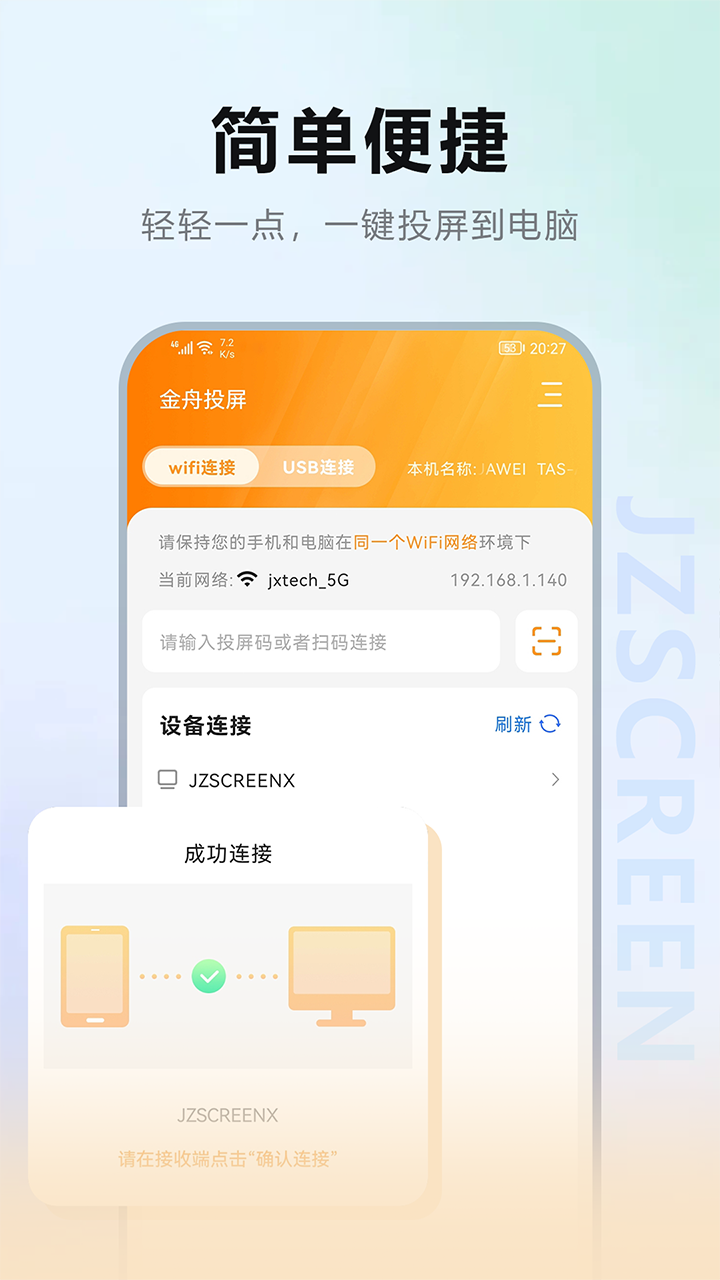
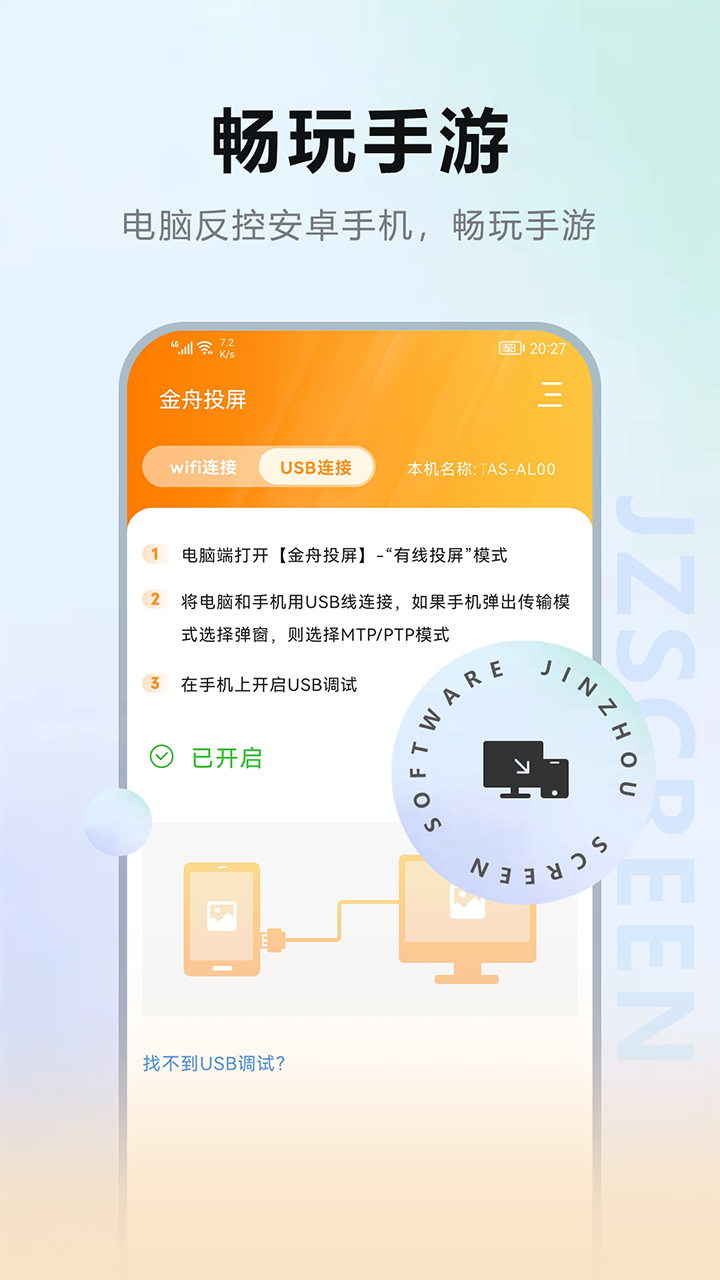
-Supports WiFi quick screencasting, USB screencasting to computer, you can also choose to scan the QR code to cast the screen, use the screencasting code to cast the screen, and enjoy the fun of screencasting in a variety of screencasting methods!

Computer counter-control Android devices

The computer can control Android devices. It is very convenient for the computer to reply to mobile phone messages. You can also experience the fun of playing mobile games with a keyboard and mouse!

Advantages of Jinzhou screen projection software

   Video call screencasting

The video chat image is too small, support video chat screen projection to TV;

   Mobile game screencasting

You can cast mobile games to your TV, and enjoy the big-screen TV experience with mobile games such as Peace Elite and Honor of Kings;

​​​​​​​​​​​​​​​​​​​​​​​​​​​​​​​​​​​​​​​​​​​​​​​​​​​​​​

                                                                             With one click, mirror PPT/documents from mobile phones and “PPTs” from computers to the large conference screen to make meetings more efficient and convenient;

      Local photo album screencast

​​​​​​​​​​​​​​​​​​​​​​​​​​​​​​​​​​​​​​​​​​​​​​​​​​​​​​​​​​​​​​​​​​​​​​​​​​​​​​​​​​​​​​​​​​​​​​​​​​​​​​​​​​​​​​​​​​​​​​​​​​​​​​​​​​​​​​​​​​​​​​​​​​​​​​​​​​​​​​​​​​​​​​​​​​​​​​​​​​​​​​​​​​​​​​​​​​​​​​​​​​​​​​​​​​​​​​​​​​​​​​​​​​​​​​​​​​​​​​​​​​​​​​​​​​​​​​​​​​​​​Project local photos, videos, and files to your TV or computer screen to enjoy the big screen. Watching the big screen will make you love screen casting even more;

Online video casting

Supports native casting of 3,000+ video APPs such as Douyin, Kuaishou, and Bilibili, and can cast high-definition online videos at will. After the phone successfully casts to the TV, the phone can exit the playback interface and perform any operation.

FAQ


1. Screencasting connection problem

Unable to find device

Solution:

Make sure the phone and computer are on the same Wi-Fi network or in the same LAN environment.

Check whether the Jinzhou screen mirroring software on your mobile phone and computer is the latest version. You can download the latest version from the Jinzhou Software official website.

Try restarting your phone, computer, and router to eliminate possible network interference.

Connection failed

Solution:

Check the firewall settings to ensure that the Jinzhou Screen Mirroring software is allowed to pass through the firewall.

If you are using a USB connection, please ensure that the USB debugging mode of your phone is turned on and the correct USB driver is installed.

2. Problems with screen projection effect

The screen projection is not clear

Solution:

Adjust the projection resolution in the Jinzhou projection software and choose a higher resolution to get a clearer picture.

Make sure the screen resolution settings of your phone and computer match to avoid blurry images caused by resolution differences.

Screencast sound cannot be synchronized

Solution:

Check the volume settings on your phone and computer to make sure the volume is on and not muted.

If it is an Android phone, you can turn off the phone microphone in the Jinzhou screen mirroring software and select the system sound as the screen mirroring sound source.

Jinzhou Screen Mirroring update log

Working day and night just so you can be happier

Mummy, Mummy, coax~all the bugs are gone!

Huajun editor recommends:

After seeing the introduction provided by the editor of Huajun Software Park above, are you already ready to take action? Then quickly download Jinzhou Screen Mirroring and use it. Huajun Software Park also providesJianxin Rongtong,Universal charger,professional ability,Orange Heart Digital,calculatorWaiting for you to download and use.

FAQ

Associated version