
-
Extreme Wubi input method
- Size: 7.08M
- Language: Simplified Chinese
- Category: Pinyin input
- System: Win all






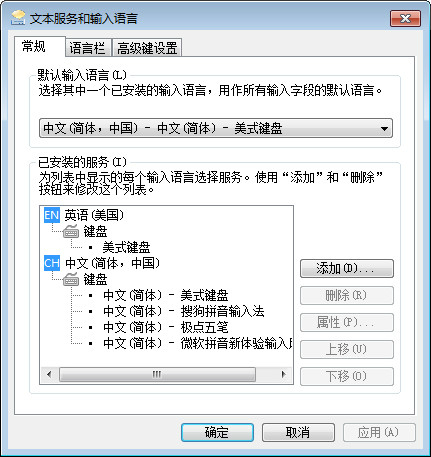


Extreme Wubi input methodThe official version is a free multi-functional WubiPinyinInput software mainly uses Wubi input method, supplemented by Pinyin input. The default Wubi input method is traditionalWubiThe interface adopts the standard 86 version Wubi font scheme, and supports Wubi 98 version and other font code schemes. The official version of Jidian Wubi input method can continue to input after making a mistake. When used, it combines Wubi typing and pinyin.typingThe functions of the two are that if you know Wubi, you can type Wubi, and if you don't know Wubi, you can type Pinyin directly. Huajun Software Park provides you with the download address of the official version of Jiji Wubi Input Method!
How to use the Jidian Wubi input method
How to switch between Simplified and Traditional Chinese in Jidian Wubi Input Method? What are the shortcut keys for switching between Simplified and Traditional Chinese in Jidian Wubi Input Method?
The first method
1. Switch the input method to JiJie Wubiinput methodFinally, use the left mouse button to click the "simplified" option on the tool box.

2. After that, it becomes the word "Traditional", indicating that it has been switched to Traditional Chinese.

The second method
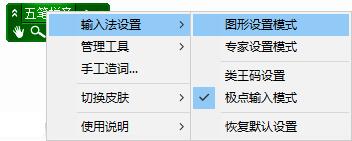
1. Right-click the mouse on the toolbar of Jidian Wubi Input Method, point the mouse to the "Input Method Settings" column in the right-click menu, and then click the "Graphics Settings Mode" option in the submenu.
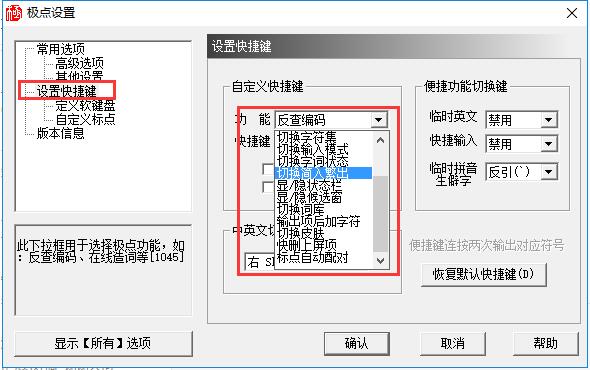
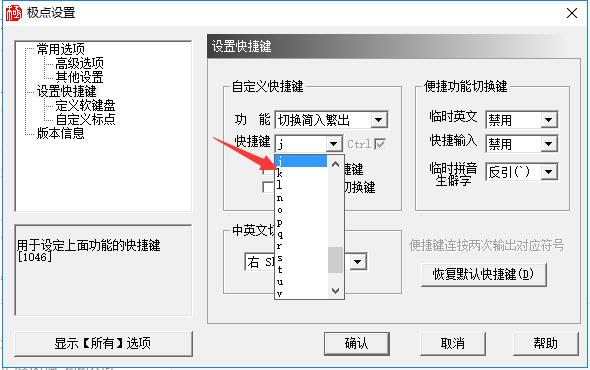
2. Switch the new window that opens to "Settings"Shortcut keys"Function page, under "Customized shortcut keys", set "Function" to "Switch Simplified In and Traditional Out". Then you can choose your favorite shortcut keys in the "Shortcut Keys" column below. It should be noted that the "Ctrl" at the end is checked by default, so when using the shortcut keys, you need to press the "Ctrl" key at the same time.
JiDian Wubi FAQ
What should I do if the candidate box of Jipian Wubi Input Method is missing?
Method 1:
1. Right-click the mouse on the JiDian Wubi input method toolbar, point the mouse to the "Input Method Settings" column in the right-click menu, and then click the "Graphics Settings Mode" option in the submenu.

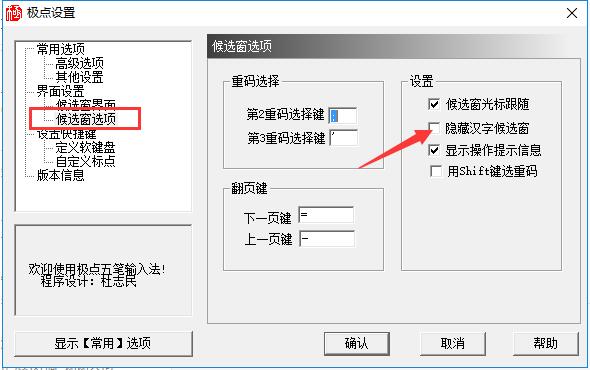
2. Switch to the "Candidate Window Options" function page under "Interface Settings", click to uncheck the "Hide Chinese Character Candidate Window" option on the right, and then confirm the modification.
Method 2:
1. Right-click the mouse on the JiDian Wubi input method toolbar, point the mouse to the "Input Method Settings" column in the right-click menu, and then click the "Expert Settings Mode" option in the submenu.

2. Find the "HideCandWnd" column, change the number after "=" to "0" to unhide it, and then save the changes.

What should I do if the candidate box is missing?
Retrieve via graphics settings mode:
Click the right mouse button on the JiDian Wubi Input Method toolbar and select “Graphics Settings Mode” in “Input Method Settings”.
Switch to the "Candidate Window Options" function page under "Interface Settings", uncheck the "Hide Chinese Character Candidate Window" option on the right, and then confirm the modification.
Retrieve through expert setting mode:
同样在极点五笔输入法工具栏上单击鼠标右键,选择“输入法设置”中的“专家设置模式”。
Find the "HideCandWnd" column, change the number after "=" to "0" to unhide it, and then save the changes.
The input method status bar cannot be displayed or called up?
Use the shortcut keys to bring up: Press Ctrl+← (that is, the combination of Ctrl and the left shift key) once or twice to bring up the status bar icon that comes with the Jipin Wubi input method.
Adjustment through system settings: right-click the input method icon to enter the input method management interface, check and adjust the settings of the Jiji Wubi input method to ensure its normal display.
Features of Jidianwubi software
1. Jidianwubi input method is the first input method with built-in dictionary function
2. The first plug-in input method
3. Beautiful and practical status bar
4. The command through train has expanded the following functions:
①$F output local text function;
$P output position function; (for the corresponding function description, see the help of Pole 5.0)
Use the encoding: zzka, zzkb to open the corresponding soft keyboard function;
④ Minimize the desktop window: tray $xtray
⑤Open the CD-ROM drive: opencd $xopencd
⑥Switch speaker: mute $xmute
⑦Pole directory variable: dirr $X[Pole directory]%freewb%
5. Add typing sound effect function. It is turned off by default, set in advanced settings, and does not occupy resources when turned off;
6. A more beautiful and practical status bar. Jidian has further expanded the status bar skin, with two states of contraction and expansion, which is more beautiful and practical. The various states and common functions of the input method are clear at a glance.
7. Further optimize the retrieval algorithm, which not only reduces resource usage, but also improves retrieval speed.
8. Various problems found in previous versions have been corrected, especially key errors such as illegal activation of speaker alarms. The speaker alarm function has also been improved. Users can customize the alarm sound files for empty codes and repeated codes.
Extreme Wubi software functions
1. Automatic phrases
2. Universal key
3. Phrase association
4. Prompt system already has phrases
5. Intelligent hidden phrase function
6. Related functions of maintaining thesaurus
7. Typing sound effects
8. Backup and recovery of system configuration and vocabulary
9. Super long phrase annotation function (enter the code sfna to see the effect)
10. Multi-line phrase support function
11. Input function for uppercase numbers, amounts and any dates
12. JiDian Wubi input method has built-in "Advanced Chinese Dictionary" (only supports Simplified Chinese system)
JiDieWuBi installation steps
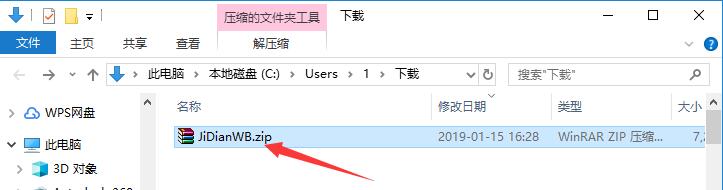
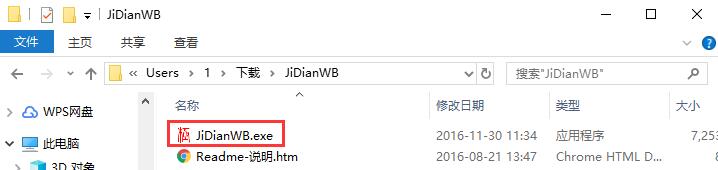
1. Download the Jidian Wubi Input Method software package from Huajun Software Park, unzip the compressed package, and double-click with the left mouse button to open the installation file.
Note: To decompress the compressed package, you need to use a compression and decompression tool. WinRAR is recommended because the technology is mature and reliable. WinRAR download address:http://softwaredownload4.com/soft/5.htm
2. Enter the installation program and read the software-related license agreement. If you have no objections, click the "I Accept" button below to agree to the agreement and proceed to the next step.
3. Click "Browse" to select the installation directory of Jipin Wubi. It is not recommended to install on the C drive. If there are too many files on the C drive, it will affect the running speed of the computer. After selecting, click "Install".

4. Wait for Jidian Wubi to be installed. This process takes about 5 minutes.
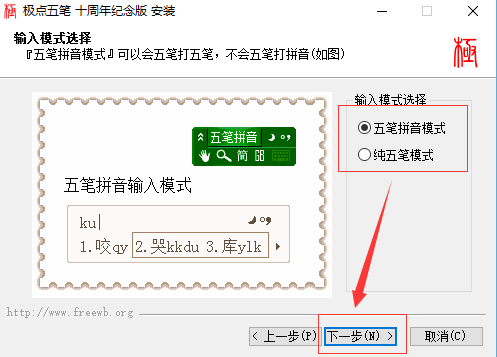
5. Then, according to the user's usage habits, choose to use the Wubi + Pinyin input mode or the pure Wubi mode, and then click "Next".
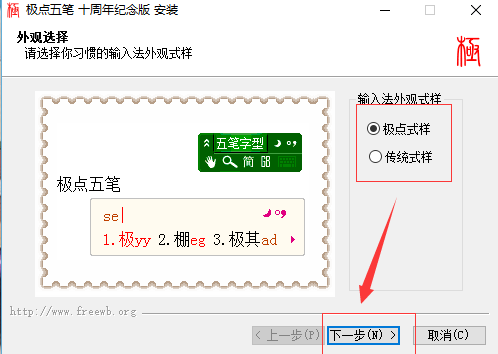
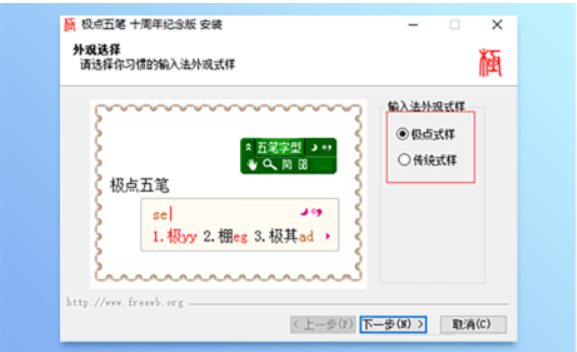
6. Choose the appearance of JiDian Wubi. There are two types: "JiDian Style" and "Traditional Style". Users can see a preview of the style on the left. After selecting, click "Next".
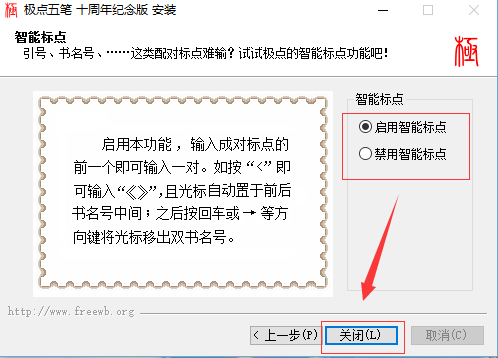
7. Choose whether to enable the smart punctuation function during the input process, and finally click "Close".

8. Afterwards, it will prompt that the installation is successful, then click "OK".
Correction content of JiDie Wubi
1. Correction: When JiDian Wubi is set as the default input method, Windows cannot enter the desktop.
2. Fixed: The problem of being unable to switch when opening multiple word or Excel files
3. Correction: The problem of closing the pole when editing the user code table and exiting the editing is illegal.
4. Correction: Problem with letters in reverse order or on the screen under Opera and other software
5. Correction: Shift+letters+numbers, then enter a space and the input content appears on the screen.
6. Optimization: candidate window display
7. Correction: Some codes under Erbi cannot be displayed on the screen using punctuation top items.
8. Improvement: The installation package and registry.exe support silent installation
9. Improvement: the simple and complex changes of certain words and phrases
10. Improvement: The candidate window does not follow the cursor
11. Improvement: Drag processing of candidate window and status bar
12. Improvement: Add a setup wizard to the Jidian Wubi installation interface
Extreme Wubi update log
1. Optimized some functions
2. Solved many unbearable bugs
Huajun editor recommends:
Jidian Wubi input method is a Wubi input method with a very high user usage rate. It is easy to use and the software is compact. Users who have used Wubi input for a long time will definitely favor the Jipin Wubi input method, so come and download it. The editor has also prepared Magnum Wubi, .NET, and Cloud Machine Manager for you
Version: 10.8.9 | Update time: 2025-10-23
Similar recommendations





Latest updates





How to use the Jidian Wubi input method - Tutorial on using the Jidian Wubi input method
How to use Jidian Wubi Input Method - Steps to type special symbols using Jidian Wubi Input Method
How to use JiPoint Wubi input method - How to switch input modes with JiPoint Wubi input method
Tutorial on how to switch to the 98 lexicon using the Wubi input method
The solution to the problem of unable to enter the pause mark using the JiJiWibi input method
Reviews of Jiepin Wubi Input Method
-
1st floor Huajun netizen 2021-12-25 14:19:56The Jidian Wubi input method software is very easy to use, the download speed is very fast, and it is very convenient!
-
2nd floor Huajun netizen 2020-10-24 22:05:00The overall feeling of Jidian Wubi input method is good, I am quite satisfied, the installation and operation are very smooth! It went very smoothly following the installation step-by-step guide!
-
3rd floor Huajun netizen 2022-03-20 04:55:27The JiDian Wubi input method is not bad and downloads very quickly. I would like to give you a good review!
Recommended products










- Diablo game tool collection
- Group purchasing software collection area
- p2p seed search artifact download-P2P seed search artifact special topic
- adobe software encyclopedia - adobe full range of software downloads - adobe software downloads
- Safe Internet Encyclopedia
- Browser PC version download-browser download collection
- Diablo 3 game collection
- Anxin Quote Software
- Which Key Wizard software is better? Key Wizard software collection




