
-
Microsoft input method
- Size: 61.97M
- Language: Simplified Chinese
- Category: Pinyin input
- System: WinAll






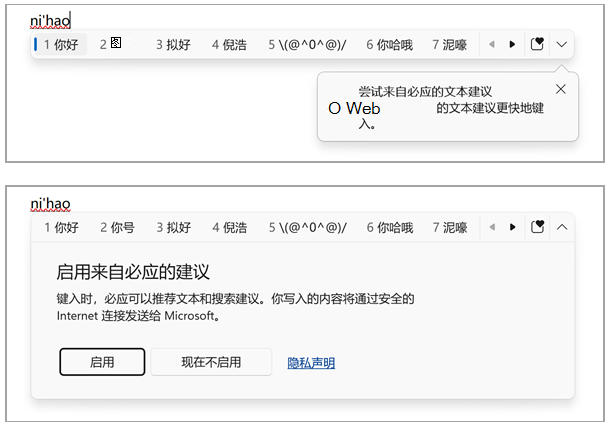
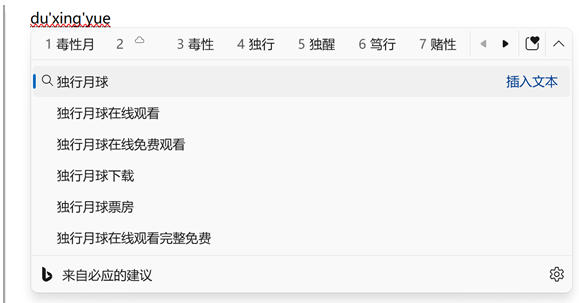
The PC version of Microsoft Input Method is the intelligent Pinyin input method that comes with Windows system. It has intelligent input, multiple input methods, custom settings and cloud synchronization as its core advantages. It has a simple interface, strong compatibility, and low resource usage, making it suitable for daily office, study, and touch screen device use. Intelligently predict the next word based on input habits and context to improve input speed. It has an intelligent association function that can automatically recommend related words or phrases based on the input content. Friends who like Microsoft input method, come to Huajun Software Park to download and experience it!
Microsoft input method highlights
Compatibility and stability
System compatibility: Integrated into Windows system, compatible with Windows XP to Windows 11 versions, and runs stably.
Hardware optimization: Use advanced algorithms to reduce CPU usage and ensure smooth operation of low-configuration devices.
Simple interface
Flat design: The interface layout is simple and clear, commonly used functions are clear at a glance, and the operation is convenient.
Translucent background: The input method panel adopts a translucent design, which is integrated with the system interface and has a harmonious visual effect.
Low resource usage
Lightweight: The software is small in size, uses low system resources, and is suitable for old equipment.
Microsoft input method features
Daily office and study
Text input: It is suitable for students, office workers and other users who need to input text efficiently. It supports document editing, email writing and other scenarios.
Multi-language switching: supports multi-language input, suitable for users who need to switch between different languages (such as mixed Chinese and English input).
touch screen device
Handwriting input: Provides handwriting input function, suitable for users using touch screen devices (such as tablets, 2-in-1 devices).
special needs
Non-networked environment: supports offline use, and the custom vocabulary function can still provide prompts when there is no Internet connection (needs to be set in advance).
Professional fields: By customizing vocabulary and phrases, it can meet the special input needs of professional users such as engineering students and programmers (such as proper nouns and code snippets).
Interface and fluency: Users praise its simple interface and smooth input, which is suitable for users who pursue simplicity and efficiency.
Custom functions: Custom text shortcuts and fuzzy sound settings are powerful and can significantly improve input efficiency.
Compatibility: As the system's own input method, it has strong compatibility and requires no additional installation. It is suitable for deployment in enterprise environments.
Microsoft input method function
Intelligent input and prediction
Whole sentence conversion: using sentence-based whole sentence conversion method, the user continuously inputs the pinyin of the whole sentence without manual word segmentation or selection of candidate words, ensuring smooth thinking.
Fuzzy sound input: Supports fuzzy sound settings. Even if the pinyin input is not completely correct, the correct Chinese character can still be matched (for example, inputting "gao" can match "eng" or "gao").
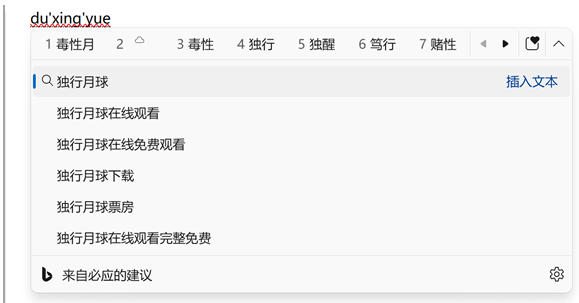
Intelligent association: Automatically associate words or phrases based on input habits. For example, entering "Microsoft" can associate "Microsoft Corporation", "Microsoft Yahei", etc.
Multiple input methods
Pinyin input: supports multiple pinyin modes such as Quanpin and Shuangpin (customized Shuangpin scheme).
Wubi input: Compatible with Wubi 86, Wubi 98 and other Wubi solutions, the recognition rate is greatly improved.
Handwriting input: Provides handwriting input function and supports writing text directly on touch screen devices.
Voice input: Integrated voice input function, converting speech into text through speech recognition technology.

Custom settings
Customized text shortcuts: Users can set abbreviations for commonly used phrases, sentences or paragraphs. After entering the abbreviation, it will automatically expand into preset text (such as setting "addr" to a complete address).
Candidate word adjustment: Supports adjusting the number and display position of candidate words to improve input efficiency.
Fuzzy sound settings: Adjust fuzzy sound rules according to personal pronunciation habits to improve input accuracy.
Cloud sync function
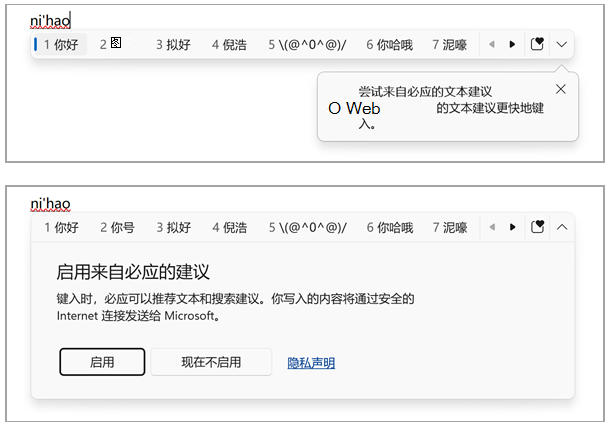
Vocabulary synchronization: By logging in to a Microsoft account, users can synchronize their personal vocabulary and input records between different devices to ensure a consistent input experience.
Special symbol input
Built-in text replacement: supports quick input of special symbols (such as ℃, °, ※) and automatic embedding of the current date and time.
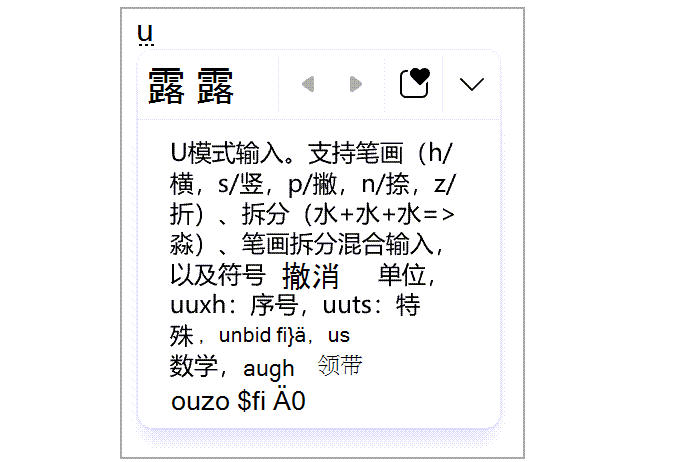
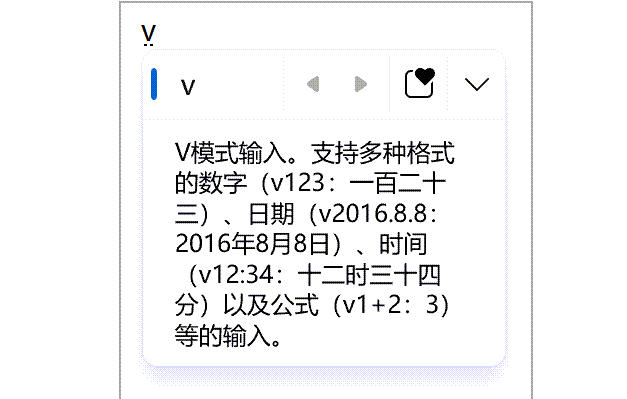
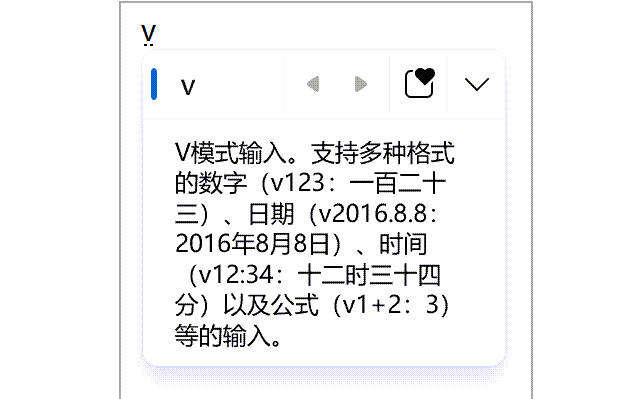
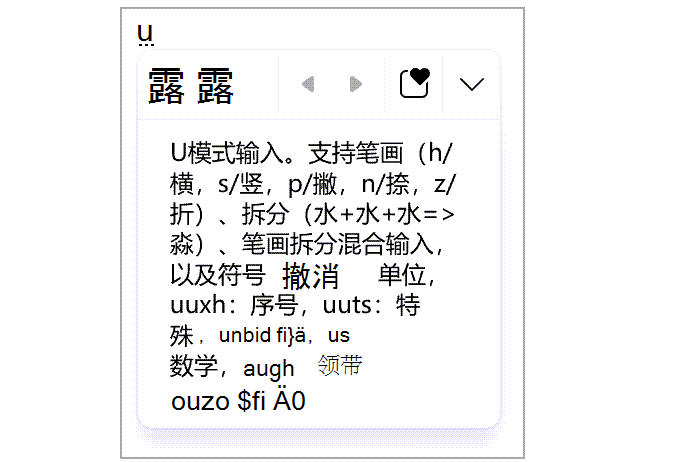
U/V mode: U mode supports word splitting input (such as inputting "u+huohuohuo" to generate "焱"), and V mode supports digital conversion (such as inputting "V123" to generate "one hundred and twenty-three").
Microsoft input method FAQ
Unable to input Chinese characters or garbled characters are displayed
Problem performance:
Only English can be input and cannot be switched to Chinese mode.
After inputting Pinyin, there are no candidate Chinese characters, or garbled characters are displayed.
Solution:
Switch between Chinese and English modes:
The default shortcut key is Shift or Ctrl+Space (you need to check the system settings for conflicts).
If the shortcut keys are invalid, go to Settings > Time & Language > Language and Region > Chinese (Simplified, China) > Options > Microsoft Pinyin > Keys to reconfigure the shortcut keys.
Restore default settings:
Open Microsoft Pinyin settings and select General > Restore input method default settings.
Enable compatibility mode:
Turn on compatibility in the General options to resolve conflicts between the new input method and old systems or software.
Restart your computer:
Temporary system freezes may cause input method abnormalities, which can be restored by restarting.
Microsoft input method update log:
1. Optimized some functions
2. Solved many intolerable bugs
Huajun editor recommends:
After many updates and optimizations, the Microsoft input method has become more user-friendly and easier to operate. The editor of Huajun Software Park personally tested it and recommends it to everyone for download. Interested friends can also download Pinyin Plus Input Method, .NET, and Batch Butler.
Version: 14.0.6119.5000 | Update time: 2025-10-23
Similar recommendations






Latest updates




How to uninstall Microsoft Input Method - Operation process of uninstalling Microsoft Input Method
Pixel Naruto online play entrance-Pixel Naruto web version online play-Huajun Software Park
How to add background music in python-How to add background music in python
How to configure environment variables in python - How to configure environment variables in python
Microsoft Input Method Review
Recommended products










- Diablo game tool collection
- Group purchasing software collection area
- p2p seed search artifact download-P2P seed search artifact special topic
- adobe software encyclopedia - adobe full range of software downloads - adobe software downloads
- Safe Internet Encyclopedia
- Browser PC version download-browser download collection
- Diablo 3 game collection
- Anxin Quote Software
- Which Key Wizard software is better? Key Wizard software collection




