Is the word selection box of JiJie Wubi input method missing? Recently, many netizens said that they have encountered this problem. For this reason, today the editor will explain to you how to deal with the missing word selection box of Jiji Wubi input method. Friends in need should not miss it.
Method one:
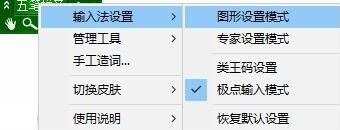
Right-click the mouse on the JiPoint Wubi input method toolbar, point the mouse to the "Input Method Settings" column in the right-click menu, and then click the "Graphics Settings Mode" option in the submenu.
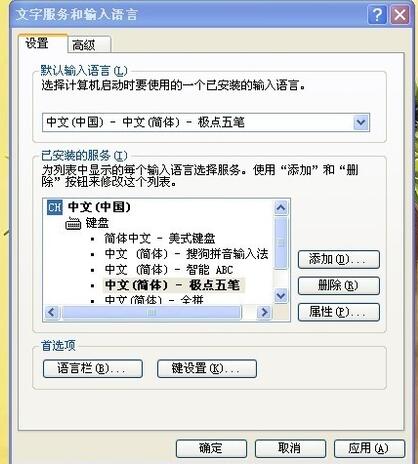
Switch to the "Candidate Window Options" function page under "Interface Settings", click to uncheck the "Hide Chinese Character Candidate Window" option on the right, and then confirm the modification.
Method two:
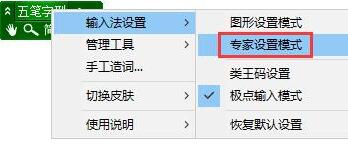
Right-click the mouse on the Jipin Wubi input method toolbar, point the mouse to the "Input Method Settings" column in the right-click menu, and then click the "Expert Settings Mode" option in the submenu.
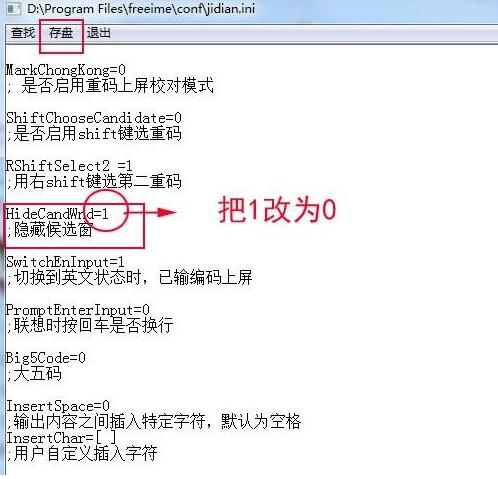
Find the "HideCandWnd" column, change the number after "=" to "0" to unhide it, and then save the changes.
The above article explains the operation process of the missing word selection box of Jiji Wubi input method. I hope friends in need can learn from it.