





Hikvision SADP search software (SADPTool)It is a search tool suitable for Hikvision equipment.HikvisionSADP search software is powerful and can search for the sameLANAll online devices within. In addition to this, the software can also modify the devicenetworkparameters, restore the device's default password, and display device-related information. Welcome everyone to come to Huajun Software Park to download and use SADP search software (SADPTool)!

-
Convenient and efficientView
-
Simple interfaceView
-
Powerful functionView
-
Professional and practicalView
-
High performanceView
Hikvision SADP Search Software (SADPTool) Frequently Asked Questions
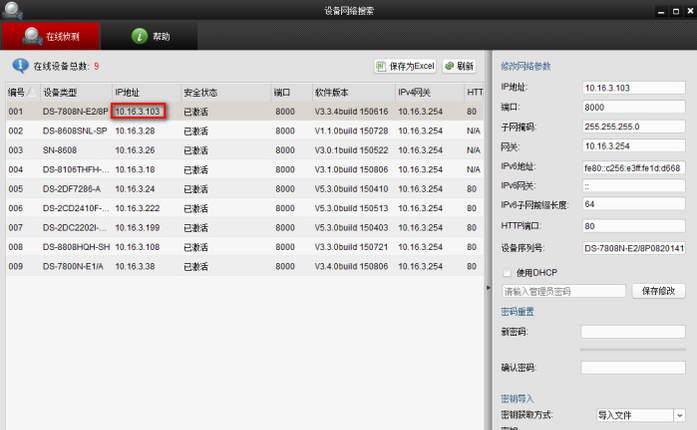
How to quickly access the device with Hikvision SADP search software (SADPTool)?
1. Select the device you want to access
2. Double-click the deviceIPaddress
How to modify individual device parameters in Hikvision SADP search software (SADPTool)?
1. Click on the device that needs to be modified
2. The network parameters of the device will be displayed on the right side of the software.
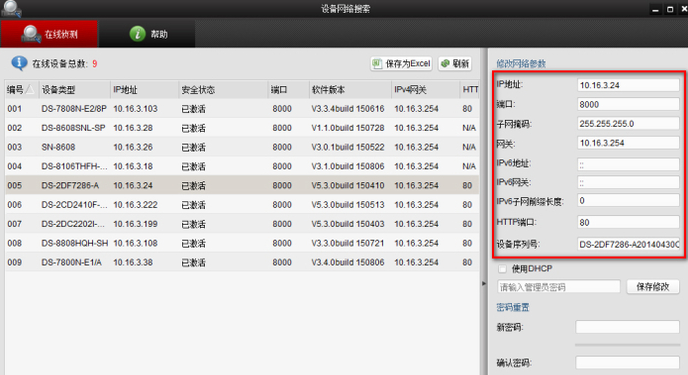
3. Change parameters and enter the device administrator password
4. Click "Save Changes"
5. Completed
How to export Hikvision SADP search software (SADPTool) information?
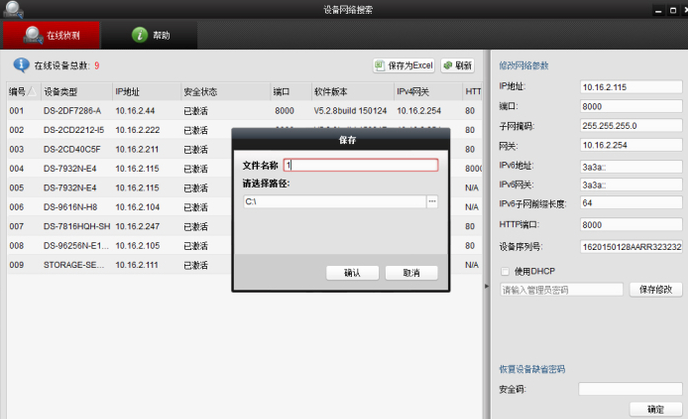
1. Click “Save as” in the upper right corner of the software interface.excel"
2. Select the save path
3. Complete the export after confirmation
How to export device information from Hikvision sadp app?
1. Click "Save as excel" in the upper right corner of the software interface
2. Select the save path
3. Complete the export after confirmation.
What should I do if I lose my device password?
What should I do if I lose my device password?
1. Contact relevant technical personnel to obtain the security code
2. Enter the security code and confirm
3. After success, it will prompt "Initial password recovery successful"
How to use Hikvision SADP search software (SADPTool)
Modify network parameters
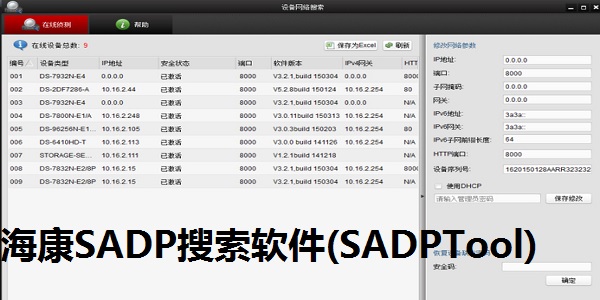
1. Click to select the device that needs to be modified. At this time, the network parameters of the device will be displayed on the "Modify Network Parameters" page on the right side of the software.
2. Edit the network parameters that need to be changed, such as: IP address, gateway, etc.
3. Enter the device administrator password and click the button to save changes.
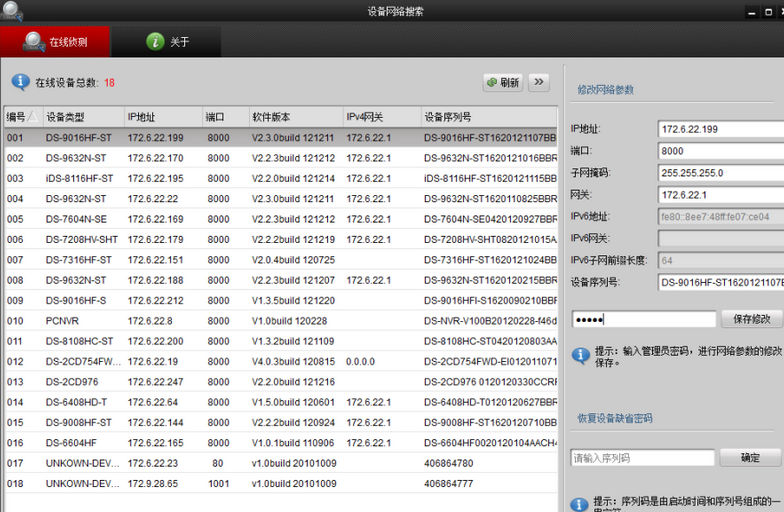
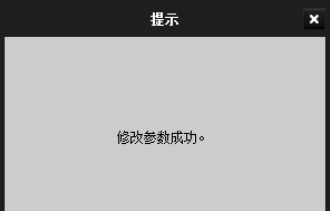
4. After successful saving, it will prompt "Modify Parameters" successfully.
Hikvision SADP search software (SADPTool) software functions
1. Search the online devices in the network segment where the software is located through the network.
2. Can display specific information about related devices, including device type, activation status, IP address, port, IPv4 gateway, HTTP port, etc.
3. The network parameters of the device can be modified: including IP address, port, subnet mask, gateway, etc.
4. All device information can be exported with one click.
5. Support the use of DHCP network.
6. Supports changing the network administrator password.
Hikvision SADP search software (SADPTool) software features
1. Easy to use
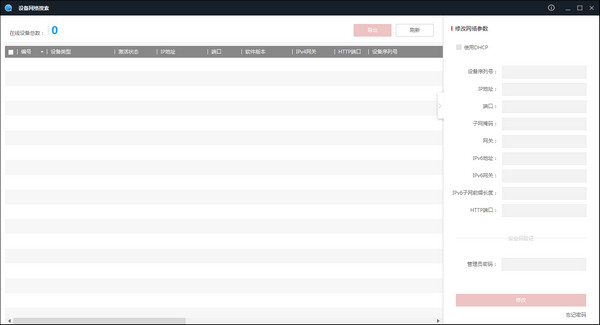
Just open the software and the program will automatically search for all online devices in the local area network.
2. Green and free
There is no charge, you can use it for free after downloading.
3. Simple interface
There are no extra buttons, all buttons and functions are required.
Hikvision SADP search software (SADPTool) installation steps
1. Download the Hikvision SADP search software (SADPTool) from the Huajun Software Park and extract it to the current folder. Click the SADPTool.exe application to enter the installation wizard interface, and then click Next.
2. Select the software installation location interface. Huajun editor recommends that users install it on the D drive, select the installation location and click Next.
3. The installation of Hikvision SADP search software (SADPTool) is completed, click Finish.
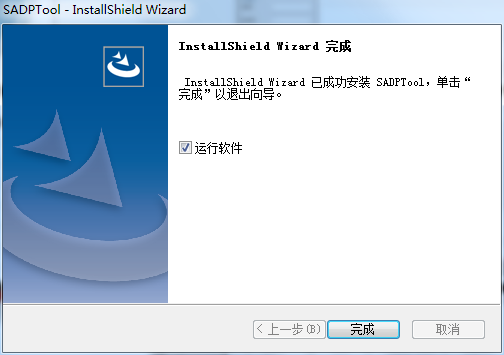
Installation summary:First, download the Hikvision SADP search software mini picture viewing software installation package from this website, unzip it, open the exe file, and enter the installation wizard. Follow the steps to install according to the prompts, and choose an installation method that suits you. During installation, you can choose the default installation location or customize the installation location. After checking the corresponding shortcut, enter the installation program. After a short wait, the installation will be completed and enjoy this software.
Recommended software similar to Hikvision SADP search software (SADPTool)
Eagle Eye Control Official VersionIt is an efficient, professional and practical software that can use one computer to remotely control multiple mobile phones. The official version of the Eagle Eye control system software also supports batch management of dozens to thousands of devices, and can customize device names and device group management. The latest version of the Eagle Eye control system can operate the mobile phone through the mouse/keyboard, allowing sliding, clicking, and text input operations. Supports multi-functional shortcut operations, including device shortcut operations.
Download link:http://softwaredownload4.com/soft/10006372.htm
Sunflower remote control software controlled terminalIt is a remote control tool that can remotely switch on and off the machine with one click. Through the Sunflower Console wThe eb page accesses and controls the remote host with the Sunflower controlled program installed, and performs remote desktop, remote management, remote file, remote camera, remote restart and shutdown operations on the remote host. Users can use Sunflower to access OA services, websites, and FTP services on remote hosts, and remotely control computers and routers.
Download link:http://softwaredownload4.com/soft/110864.htm
Xshell 6 free versionIt is a powerful secure terminal emulation software that supports SSH1.SSH2 and TELNET. protocol, users can connect to the remote host through the home network, which facilitates users to deal with emergencies at home and allows users to easily manage remote hosts. Xshell6 can also upload and download files, and has Unicode encoding support, dynamic port forwarding, custom keyboard mapping and other functions, which is very convenient.
Download link:http://softwaredownload4.com/soft/36383.htm
Hikvision SADP search software (SADPTool) update log
1. The exported device list is changed from the original Excel to a csv file.
2. Solve the problem of network disconnection caused by starting SADP under Win10.
Huajun editor recommends:
Hikvision SADP search softwareIt is one of the best in remote control. It has won unanimous praise from users for its comprehensive functions and simple operation. Huajun Software Park provides users with ways to download related softwareXshell6,Sunflower remote control software controlled terminal,eagle eyecontrol, everyone is welcome to download!














Useful
Useful
Useful