





Speech synthesis assistant software features
1. Intelligent speech synthesis: The core technology is provided by "Baidu Intelligent Speech Open Platform" and "Yunzhisheng Open Platform".
2. Export MP3 files: The generated MP3 files can be copied to a USB flash drive or memory card for playback.
3. Bluetooth playback: It can be connected to a Bluetooth speaker for playback, and can be used without exporting files.
4. Massive background music: supports adding background sounds and personalized customized background music
Features of speech synthesis assistant software
1. Various speakers: In addition to supporting various Mandarin and English speakers, this product also supports the following special speakers: Cantonese, Sichuan dialect, Northeastern dialect, Henan dialect, Hunan dialect, Shaanxi dialect, Crayon Shin-chan, childhood female voice, English speaker, etc.
2. Background sound function: Supports various classic background sounds, such as Little Apple, Jiangnan Style, Annie's Wonderland, square dance songs, etc.
3. Lyrics function: The synthesized text will generate a lyrics file synchronized with the sound.
4. Supports exporting mp3 and lyrics files, which can be sent to the computer via qq, copied to a USB flash drive and played on the speaker.
4. Bluetooth playback: Supports linking to Bluetooth speakers for playback.
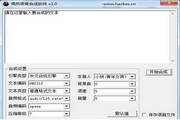
PC: Speech synthesis service provided by iFlytek.
How to use speech synthesis assistant
1. Download and install this software.
2. After installation, open the software, enter the "Text to Sound" page, enter the English document that needs to be synthesized, select the speaker: "Henry English", "Catherine English" or "Mary English", click "Next" to synthesize the text into an mp3 sound file.

3. After synthesis, you can also add various types of background music to the sound file. Here we choose the song "Annie's Wonderland". After adding the background music, click "Save" and the sound file will be saved in the list. Pair it with a nice background music and listen to it on your mobile phone when you have nothing to do. The effect is very good.

4. Click the arrow button on the right in the list, you can see "Export", you can export mp3 sound files and English lyrics files.

5. After clicking "Export", you can send the sound file to your computer through QQ, or "share" it with your friends.
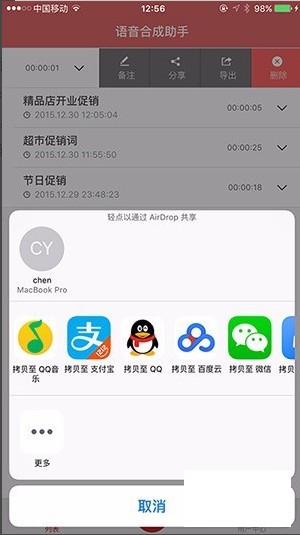
6. You can also listen to the newly recorded English audio directly through the "speech synthesis assistant". The synthesized English text will be played synchronously with the sound like lyrics.

Speech synthesis assistant applicable scenarios
1. Advertising dubbing: shopping mall advertising promotions, street stall hawking, corporate publicity, film and television dubbing, etc.
2. English readings: production of various English dubbings, English listening audio production, etc.
3. Audio reading: novels, magazines, textbooks, fairy tales, create your own personalized audiobook APP.
4. Broadcasting: broadcasting in schools, enterprises, stations, airports and shopping malls.
5. Dubbing categories: cartoons, flash videos, and various radio dramas.
6. Film and television categories: commercial dubbing, film and television dubbing, and animation post-dubbing.
7. Industrial sound: voice recording for anti-theft, alarm, and vehicle and ship navigation systems.
8. Publications: Voice recordings of audiobooks, literary and artistic works, courseware, and training software.
9. Multimedia: CD commentary, group ring tones, telecommunications, and financial CTI voice recording.
10. Commentary category: corporate feature films, construction animations, project tender document explanations and other dubbing explanations.
11. Teaching categories: electronic dictionaries, textbooks, electronic books, various voice IC series recordings.
Speech synthesis assistant FAQ
Question: How to transfer the speech synthesis assistant voice to VideoStudio?
Answer: Open the "Speech Synthesis Assistant", enter the "Usage Help" of the "User Center", follow the instructions in the Help, export the sound file, send it to the computer, and then import it into VideoStudio.
Question: How to set the Guanzhong dialect for the male voice in the speech synthesis assistant?
Answer: Look among the speakers to see if there is a male voice in the Guanzhong dialect. If not, you can choose a speaker with roughly the same pronunciation.
Comparison of similar software
Voice input to textThe computer version is a popular and easy-to-use text-to-speech software. The computer version of the voice input to text converter can record voices at any time. The computer version of the voice input to text converter supports multiple languages and supports copying and pasting content. The software supports uploading and converting audio and video files. The software has functions such as real-time speech transcription, audio and video transcription, file link conversion, text translation, and short sentence transcription. It supports sentence listening function.
iFlytek voice to textThe Android version is a powerful speech-to-text tool. The official version of the iFlytek speech-to-text app is based on iFlytek's intelligent voice and language technology, which can provide users with convenient and efficient machine transcription services and professional and accurate manual transcription services. iFlytek's speech-to-text app supports conversion of voice input into text with accurate recognition. It also supports voice memos, text documents, etc.
Installation steps
Special note: The installation package provided by Huajun Software Park contains the Android emulator and software APK files. For the computer version, you need to install the emulator first and then install the APK file.
1. First download the installation package from Huajun Software Park. The software package contains an Android emulator exe installation program and an APK file and unzip it. First click on the exe program to install the lightning simulator.
2. Double-click "Lightning simulator.exe" file to enter the installation interface. Users can click "Quick Installation" to select the system's default installation address for installation, or click "Custom Installation" to choose the installation path. Custom installation is recommended here.
3. WaitingLightning simulatorAfter the installation is complete, click "Try Now" to open the emulator.
4. Enter the main interface of the lightning simulator and clickRight column APK iconSelect the "Local APK Install" button.
5. In the pop-up window, click on the decompressed APK file, and then click to open.
6. After that, the software will enter the installation process. You need to wait for a moment. After the software installation is completed, it will appear in my software list. Click the icon and double-click to open it.






More detailed log of speech synthesis assistant
1. Add one-click deletion of text;
2. Modify known bugs and optimize user experience.
Huajun editor recommends:
The speech synthesis assistant includes Bluetooth playback service, multi-language pronunciation broadcast service, custom replacement of classic background sounds, and mp3 and lyrics file import/export services. Users who are interested in this software need to go to the editor of Huajun Software Park to satisfy you!




















Useful
Useful
Useful