






wo musicSoftware introduction
Wo Music PC version is a music player officially developed by China Unicom for the android platform. It has millions of genuine music contents, and all music can be listened to for free. At the same time, the software has one-click ring ordering and one-click ring setting functions, which can provide users with personalized mobile phone ringtone settings. Wo Music 3.0 has a new design and a new revision, which will bring users a better audio-visual experience.
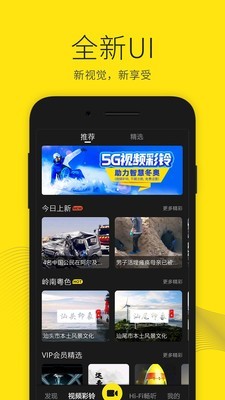
wo musicSoftware function
WoMusic-Discover the beauty of sound
5G video ring tones give you a different call experience!
【Trend Vision】Exquisite design, new visual enjoyment
【Massive music library】Massive lossless music library, high-quality and superior listening enjoyment
【Free listening】Listen to all music on the site for free
【Music play】Driving, running, sleeping, dynamic music scenes make the road not lonely
【Music Speed Dating】Quickly discover good music

wo musicSoftware features
1. A powerful music library with multiple copyrights allows you to discover music;
2. Music speed matching helps you quickly find the music you like;
3. All music on the site supports free listening;
4. Various dynamic music scenes accompany you with music every moment.

wo musicSoftware Highlights
百万炫铃:电话铃声,一键切换
Wo Music Club: Discover a beautiful new upgrade of sound
Entertainment Highlights: Celebrity News, Popular Entertainment Express
wo musicFAQ
Q: What is Wo Music?
A: Wo Music is the music business brand of China Unicom. We are committed to becoming an innovative leader in the music industry, allowing every user to feel the joy of music through high-quality music content, all-round music services, and a rich product lineup.
沃音乐,给用户最潮、最嗨的音乐内容!百万精品曲库,拥有更多爱听的。
WoMusic provides users with a full range of music services! Listen, sing, play and DIY to meet each user's individual needs for music!
Wo Music provides users with the most considerate music products! Songs, ringtones, MVs, ringtones, celebrity peripherals, celebrity concerts, unlimited listening Internet music APP targeted traffic products, rich product lineup, and diversified product experience. Wo Music, deliver music and share happiness!.
Q: What businesses does Wo Music include?
A: Wo music membership, Wo music ring, Wo music box (ringtone box), client phone ring, business phone ring, advertising ring, Wo music client, Wo+ music
Q: What is the access number for Wo Music Voice (IVR)?
A: Hello, the Wo Music Voice (IVR) access number is 10155. Currently, only users in Guangdong Province, Zhejiang Province, and Anhui Province support the IVR method for ordering ringtone services. Other provinces will open it later, please pay attention.
Q: What are the ways to announce various activities of Wo Music?
A: Please pay attention to and visit Wo Music WEB website, WAP portal, Wo Music client, Wo Music official blog (Sina or Tencent), local Unicom business hall, etc. to participate in Wo Music prize-winning activities according to the event rules. For details of the event, please consult China Unicom’s online customer service or call the local customer service hotline
Wo Music update log
1. Fixed other bugs;
2. Optimized software compatibility.
Huajun editor recommends:
Wo Music has always been a commonly used audio and video player software for most friends. Its dominance in the minds of netizens is obvious. The editor of Huajun Software Park recommends users to download Wo Music. Come and download it. In addition, there are360 Film and Television Collection 2021,Film and Television Collection 2021,butterfly movies,Chinese Voice,Chinese CinemaAvailable for download.
Installation steps
Special note: The installation package provided by Huajun Software Park contains the Android emulator and software APK files. For the computer version, you need to install the emulator first and then install the APK file.
1. First download the installation package from Huajun Software Park. The software package contains an Android emulator exe installation program and an APK file and unzip it. First click on the exe program to install the lightning simulator.

2. Double-click "Lightning simulator.exe" file to enter the installation interface. Users can click "Quick Installation" to select the system's default installation address for installation, or click "Custom Installation" to choose the installation path. Custom installation is recommended here.

3. WaitingLightning simulatorAfter the installation is complete, click "Try Now" to open the emulator.

4. Enter the main interface of the lightning simulator and clickRight column APK iconSelect the "Local APK Install" button.

5. In the pop-up window, click on the decompressed APK file, and then click to open.

6. After that, the software will enter the installation process. You need to wait for a moment. After the software installation is completed, it will appear in my software list. Click the icon and double-click to open it. 












Useful
Useful
Useful