





Introduction to the functions of Ekaotong online examination system
1. The system is based on Microsoft’s advanced .Net platform and uses Sql Server serves as the backend database, with a 100% pure B/S architecture model. The system is easy to deploy and maintain, and has good openness, scalability and expansibility;
2. The system test papers are divided into examination mode and homework mode. The examination mode is automatically timed, and the homework mode is not timed, and can be used for daily homework or practice; the test paper question method can use a fixed question order, a random question order, or a question random mode; the test paper display mode is divided into a whole paper mode and a question-by-question mode; the random question and question-by-question modes can effectively prevent cheating;
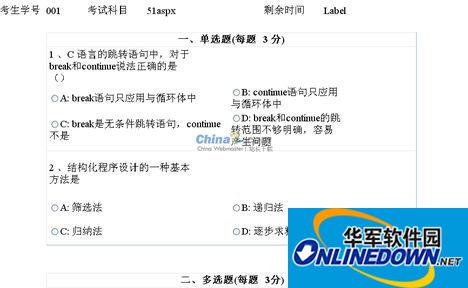
3. Supports custom question types. The system provides nine basic question types, including single-choice, multiple-choice, judgment, fill-in-the-blank, question-and-answer, composition, typing, operation and reading comprehension. Among them, operation-type test questions provide file download and upload functions, making it easy to implement Word, Excel, FrontPage, Visual Foxpro and other operations on files or folders; supports automatic grading functions for single-select, multiple-select, judgment and fill-in-the-blank test questions;
4. The system can set attributes such as subjects, knowledge points, question types, difficulty, scores, question content, and question analysis. Single-choice and multiple-choice questions support 6 options, which can fully meet the requirements of the current test questions. If there are less than 6 options, they will be automatically hidden when the test paper is displayed;
5. The test questions are rich in content. Pictures, audio/videos, tables, Flash animations and mathematical formulas can be inserted into the test questions. It fully supports listening test, speech analysis, audio/video appreciation and other test questions. Among them, the mathematical formula editor greatly facilitates science examinations and truly realizes multimedia test questions;
6. A variety of paper composition modes, which can be composed of single subject papers or comprehensive papers of multiple subjects; the test questions can be randomly selected according to subjects, knowledge points, question types and difficulty in the test paper strategy, or the test questions can be manually selected to form the papers; the test questions can be converted into the total score of the test paper according to the test score or the specified score according to the question type; the question type display order and other attributes can be set;
7. Convenient test paper and answer sheet export function. The system can export the test paper and candidate answer sheet in Word format, and can be printed directly without any further typesetting, realizing the traditional examination paper making and candidate answer sheet archiving functions;
8. Supports the batch import and export function of accounts and test questions. The system can batch import Excel format account files and test question files into the system, making it more convenient and faster to establish basic data;
9. Powerful answer sheet statistics function. The system can count candidates' answer sheets according to scores, knowledge points, question types and test scores, and display them intuitively in the form of charts, which reflects the evaluation and guidance functions of the exam;
10. Provide learning and training functions. The system can publish teaching materials for examinations, homework and training through e-books for candidates to learn and improve online. The subject chapters are rich in content and can easily insert multimedia content such as pictures, audio/video, tables, Flash animations and mathematical formulas. Attachments can also be uploaded for users to download and use. The subject chapters are presented in a tree structure, with a clear structure and distinct layers, which greatly facilitates user browsing and learning;
11. Flexible account management function. System accounts are divided into three categories: system administrator, examination administrator and ordinary account. The system administrator has the highest authority. The examination administrator has the authority to create news, accounts, test questions and test papers. It can set the marking account, marking question type and role menu for the examination administrator. The ordinary account has the authority to view news, take exams, participate in homework, participate in study and score inquiry, etc.;
12. Supports blocking system hot keys and lock screen functions such as Alt+Tab, which greatly prevents candidates from cheating; supports the function of checking answer sheets and displaying wrong questions; supports the function of marking test questions;
13. Supports forced submission function, file management function and data backup and restoration function; supports news prompt function and login log management function;
14. Support the function that only one computer can log in to the same account at the same time; support the function of restricting the account login IP;
15. Provide powerful chart statistics functions. The system uses pie charts to display test question distribution, curve charts to display candidates' historical scores, column charts to display candidates' learning progress, etc., allowing administrators to more intuitively and quickly understand the situation of candidates and departments in all aspects.

Features of Ekaotong online examination system software
1. The system has good openness, scalability and expansibility. The system is based on Microsoft's advanced Net platform and uses Sql Server serves as the backend database, with a 100% pure B/S architecture model, making system deployment and maintenance easy.
2. The system test papers are divided into examination mode and homework mode. The examination mode is automatically timed, and the homework mode is not timed, and can be used for daily homework or practice; the test paper question method can use a fixed question order, a random question order, or a question random mode; the test paper display mode is divided into a whole paper mode and a question-by-question mode; the random question and question-by-question modes can effectively prevent cheating.
3. The system can set attributes such as subject, knowledge point, question type, difficulty, score, question content and question analysis. Single-choice and multiple-choice questions support 6 options, which can fully meet the requirements of the current test questions. If there are less than 6 options, they will be automatically hidden when the test paper is displayed.
4. The test questions are rich in content. Pictures, audio/videos, tables, Flash animations and mathematical formulas can be inserted into the test questions. It fully supports listening test, speech analysis, audio/video appreciation and other test questions. Among them, the mathematical formula editor greatly facilitates science examinations and truly realizes multimedia test questions.
5. There are rich paper composition modes, which can be composed of single subject papers or comprehensive papers of multiple subjects; the test questions can be randomly selected according to subjects, knowledge points, question types and difficulty in the test paper strategy, or the test questions can be manually selected to form the papers; the test questions can be converted into the total score of the test paper according to the test score or the specified score according to the question type; the question type display order and other attributes can be set.
6. The same account in the system can only log in to one computer at the same time, and the account login IP function can be restricted.
Computer configuration requirements for Ekaotong online examination system
Operating system: Windows system requires win7 or above. Apple mac system is not supported yet.
Memory: 4G or above
Hard disk: more than 10G of remaining space
Graphics card: Graphics card requirements are not high. It is best to use a computer after 15 years. For computers that are too old, you need to note that the driver must be the latest driver. If you get an error during the trial, you can try downloading it.driver wizardUpdate driver
Camera: Ordinary high-definition camera is enough
Frequently Asked Questions about Ekaotong Online Examination System
1. What is the examination process of the Yikaotong online examination system?
1. First download and install the client in Huajun Software Park
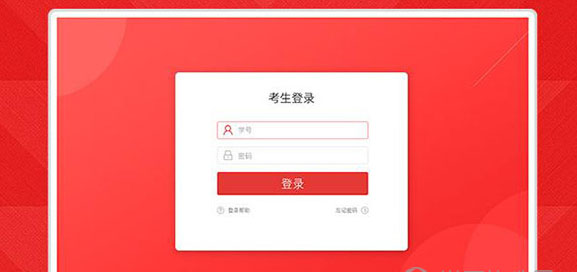
2. Log in to the system
Double-click the desktop shortcut to open the Yikaotong exam platform client, enter your student ID and password and click the login button
(Note: Please use your student ID and default password to log in to the system for the first time. The default login password for mainland residents is the last 6 digits of your ID card. The default login password for Hong Kong, Macao, Taiwan, and foreign friends is 888888. Please change your password in time after logging in for the first time!)
3. Face verification when logging in for the first time
After logging in for the first time, face recognition verification is required to ensure that the ID photo can pass my face authentication
Adjust your camera and click to start face recognition verification
If the camera location fails to obtain the camera, please click the following method to check your camera:
Use the system to test whether the camera is normal
Win7 system: Open my computer and check whether the local video device camera can be displayed normally.
Win10 system: Right-click the win window icon in the lower left corner and select search, enter the "camera" keyword search, open the camera program to check whether the camera can call the display normally
- We can use other software to test whether the camera is normal:
Use QQ for video chat and check whether the camera is enabled and displayed normally. If the camera cannot call the display normally, please try the following method to solve the problem.
- Is the camera occupied?
检查是否已有软件或网页调用占用开启了摄像头,请先关闭占用的其他软件或网页
- Check if the camera is installed
For independent cameras, please check whether the USB plug is loose. Please check whether the plug of the camera is inserted into the USB interface of the computer host. Try changing a USB plug.
- Install camera driver
If the system cannot automatically install the driver, please manually download the driver from the camera's official website, or use the driver installation CD that comes with the camera to install the camera driver.
If this interface is displayed, please contact the school’s exam administrator to help you upload photos
4. Start the exam
Switch to the "My Exam" column and click "Start Exam" to enter the exam. If you cannot enter the exam before the exam time, please pay attention to the following matters before starting the exam:
1. After the test starts, you must complete the test within the test time
2. If you exit the test abnormally during the test or close the Yikaotong test platform software by mistake, you can re-enter and continue the test during the test time. After the time has passed, the system will automatically submit the test paper
3. If you fail to take the test after the test time, it will be treated as an absence and there will be no test results.
4. If a subject is being tested, you cannot start the test of another subject at the same time.
作弊违纪达2次,将永久取消参加易考通考试的资格,并判定本次考试成绩无效。
2. Can the screen be switched in the Yikaotong online examination system?
易考通网络考试系统是专为企业公司学校而研发的正规内部考试软件,其防作弊功能完善,所以无法进行切屏。
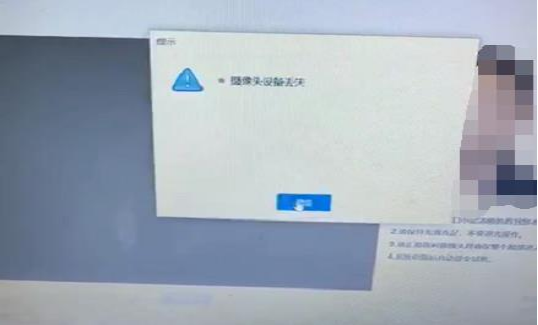
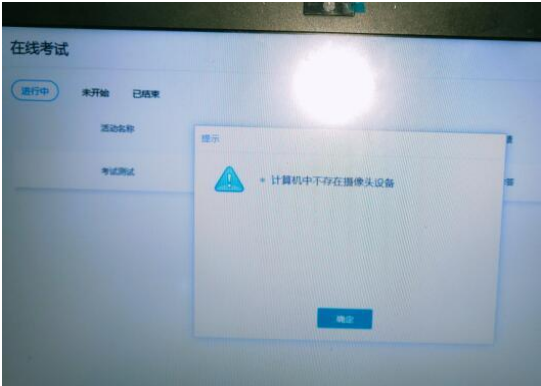
3. How to deal with the loss of camera equipment or no picture
a. Unplug the camera plug of the desktop computer and plug it back in; exit the exam client and restart the laptop computer.
b. If you have entered the exam and the camera has a black screen, check whether QQ can video. If it cannot video, it means there is a problem with the camera. As long as it is within 120 minutes, change the computer to take the exam; if QQ You can video and give feedback to the service center teacher.
Ekaotong online examination system update log:
1. Sweep the bug out and carry it out to the end
2. The most stable version ever
Huajun editor recommends:
Yikaotong Online Examination System is a very good examination system software. I secretly tell you that I also use this software, and I don’t tell others about it! Powerful, green and safe. Huajun Software Park also provides you withMicrocomputer operation simulation examination system,Future Education Examination System,APMS all-pass paper and pencil online marking system,Examination random question system,Test paper production systemWaiting for you to download.


















Useful
Useful
Useful