




Guitar Pro Features
Virtual effects chain and pedal simulation: Introducing virtual stompbox effects (such as distortion, delay, reverb, etc.), users can adjust the guitar tone through the virtual pedal chain to enhance the integration with the track.
Time stretching and audio synchronization: Supports adjusting audio speed to match the score, making it easier to practice or create.
Track Focus Mode: Helps users focus on a certain part of practice by increasing the volume of a specific track.
Guitar Pro HighlightsBeginner-friendly: The concise and clear operation interface and detailed training camp courses help novices quickly master the use of the software and guitar playing skills.
Strong professionalism: It shows strong professionalism and convenience in expressing the skills of plucked instruments (such as portamento, grace, string bending, etc.), making it a powerful assistant for senior musicians.
Comprehensive functions: It integrates music score editing, MIDI production, sound effect simulation and teaching auxiliary functions to meet the diverse needs of users in music creation and practice.
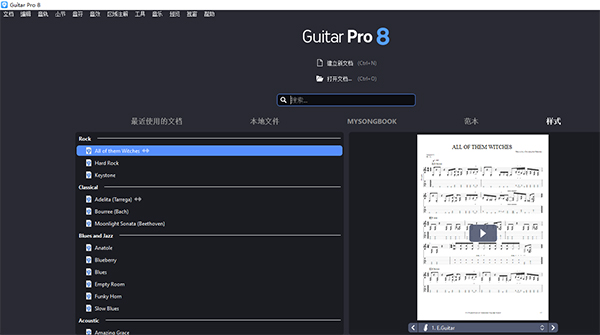
Guitar Pro features
Multi-format music score support
Six-line notation/four-line notation: Directly input the six-line notation for guitar and bass, or the five-line notation for piano, drums and other instruments through the mouse or keyboard, and intuitively display the fingering and chord direction (such as string bending, slide, overtone and other guitar techniques).
Numbered musical notation mode: supports digital musical notation input, suitable for teaching or folk song creation, and can mark chord diagrams next to the musical notation, lowering the learning threshold for zero-base users.
Staff compatibility: Supports staff display for piano, drums, orchestral instruments and other instruments to meet diverse arrangement needs.
Multi-track arrangement and audio processing
Multi-track editing: You can add multiple audio tracks such as guitar, bass, drums, keyboard, etc., support batch adjustment of volume, panning, and even add audio tracks (such as vocals or recording files), suitable for band rehearsal or production of a complete demo.
Real Sound Source Library (RSE): Built-in hundreds of instrument sounds such as electric guitar, acoustic guitar, bass, piano, drums, etc., simulating real performance effects, and the sound quality is close to the recording studio level when playing music scores.
Effect simulation: Provides guitar effects such as distortion, reverb, delay, and even simulates special sound effects such as Whammy and sliders to enhance the realism of the demo.
External audio synchronization: Supports the insertion of external audio files in WAV, MP3 and other formats, and plays them synchronously with the music score, making it convenient for users to practice or create based on actual performance effects.
Teaching auxiliary function
Variable speed practice: You can slow down the speed of complex passages and play difficult points (such as solo or strumming) in a loop to help users gradually overcome technical bottlenecks.
Split-track playback: Play a certain track alone (for example, just listen to the guitar or drums) to help analyze the band's coordination or learn the performance logic of other instruments.
Metronome and counter: Provides dynamic beat display and counting functions to help users maintain a sense of rhythm and improve practice efficiency.
Chord calculator: After entering the chord name, it will automatically recommend fingerings in different positions to solve the problem of unfamiliar chords.
Efficient editing tools
Virtual fretboard/keyboard: No need for a physical guitar or MIDI keyboard, you can input notes through the computer keyboard, get rid of the constraints of hardware, and create anytime and anywhere.
Nested legato and note fine-tuning: Supports the writing of complex legato structures, and can individually adjust the duration, offset and speed of notes to achieve more sophisticated musical expression.
Personalized style sheet: Customize the display style of music scores, including tab alignment, bar spacing adjustment, etc., to improve readability.
MIDI import and export: Works seamlessly with mainstream music software (such as FL Studio, Logic Pro), and supports the export of MIDI or audio files to facilitate post-production.
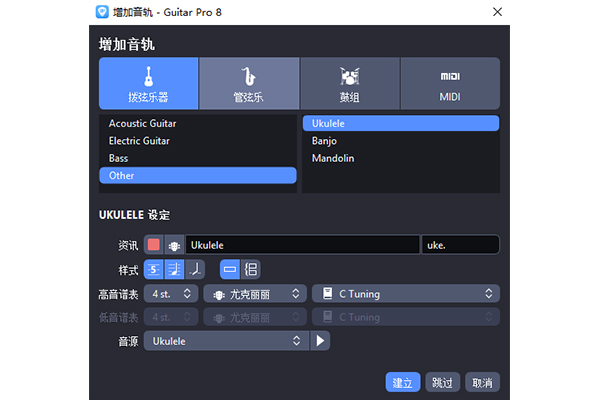
Guitar Pro FAQ
Q: What should I do if it prompts "Invalid serial number" or "Activation failed" after installation?
Check that the serial number is entered correctly (case sensitive).
Make sure the network connection is normal and turn off the firewall or proxy settings.
Try running the installer as administrator.
Guitar Pro update log:
Sweep the bug out and carry it out to the end
Optimize user feedback issues and improve detailed experience
Huajun editor recommends:
A very good Guitar Pro, easy to use and powerful, don’t miss it if you need it. This site also providesMusic creation master DX,WaveToMidi,Simple musical notation of elegant music,PhotoScore MIDI Lite,MidiNotateAvailable for you to download.




Useful
Useful
Useful