





 You may like





Highlights of the all-round photo compression king
Insufficient mobile phone storage space: By compressing pictures, you can effectively save mobile phone storage space and facilitate users to manage a large number of picture files.
Image transmission and sharing: Compressed image files are smaller and the transmission speed is faster, making it easier for users to quickly share images on social media, emails and other channels.
Image editing and optimization: Users can use the image editing function provided by the APP to crop, rotate, add filters, etc. to create personalized image effects.

Features of the all-round photo compression king
Efficient compression: Use advanced compression algorithms to ensure that image details are retained to the greatest extent during the compression process, while significantly reducing file size.
Simple and easy to use: The interface design is intuitive and friendly, and the operation is simple and easy to understand. Even users without any image processing experience can get started quickly.
High-quality output: While ensuring that the file size is reduced, the optimization algorithm ensures that the quality of the output pictures is not affected to meet the different needs of users.
Rich functions: Provides comprehensive image processing and compression functions to meet users' various needs in image management.
Stable performance: During actual use, the software runs stably without obvious lags or crashes, showing good stability and reliability.
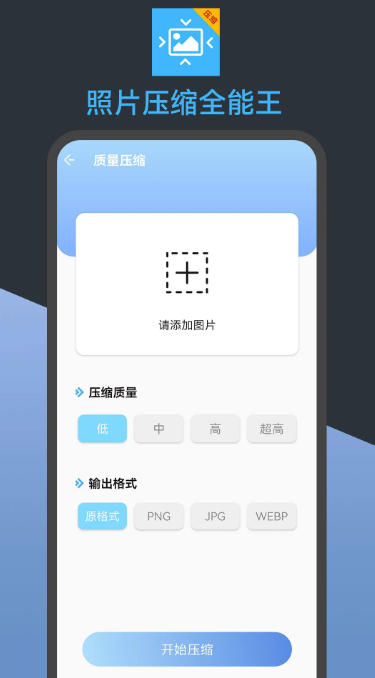
The all-round photo compression function
Image compression:
Using advanced lossless compression technology, it can significantly reduce the space occupied by images without changing the size of the image, thereby saving storage space on your mobile phone or computer.
Supports multiple compression levels, users can choose the appropriate compression level according to their needs.
The quality of the compressed pictures is not affected and the high-definition effect is maintained.
Picture editing:
Provides rich picture editing functions, such as cropping, rotating, adding filters, etc., allowing users to easily create personalized picture effects.
Supports adjusting the color saturation, hue and contrast of pictures to make the photos more colorful and details more prominent.
Equipped with image clarity enhancement function, bring blurred pictures back to life.
Provides lossless enlargement function, which can maintain high-definition quality even if the picture is enlarged.
Supports the removal of haze and blur in images to make images appear clearer.
It can restore the original proportions and details of the stretched picture and restore the original appearance of the picture.
Add color to black and white photos and bring new life to old photos.
Format conversion:
Supports conversion between multiple mainstream image formats, including PNG, JPG, WEBP, etc.
Users can choose the appropriate format according to different uses, so that the pictures can be displayed on different platforms and devices with excellent effect.
Images can be easily exported to the required format to meet the needs of different scenarios.
Size adjustment:
Provides a proportional scaling function to ensure that the aspect ratio of the image remains unchanged, and users can easily adjust the image size to adapt to different display requirements.
It supports image conversion according to the user-specified length pixels and width pixels, and quickly obtains accurate size images that meet the needs.
Batch processing:
Supports batch compression and editing of pictures, users can process multiple pictures at one time to improve work efficiency.
Suitable for users who need to process a large number of pictures, such as photographers, designers, etc.
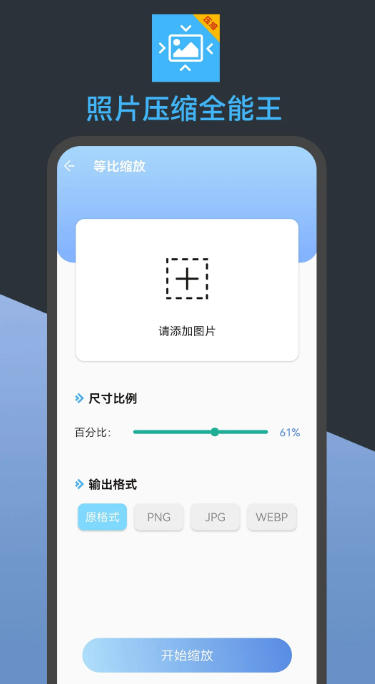
Photo Compression King FAQ
Image quality decreases after compression
Possible reasons: The compression ratio is set too high and the original image resolution is too low.
Solution:
Adjust the compression ratio to avoid over-compression.
Use HD original images for compression.
Select Lossless Compression mode (if supported).
Photo Compressor Almighty King update log:
Working day and night just so you can be happier
Mummy, Mummy, coax~all the bugs are gone!
Huajun editor recommends:
Photo Compression King has always been a common choice for most netizens to take pictures, and its dominant position in the minds of netizens can be seen. We strongly recommend users to download Photo Compression King and use it. Come to Huajun Software Park to download it. In addition, there areRemove watermarks with one click,music album,Tempo,You and me back then,Instant ShareAvailable for download.















Your comment needs to be reviewed before it can be displayed